LoadTester
LoadTester lets engineering teams run distributed HTTP and API load tests from browser or CI/CD without managing infrastructure.
Visit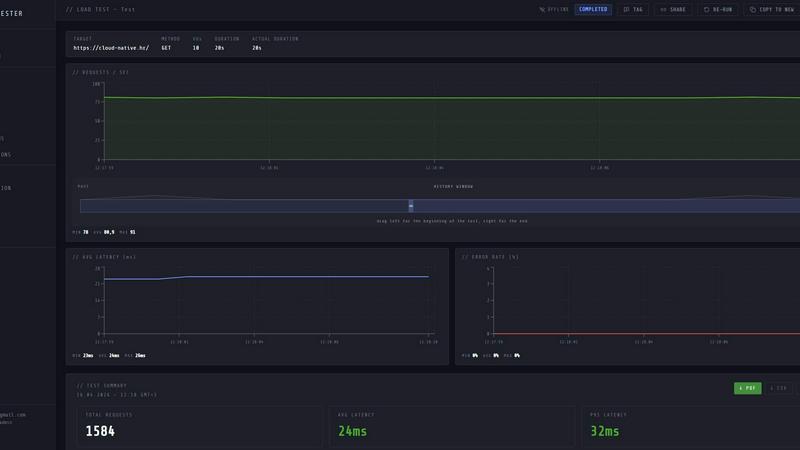
About LoadTester
LoadTester is a modern, cloud-native HTTP and API load testing tool built by Cloud Native d.o.o. for engineering teams that need repeatable, scalable performance checks without the overhead of managing infrastructure. It allows developers, QA engineers, and site reliability engineers to create, launch, and monitor load tests directly from a browser or through a CI/CD pipeline, with live analytics, p95 and error-rate thresholds, scheduled baselines, and run-to-run comparisons. The core value proposition is simplicity and speed: you can go from zero to a running distributed load test in under three seconds, scaling up to 10,000 virtual users or 10,000 requests per second, with zero infrastructure to provision. LoadTester eliminates the painful setup, configuration, and orchestration typically associated with performance testing tools, letting teams focus on what matters: catching performance regressions before users notice them. It supports HTTP methods including GET, POST, PUT, and DELETE, and provides real-time streaming of throughput, latency, active users, and errors during a run. After a test completes, you get a clean, shareable summary with total requests, average latency, p95 and p99 percentiles, data sent and received, and success rates. LoadTester also includes exports to PDF, CSV, and JSON, scheduled tests, a REST API, and workflow integrations like Slack, email, and webhooks, making it a complete solution for teams that want simple, repeatable, and automated performance checks.
Features of LoadTester
Instant Distributed Execution
Start distributed load tests in seconds with no infrastructure setup, no worker orchestration, and no scheduling headaches. LoadTester handles worker scaling, infrastructure coordination, and execution flow automatically, booting up to 10,000 virtual users or 10,000 requests per second in under three seconds. Your team focuses on results, not on provisioning servers or managing queues. The system auto-scales workers based on test requirements, and there is zero queue time for test launch, enabling truly instant performance validation.
Live Analytics and Telemetry
Watch requests, latency, failures, throughput, and bottlenecks in real time while your test is running. The live dashboard streams key metrics including RPS (requests per second), p50, p95, and p99 latency, error counts, active virtual users, and success rate. Latency distribution charts update every 60 seconds, showing trends and anomalies as they happen. This real-time visibility allows teams to identify performance degradation immediately and make informed decisions about scaling, code changes, or infrastructure adjustments during the test.
Smart Auto-Stop with Thresholds
Set failure or latency thresholds and automatically stop tests when things go sideways. LoadTester supports configurable guardrails for p95 latency, error rate percentage, and regression against baseline runs. When a threshold is breached, the test auto-stops, preventing wasted compute resources and protecting your production systems from unintended load. You can also configure webhooks to trigger on test completion, sending result links to release bots, Slack channels, or email distribution lists, enabling immediate notification and action.
CI/CD Automation and Integrations
Run tests on every deploy, every commit, or every scheduled interval without manual intervention. LoadTester is CI/CD ready with a REST API that allows you to trigger tests programmatically from GitHub Actions, GitLab CI, Jenkins, or any other pipeline tool. Webhooks and Slack and email alerts ensure your team stays informed about performance regressions. Scheduled tests run at defined times (e.g., nightly release gates) and compare results against baselines, automatically flagging any significant deviations. This automation turns performance testing into a seamless, repeatable part of your development workflow.
Use Cases of LoadTester
Pre-Release Performance Validation
Before launching a new feature or version to production, engineering teams can run load tests against staging or canary environments to validate that the application can handle expected traffic spikes. LoadTester allows you to simulate realistic user loads, set p95 latency thresholds (e.g., under 400ms) and error rate limits (e.g., under 2%), and automatically fail the test if performance degrades. This catches regressions before users experience slowdowns or outages, ensuring a smooth launch.
Continuous Integration Performance Gate
Integrate LoadTester into your CI/CD pipeline to run performance tests on every pull request or merge to main. The test results become a quality gate: if p95 latency increases by more than 15% compared to the baseline, or if error rates exceed a threshold, the pipeline can fail automatically. This prevents performance degradation from reaching production and gives developers immediate feedback on the performance impact of their code changes.
Scheduled Baseline Monitoring
Set up recurring load tests (e.g., daily at 02:00 UTC) to monitor the performance of critical API endpoints over time. LoadTester automatically compares each run against the historical baseline, alerting your team via Slack, email, or webhook if there is a significant regression. This use case is ideal for SRE and platform teams that need to maintain service level objectives (SLOs) and detect gradual performance degradation caused by data growth, configuration changes, or infrastructure drift.
Spike and Capacity Testing for Events
Prepare for high-traffic events such as product launches, Black Friday sales, or marketing campaigns by running spike tests that simulate sudden increases in user load. LoadTester can ramp up to 10,000 virtual users in seconds, allowing you to observe how your application handles rapid scaling. The live analytics show throughput, latency, and error rates in real time, helping you identify bottlenecks and ensure your infrastructure can handle the expected peak demand.
Frequently Asked Questions
What types of load tests can I run with LoadTester?
LoadTester supports HTTP and API load testing for GET, POST, PUT, and DELETE methods. You can create tests using either virtual users (VUs) or requests per second (RPS) mode, set a specific rate and duration, and target any public or internal API endpoint. The tool is designed for modern web applications, microservices, and RESTful APIs, and can simulate realistic user behavior patterns.
How does LoadTester handle infrastructure and scaling?
LoadTester is fully managed and requires zero infrastructure to provision. When you launch a test, the system automatically dispatches distributed workers (up to 8 workers per test) and scales them based on your test configuration. The cold start time from launching a test to the first request is under three seconds, and there is no queue time. You never need to manage servers, containers, or orchestration tools.
Can I integrate LoadTester with my CI/CD pipeline?
Yes, LoadTester provides a REST API that allows you to trigger tests programmatically from any CI/CD tool, including GitHub Actions, GitLab CI, Jenkins, and others. You can pass test parameters, set thresholds, and retrieve results via the API. Additionally, webhooks and Slack and email alerts enable automated notifications when tests complete or thresholds are breached, making it easy to create a fully automated performance gate.
What kind of results and exports does LoadTester provide?
During a live run, you see real-time streaming metrics including RPS, p50, p95, and p99 latency, error count, active VUs, and success rate, along with a latency distribution chart. After the test completes, you get a clean summary with total requests, average latency, p95, p99, data sent, and data received. Results can be exported as PDF, CSV, or JSON for sharing with your team or for further analysis in external tools.
Pricing of LoadTester
LoadTester offers a free plan that allows you to start running tests immediately with no credit card required. The free plan includes a limited number of test runs and workers per month. For teams that need higher limits, more concurrent workers, advanced scheduling, and priority support, LoadTester provides paid plans with tiered pricing based on usage volume and feature requirements. Specific pricing details are available on the LoadTester website under the Pricing section.
Similar to LoadTester


AppGrowthKit
The Growth Toolkit for App Store & Google Play. Create the store assets that make your app feel ready to ship.

Firma.dev
Pay-as-you-go e-signature API and no-code sending. €0.049 per envelope, no monthly minimums, legally valid in 55+ countries.