
ButterKit
ButterKit helps developers scale their app growth by streamlining stunning App Store screenshots and metadata across all languages.
Visit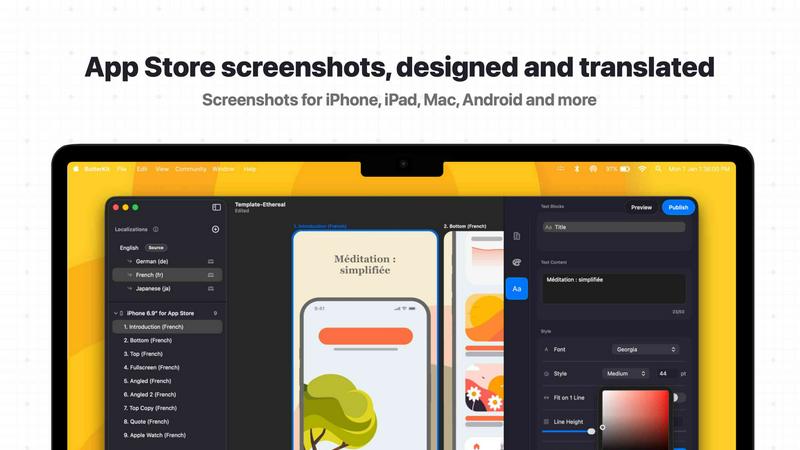
About ButterKit
ButterKit is a native macOS application engineered to revolutionize the App Store publishing workflow for Apple developers. It is a comprehensive tool designed to simplify the entire process of creating, localizing, and uploading polished App Store screenshots and metadata. At its core, ButterKit allows developers to effortlessly capture screenshots directly from the Xcode Simulator and place them into stunning, photorealistic 3D device frames. This eliminates tedious manual design work and empowers rapid iteration. The product's value proposition is centered on efficiency and scale. It leverages advanced AI models to translate app metadata into all 50 App Store Connect languages, removing the traditional hassles of localization. Furthermore, it integrates deeply with the App Store Connect API, enabling one-click uploads of finalized screenshots and metadata. Designed for modern development pipelines, ButterKit links entire folders for input and output, making it a natural fit for CI/CD workflows and Fastlane integrations. Built by a solo developer with a deep understanding of the challenges faced by other developers, ButterKit is a growth engine for any app team. It is the bridge between a great app and a global audience, providing the tools needed to create compelling store listings that drive conversion and scale user acquisition. Whether you are a solo indie developer, a growing design studio, or a large marketing agency, ButterKit provides the speed, quality, and automation required to reach more users in more markets, faster.
Features of ButterKit
Capture Screenshots with Ease
ButterKit offers multiple, seamless methods for capturing screenshots. Users can simply drag and drop PNG or JPG images directly onto 3D device frames. For a more integrated workflow, the built-in Capture Tool connects directly with Xcode and the Simulator, allowing developers to capture screenshots instantly without leaving the app. This native integration saves significant time and enables rapid design iteration. Additionally, ButterKit can link to an entire folder of images, such as those generated by Fastlane or Xcode UI tests, handling bulk processing and localizations automatically.
Design with Photorealistic 3D Devices
ButterKit is a powerful 3D rendering engine built on Metal, providing high-resolution, photorealistic device frames that make screenshots stand out. Users can choose from professionally designed templates with one click or build custom designs from scratch. The 3D devices are fully adjustable, allowing for precise control over the look and feel of the final image. Pro editing tools enable users to span devices across multiple artboards, create seamless panoramic backgrounds, and access full controls for fonts, gradients, and backgrounds to ensure every screenshot is perfectly polished.
Translate and Publish Instantly
The translation and publishing capabilities of ButterKit are designed for global scale. With a single click, users can translate their screenshots and app metadata into all 50 App Store Connect localizations. Designs remain perfectly synced across all languages, ensuring a consistent brand experience worldwide. After translation, users can batch export images or upload their complete designs directly to App Store Connect. The upload is one click and places everything in the correct order, ready for review. The App Store Preview feature allows users to see how their app's story will appear on every device and in every language before publishing.
Seamless Integration with Developer Workflows
ButterKit is built to fit naturally into modern development pipelines. It can link entire folders for both input and output, making it a perfect companion for CI/CD pipelines and Fastlane workflows. This automation capability means that developers can generate and upload screenshots as part of their build and release process, eliminating manual steps and reducing the risk of errors. The integration with the App Store Connect API allows for direct, one-click uploads of finalized assets and metadata, streamlining the entire publishing workflow from development to store listing.
Use Cases of ButterKit
Indie Developers Releasing a New App
An indie developer building their first app can use ButterKit to quickly create professional-looking App Store screenshots without hiring a designer. By capturing screenshots directly from the Xcode Simulator and placing them into 3D device frames, they can produce high-quality visuals that stand out. The AI-powered translation feature allows them to instantly localize their app metadata for all 50 languages, expanding their potential user base globally with minimal effort and cost.
Design Studios Managing Multiple Client Apps
A design studio that handles App Store assets for numerous clients can leverage ButterKit to standardize and scale their workflow. They can create branded templates and apply them consistently across different projects. The ability to link folders and integrate with Fastlane means they can automate the generation of screenshots for various device sizes and localizations. This efficiency allows the studio to take on more clients and deliver polished, localized assets faster.
Marketing Agencies Running A/B Tests
Marketing agencies focused on maximizing app conversion rates can use ButterKit to rapidly create multiple sets of screenshots for A/B testing on App Store Connect. The instant translation feature ensures that test variants are available in all target languages simultaneously. By using the App Store Preview, they can see exactly how each variant looks on different devices before uploading. This data-driven approach helps optimize store listings to improve download rates and user acquisition.
Enterprise Teams with CI/CD Pipelines
Large enterprise development teams can integrate ButterKit into their automated CI/CD pipelines. By linking input folders containing screenshots generated by automated UI tests, ButterKit can process them, apply device frames and templates, and then upload the final assets directly to App Store Connect. This end-to-end automation removes manual bottlenecks from the release process, ensures consistency across all app versions, and speeds up the time to market for new updates.
Frequently Asked Questions
How does ButterKit capture screenshots from the Xcode Simulator?
ButterKit has a dedicated Capture Tool that integrates directly with Xcode and the Simulator. When you run your app in the Simulator, you can use ButterKit to capture the screen instantly without needing to take manual screenshots or use other tools. This direct integration saves time and allows for rapid iteration as you adjust your app's UI and capture new images.
Can ButterKit handle translations for all App Store languages?
Yes, ButterKit uses advanced AI models to translate your app metadata and synchronize your screenshots into all 50 App Store Connect localizations. The translation is instant and keeps your designs perfectly synced across every language, ensuring a consistent brand experience for users worldwide. You can review and edit translations before uploading.
Is ButterKit compatible with Fastlane and CI/CD workflows?
Absolutely. ButterKit is designed to fit seamlessly into modern development pipelines. You can link entire folders for both input and output, which means you can use it with Fastlane or any CI/CD system. This allows you to automate the entire process of generating screenshots from UI tests, applying device frames, and uploading the final assets to App Store Connect.
What file formats does ButterKit support for screenshots?
ButterKit supports common image formats including PNG and JPG. You can drag and drop these files directly onto the 3D device frames within the application. For batch processing, you can link a folder containing these images, and ButterKit will handle them all automatically, making it easy to work with outputs from Fastlane or Xcode UI tests.
Similar to ButterKit

laya.tools
A free directory of 950+ projects built on Laya, the open-source decision model. Updated daily.
Sprite Sheet Maker
A free browser-based toolkit for creating, cutting, converting, and previewing sprite sheet animations.
Forms Plugin
The #1 Native Form Builder Plugin for Framer - No Code, No Embeds, No External Platforms.



JsonTranslate
Translate JSON, Markdown, and TXT files while preserving keys, nested paths, and project structure.