
ProcessSpy
ProcessSpy is an advanced process monitor for Mac, delivering real-time insights and powerful filtering for seamless system management.
Visit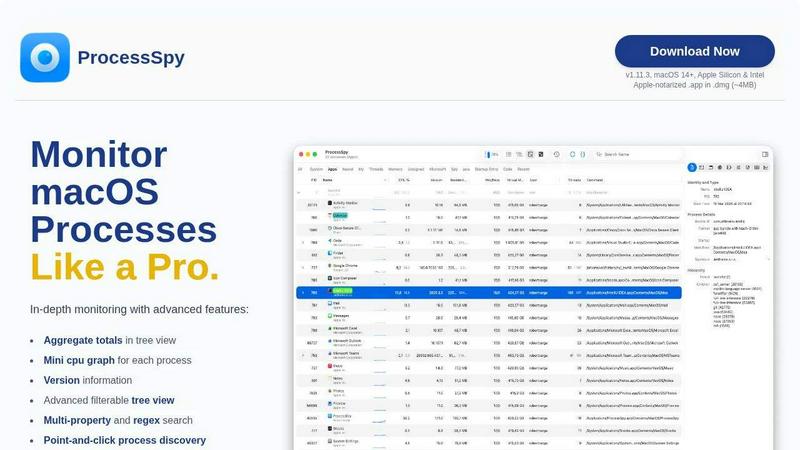
About ProcessSpy
ProcessSpy is the ultimate process monitoring tool designed specifically for macOS users, providing a robust alternative to the traditional Activity Monitor. Built for developers and power users, ProcessSpy offers unparalleled insights into system processes by revealing what Activity Monitor often conceals. With features like process tree visualization, detailed command-line information, and real-time monitoring, users can easily identify and manage applications. Whether you need to track resource usage, analyze dependencies, or troubleshoot stubborn applications, ProcessSpy empowers you to take control. Its intuitive interface and advanced functionality create a Mac-first experience that prioritizes performance and usability. With ProcessSpy, you can transform your understanding of macOS processes and optimize your workflows effortlessly.
Features of ProcessSpy
Advanced Tree View
The advanced tree view in ProcessSpy allows users to visualize processes hierarchically, offering real-time filtering and search capabilities. Users can easily spot aggregate totals for CPU, Memory, and Threads, enhancing their ability to monitor resource usage effectively.
Javascript Filters
ProcessSpy's Javascript filter feature empowers users to create complex filtering conditions with ease. This advanced functionality allows for tailored searches, enabling users to filter processes based on specific criteria and streamline their monitoring tasks significantly.
Environment Variables Access
With the paid license, users can delve deeper into process details by accessing environment variables. This feature is essential for developers who need to understand the context in which processes run, offering insights into configuration and execution parameters.
Process History Recording
ProcessSpy provides a unique ability to record the historical values of CPU, Memory, and Threads for each process. This feature, available with the paid license, allows users to track performance over time, export results to CSV, and analyze trends, making it invaluable for diagnosing issues.
Use Cases of ProcessSpy
Developer Process Management
For developers juggling multiple applications, ProcessSpy helps identify which instances of Java or other languages are running. By displaying full command-line arguments and version information, it simplifies debugging and monitoring.
Performance Analysis
System administrators can leverage ProcessSpy to conduct in-depth performance analysis of applications. With aggregate resource usage and historical data, they can pinpoint performance bottlenecks and optimize system resources effectively.
Troubleshooting Stubborn Apps
When applications become unresponsive, ProcessSpy allows users to quickly identify and terminate problematic processes. Its point-and-click functionality streamlines the process of managing uncooperative applications.
Security Audits
Security professionals can utilize ProcessSpy to inspect running processes for potential vulnerabilities. By accessing detailed information such as entitlements and Info.plist data, they can ensure that applications meet security standards and best practices.
Frequently Asked Questions
Is ProcessSpy safe to install on my Mac?
Yes. ProcessSpy is Apple-notarized and distributed as a signed .app inside a .dmg, ensuring it is verified and safe for use on both Intel and Apple Silicon Macs.
Does ProcessSpy support older versions of macOS?
ProcessSpy is specifically designed for macOS 14 and newer, ensuring compatibility with the latest features and enhancements provided by Apple.
What is the license model for ProcessSpy?
The license is valid for one user on unlimited devices. It includes lifetime updates and access to new features, providing great value for ongoing use.
How do I contact support for ProcessSpy?
Users can reach out for support through the official website, where they can find resources, documentation, and contact information for any inquiries or assistance needed regarding ProcessSpy.
Similar to ProcessSpy

SightRadar
Face recognition API that is a drop-in replacement for AWS Rekognition. Index, search, compare and detect faces, billed per photo, no subscription.

MD TO TEXT
Free online Markdown to Text converter: paste Markdown to strip formatting, get clean readable plain text, copy instantly, all in your browser.

Enlisted
Search 20,000+ open-source and SaaS tools by the job you need done or the app you want to replace.

Luminus Tools
A fast, privacy-first suite of online calculators, financial desks, health trackers, and developer utilities running completely in your browser withou

TrueProxies
Residential and datacenter proxy provider with 50M+ residential IPs across 150+ countries. Fast, reliable HTTP/SOCKS5 proxies for scraping and data.



laya.tools
A free directory of 950+ projects built on Laya, the open-source decision model. Updated daily.