
poseup
PoseUp enhances your photos with AI-driven posture and composition improvements for stunning, professional results in.
Visit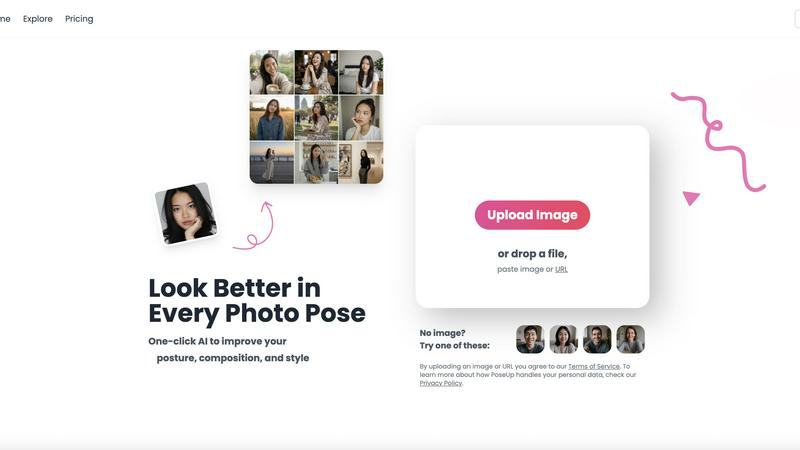
About poseup
PoseUp is an innovative AI-powered photo enhancement platform designed to democratize the world of professional photography. By transforming ordinary, awkward, or poorly composed photos into stunning, publication-ready images with just a single click, PoseUp makes high-quality photography accessible to everyone. The platform utilizes advanced artificial intelligence technology to analyze key elements of images, such as human posture, body positioning, and overall composition, to apply intelligent corrections automatically. This revolutionary approach removes the barriers of costly photo shoots, extensive editing skills, and the need for natural modeling talent. PoseUp's primary value proposition lies in its scalability for personal branding and content creation, empowering social media influencers, aspiring models, small business owners, and everyday individuals to produce high-quality visual content that captivates audiences and projects confidence. By correcting slouches, optimizing body alignment, and suggesting more flattering poses, PoseUp ensures that anyone can look their best in every photo, thereby accelerating personal and professional growth in the digital arena.
Features of poseup
One-Click Enhancement
PoseUp’s one-click enhancement feature allows users to upload their images and instantly improve posture, composition, and style. The AI technology analyzes photographs and applies intelligent corrections with no need for extensive editing skills or prior experience, making it perfect for users at any skill level.
AI Pose Correction
This feature utilizes advanced AI algorithms to automatically identify and correct poor photo poses. Whether it's fixing bad selfie positioning or optimizing group photos, PoseUp ensures that every image captures the best angles and aesthetics, enhancing the overall visual appeal.
Scene-Specific Enhancements
PoseUp offers tailored enhancements for various scenes, including casual lifestyle shots, outdoor adventures, professional headshots, and fitness photos. This ensures that users can achieve professional results regardless of the context in which they are photographing, making it a versatile tool for all occasions.
Support for Multiple Formats
The platform supports a variety of image formats, including JPG, PNG, WEBP, and HEIC, with a maximum file size of 5MB per image. This flexibility allows users to upload and enhance their photos without worrying about compatibility issues, ensuring a seamless experience.
Use Cases of poseup
Social Media Creators
Social media influencers can leverage PoseUp to enhance their photos, ensuring visually captivating content that stands out on platforms like Instagram and Facebook. The automatic corrections help maintain a professional aesthetic, boosting engagement and follower growth.
Aspiring Models
For aspiring models, PoseUp serves as a powerful tool to improve portfolio images. By optimizing poses and enhancing visual quality, models can present themselves in the best light, increasing their chances of being noticed by agencies and clients.
Small Business Owners
Small business owners can utilize PoseUp to create high-quality images for marketing purposes. Whether it is product shots or promotional materials, the platform enables them to enhance visual content, thereby attracting more customers and driving sales.
Everyday Individuals
PoseUp is perfect for everyday individuals looking to improve personal photos, whether for family albums, special occasions, or casual selfies. The ease of use allows anyone to produce stunning images that capture cherished moments beautifully.
Frequently Asked Questions
How does PoseUp work?
PoseUp uses advanced AI technology to analyze your photos, focusing on posture, body positioning, and composition. It then applies intelligent corrections automatically, allowing for enhanced visual appeal with minimal effort.
What types of photos can I enhance with PoseUp?
You can enhance a wide variety of photos, including selfies, family pictures, professional portraits, and lifestyle shots. The platform is designed to optimize images for any context, ensuring you look your best in every scenario.
Is PoseUp easy to use?
Yes, PoseUp is designed for users of all skill levels. With its one-click enhancement feature, anyone can upload photos and achieve professional-quality results without any prior experience or editing skills.
What file formats does PoseUp support?
PoseUp supports multiple image formats, including JPG, PNG, WEBP, and HEIC. Users can upload images up to 5MB in size, ensuring a flexible experience for various photo types.
Explore more in this category:
Similar to poseup

Try This Skill
One-click AI photo stylization for e-commerce & portraits

Video2Jpg
Convert video to JPG, PNG, or WebP frames in your browser. High-quality video to image converter with no uploads—fast, private, and free.

AI Image Editor
Free AI image editor that edits, retouches, and transforms photos with natural-language text prompts.
Imagine2
Private browser-based AI image generation and editing with text-to-image, targeted edits, and multi-image references.

Kogashitsuka AI
An online AI image tool that enhances photos and illustrations at their original size or upscales them by 2x or 4x.


IsThisAIImage
Free online AI image and deepfake checker. Upload a photo for AI-generated and deepfake scores, a clear verdict band, and optional generator hints.

DeepFake AI
DeepFake AI is your all-in-one studio to instantly swap faces, animate photos, and generate share-ready videos with AI music and effects.