
SparkPix
Edit photos effortlessly with SparkPix by simply typing your requests to enhance, restore, and transform images instantly online.
Visit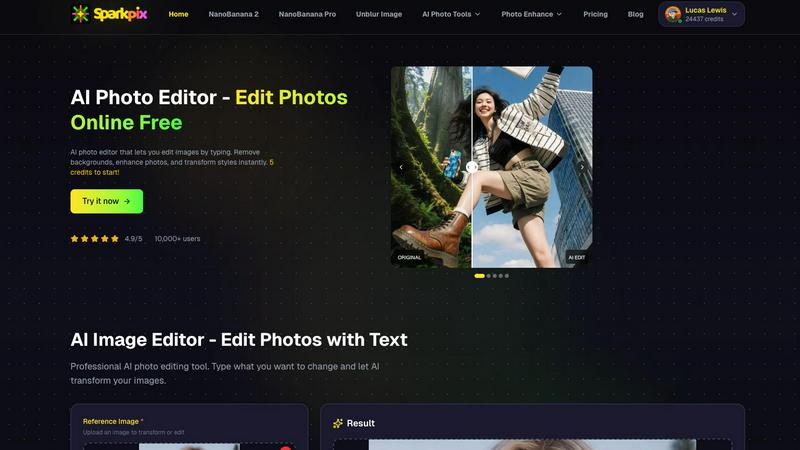
About SparkPix
SparkPix is an innovative AI-powered photo editing platform designed to make photo enhancement accessible to everyone, regardless of their technical skills. With SparkPix, users can effortlessly edit photos by simply typing commands, eliminating the need for advanced tools like Photoshop. This user-friendly interface caters to a wide audience, including casual photographers, social media enthusiasts, and professionals looking for quick, high-quality edits. The main value proposition lies in its ability to transform photos in less than 30 seconds, offering features such as background removal, photo restoration, and style transfer. Whether you want to enhance family photos, create stunning social media graphics, or restore cherished memories, SparkPix provides a seamless and efficient solution that empowers users to achieve professional results without the steep learning curve.
Features of SparkPix
AI Photo Editor
The AI Photo Editor allows users to type specific instructions like "remove background" or "enhance colors," and the AI executes these commands in under 30 seconds. This feature democratizes photo editing, enabling anyone to achieve professional-quality results without prior experience.
Background Remover
With the one-click background removal feature, users can quickly isolate subjects from portraits, product images, or complex scenes. This functionality is perfect for e-commerce applications or creating standout social media content, making it easy to generate clean, polished images.
Unblur Image
The Unblur Image feature uses advanced AI algorithms to fix motion blur, out-of-focus shots, and compression artifacts. This ensures that your images maintain clarity and sharpness, even after edits, making it an essential tool for restoring the quality of your photos.
Photo Restoration
SparkPix excels in photo restoration, allowing users to repair old, faded, scratched, or damaged photographs. This feature is particularly beneficial for preserving family archives and cherished memories, transforming neglected images into vibrant representations of the past.
Use Cases of SparkPix
Personal Photo Enhancement
Individuals can use SparkPix to enhance their personal photos, whether for family albums or social media posts. The AI-driven editing capabilities ensure that every image can be transformed into a stunning visual that captures attention.
Professional Marketing Materials
Businesses can leverage SparkPix to create eye-catching marketing materials. By utilizing features like background removal and photo enhancement, companies can produce high-quality visuals that resonate with their target audience and elevate their brand image.
Creative Projects
Artists and creatives can explore SparkPix's style transfer feature, which allows them to convert photos into various artistic styles, such as anime or watercolor. This opens up new avenues for creative expression and innovation in their projects.
Memory Preservation
Families can use SparkPix to restore and enhance old photographs, preserving memories for future generations. By repairing damages and restoring colors, users can breathe new life into their historical pictures, ensuring they remain part of family heritage.
Frequently Asked Questions
How does the AI Photo Editor work?
The AI Photo Editor processes user commands input as text, allowing for quick transformations of images. Users simply type what they want to change, and the AI applies those edits in less than 30 seconds, simplifying the editing process.
Is SparkPix suitable for beginners?
Absolutely! SparkPix is designed for users of all skill levels. Its intuitive interface and simple text commands make it easy for beginners to edit photos without needing prior experience in graphic design or photo editing software.
Can I use SparkPix on mobile devices?
Yes, SparkPix is a web-based platform that works seamlessly across desktop, iPhone, and Android devices. There is no need for downloads, allowing for flexibility and convenience in photo editing on the go.
What are the pricing options for SparkPix?
SparkPix offers a free plan that includes 5 credits with no credit card required. Users can start editing immediately and can upgrade their plans starting at $9.99 for 350 credits, making it accessible for various needs and budgets.
Similar to SparkPix

ImageGenerator
Create and edit AI images online with multiple models, text-to-image, image-to-image, background removal, and upscaling.

SightRadar
Face recognition API that is a drop-in replacement for AWS Rekognition. Index, search, compare and detect faces, billed per photo, no subscription.

MyPhotoAI
Turn your selfies into AI headshots and portraits. Get 3 photos for US$5 or every photo from one shoot for US$10. No subscription.

AI Object Remover
Remove unwanted people, objects, text and watermarks from photos with AI
AIPetGen
AI pet image generator with photo-to-pet and free credits


Image to Layers AI
Turn any image into editable transparent PNG/PSD layers with AI

nanobanana 21
A fast, simple image studio powered by Nano Banana 2.1. Create and edit high-quality images with accurate details and readable text.