
poseup vs RemoveTexts
Side-by-side comparison to help you choose the right product.

poseup
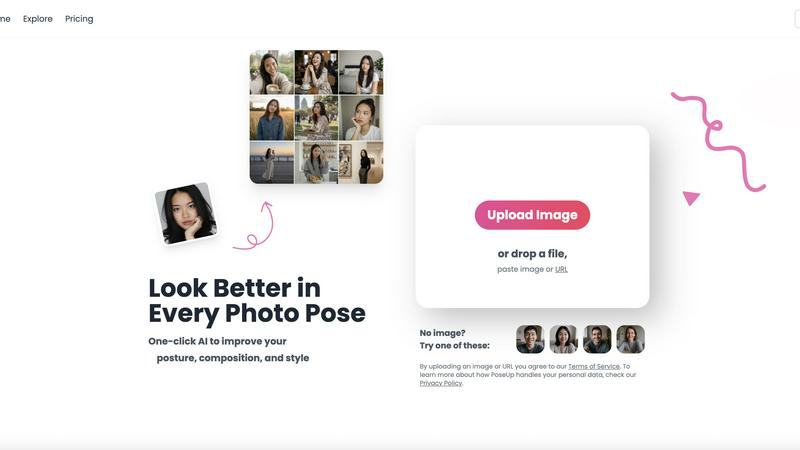
PoseUp enhances your photos with AI-driven posture and composition improvements for stunning, professional results in.
Last updated: February 28, 2026

RemoveTexts
RemoveTexts is an AI tool that instantly erases text from images, simplifying your design process without the need for Photoshop skills.
Last updated: March 11, 2026
Visual Comparison
poseup
RemoveTexts

Feature Comparison
poseup
One-Click Enhancement
PoseUp’s one-click enhancement feature allows users to upload their images and instantly improve posture, composition, and style. The AI technology analyzes photographs and applies intelligent corrections with no need for extensive editing skills or prior experience, making it perfect for users at any skill level.
AI Pose Correction
This feature utilizes advanced AI algorithms to automatically identify and correct poor photo poses. Whether it's fixing bad selfie positioning or optimizing group photos, PoseUp ensures that every image captures the best angles and aesthetics, enhancing the overall visual appeal.
Scene-Specific Enhancements
PoseUp offers tailored enhancements for various scenes, including casual lifestyle shots, outdoor adventures, professional headshots, and fitness photos. This ensures that users can achieve professional results regardless of the context in which they are photographing, making it a versatile tool for all occasions.
Support for Multiple Formats
The platform supports a variety of image formats, including JPG, PNG, WEBP, and HEIC, with a maximum file size of 5MB per image. This flexibility allows users to upload and enhance their photos without worrying about compatibility issues, ensuring a seamless experience.
RemoveTexts
Paint to Remove
The Paint to Remove feature allows users to precisely control which text is eliminated by simply brushing over specific areas in the image. This level of control ensures that only the unwanted text is targeted, maintaining the integrity of the surrounding visuals.
Auto Remove All
With the Auto Remove All feature, users can automatically detect and erase all text elements in an image with just a single click. This feature leverages the power of AI to quickly process images, saving time while delivering impeccable results.
Edit & Replace Text
The Edit & Replace Text option empowers users to not only remove text but also substitute it with new content. The AI intelligently matches the original font style, allowing for seamless integration of the new text into the image.
Remove Objects
The Remove Objects feature extends beyond text removal, enabling users to eliminate unwanted visual elements such as logos or people from their images. This function is particularly useful for marketers looking to create clean product shots or presentations.
Use Cases
poseup
Social Media Creators
Social media influencers can leverage PoseUp to enhance their photos, ensuring visually captivating content that stands out on platforms like Instagram and Facebook. The automatic corrections help maintain a professional aesthetic, boosting engagement and follower growth.
Aspiring Models
For aspiring models, PoseUp serves as a powerful tool to improve portfolio images. By optimizing poses and enhancing visual quality, models can present themselves in the best light, increasing their chances of being noticed by agencies and clients.
Small Business Owners
Small business owners can utilize PoseUp to create high-quality images for marketing purposes. Whether it is product shots or promotional materials, the platform enables them to enhance visual content, thereby attracting more customers and driving sales.
Everyday Individuals
PoseUp is perfect for everyday individuals looking to improve personal photos, whether for family albums, special occasions, or casual selfies. The ease of use allows anyone to produce stunning images that capture cherished moments beautifully.
RemoveTexts
E-commerce Product Photos
E-commerce sellers can utilize RemoveTexts to clean up product images by removing watermarks or distracting text overlays. This results in polished visuals that enhance product appeal and boost conversion rates.
Legal Document Redaction
Legal professionals can employ RemoveTexts to redact sensitive information from documents and images. With the ability to remove date stamps and personal details, they can ensure privacy while maintaining the document's professional appearance.
Social Media Content Creation
Content creators on social media can benefit from RemoveTexts by quickly editing out unwanted text from images or videos. This allows them to maintain a consistent and professional aesthetic across their platforms without time-consuming editing.
Academic Research and Presentations
Researchers and students can use RemoveTexts to prepare clean images for presentations or publications by removing irrelevant text or watermarks. This ensures that their work appears polished and credible, enhancing their academic impact.
Overview
About poseup
PoseUp is an innovative AI-powered photo enhancement platform designed to democratize the world of professional photography. By transforming ordinary, awkward, or poorly composed photos into stunning, publication-ready images with just a single click, PoseUp makes high-quality photography accessible to everyone. The platform utilizes advanced artificial intelligence technology to analyze key elements of images, such as human posture, body positioning, and overall composition, to apply intelligent corrections automatically. This revolutionary approach removes the barriers of costly photo shoots, extensive editing skills, and the need for natural modeling talent. PoseUp's primary value proposition lies in its scalability for personal branding and content creation, empowering social media influencers, aspiring models, small business owners, and everyday individuals to produce high-quality visual content that captivates audiences and projects confidence. By correcting slouches, optimizing body alignment, and suggesting more flattering poses, PoseUp ensures that anyone can look their best in every photo, thereby accelerating personal and professional growth in the digital arena.
About RemoveTexts
RemoveTexts is a cutting-edge AI-powered image editing tool designed to effortlessly remove unwanted text from images in mere seconds. With its user-friendly interface, you can upload any image and utilize advanced generative AI to eliminate watermarks, subtitles, captions, and branded overlays without requiring any Photoshop skills. The technology behind RemoveTexts utilizes deep learning inpainting, ensuring that backgrounds are intelligently reconstructed, resulting in clean, professional-grade images. Ideal for creators, marketers, designers, and anyone needing quick and effective text removal, RemoveTexts has gained the trust of over 100,000 users globally. This innovative tool supports various languages and works seamlessly with multiple image formats, making it an invaluable asset for anyone who values clean visuals and efficiency.
Frequently Asked Questions
poseup FAQ
How does PoseUp work?
PoseUp uses advanced AI technology to analyze your photos, focusing on posture, body positioning, and composition. It then applies intelligent corrections automatically, allowing for enhanced visual appeal with minimal effort.
What types of photos can I enhance with PoseUp?
You can enhance a wide variety of photos, including selfies, family pictures, professional portraits, and lifestyle shots. The platform is designed to optimize images for any context, ensuring you look your best in every scenario.
Is PoseUp easy to use?
Yes, PoseUp is designed for users of all skill levels. With its one-click enhancement feature, anyone can upload photos and achieve professional-quality results without any prior experience or editing skills.
What file formats does PoseUp support?
PoseUp supports multiple image formats, including JPG, PNG, WEBP, and HEIC. Users can upload images up to 5MB in size, ensuring a flexible experience for various photo types.
RemoveTexts FAQ
How does RemoveTexts work?
RemoveTexts utilizes advanced AI-powered deep learning inpainting technology to analyze surrounding pixels and intelligently reconstruct the background after text removal. This results in seamless, professional-grade images.
What image formats does RemoveTexts support?
RemoveTexts supports JPG, PNG, and WebP image formats, accommodating user needs across various platforms. Users can upload images up to 10MB for processing.
Can I remove watermarks with RemoveTexts?
Yes, RemoveTexts is specifically designed to remove watermarks and other unwanted text elements from images. The AI ensures that the background is reconstructed seamlessly, leaving no traces behind.
Is RemoveTexts suitable for non-designers?
Absolutely! RemoveTexts is designed for users of all skill levels. With its intuitive interface, anyone can easily remove text from images without requiring any design expertise.
Alternatives
poseup Alternatives
PoseUp is an innovative AI-powered photo enhancement platform designed to revolutionize the way individuals approach photography. By instantly perfecting photo posture and composition with just a click, it enables users to transform their images into professional-quality visuals without needing extensive editing skills or expensive photo shoots. As a solution in the image and photo category, PoseUp caters to a diverse range of users, including social media influencers, small business owners, and everyday individuals seeking to elevate their visual content. Users often seek alternatives to PoseUp for various reasons, including pricing, feature sets, and compatibility with specific platforms or devices. When looking for an alternative, it's crucial to consider factors such as user-friendliness, the effectiveness of the AI technology, the range of features offered, and the overall value provided for personal branding and content creation needs. By focusing on these elements, users can find a solution that meets their unique requirements and helps them achieve their visual goals.
RemoveTexts Alternatives
RemoveTexts is an innovative AI-powered tool designed to effortlessly remove unwanted text from images, making it a vital asset in the realm of image editing. As a member of the image and photo editing category, it caters to a diverse range of users, including creators, marketers, and designers who need quick and effective solutions for cleaning images. While RemoveTexts offers powerful features, users often seek alternatives for various reasons, such as pricing structures, feature sets, or compatibility with specific platforms. When choosing an alternative to RemoveTexts, it’s crucial to consider the ease of use, the quality of output, and whether the tool meets specific needs such as language support and advanced editing capabilities. Users should also evaluate the pricing model to ensure it aligns with their budget while providing the necessary functionality for their projects.