
Unifyca
Unifyca gives agencies total control over client WordPress sites by unifying documentation, audits, maintenance, and backups in one platform.
Visit
About Unifyca
Unifyca is a comprehensive WordPress website management platform designed specifically for agencies, freelancers, and IT professionals who maintain multiple client websites. Instead of logging into dozens of separate WordPress dashboards, Unifyca provides a single centralized workspace where you can manage every aspect of your client portfolio. The platform eliminates the chaos of scattered spreadsheets, buried emails, and fragmented chat messages by unifying website documentation, credentials, maintenance tasks, backups, and reporting into one operational hub. For growth-focused agencies scaling their client base, Unifyca replaces reactive firefighting with a predictable, proactive maintenance workflow. You can connect unlimited WordPress sites, run automated audits to detect outdated plugins, themes, and core versions, apply safe fixes remotely in bulk, schedule manual or automated backups, monitor uptime, and generate professional white-label maintenance reports that prove your value to clients. Beyond maintenance, Unifyca serves as the single source of truth for every client website by centralizing hosting accounts, domains, FTP and SSH access, email settings, SSL certificates, credentials, brand assets, project notes, and technical documentation. The result is a complete operational infrastructure that helps agencies reduce manual work, improve team consistency, document every client website thoroughly, and deliver professional maintenance services at scale. Unifyca is built for teams that want to grow without adding administrative chaos.
Features of Unifyca
Centralized Website Documentation
Unifyca transforms scattered information into a single source of truth for every client website. Stop searching through emails, spreadsheets, and chat messages to find critical details. The platform lets you store WordPress credentials, FTP and SSH access, hosting account information, domain registrar details, database credentials, email account settings, plugin and theme licenses, API keys, SSL certificate data, and server configurations. Every piece of technical documentation is securely linked to the correct client and website, so your entire team always works with the complete context of every client website. No more hidden knowledge in personal files or lost conversations.
Automated WordPress Audits and Maintenance
Connect your client WordPress sites using the Unifyca Audit Connector and let the platform scan everything automatically. Unifyca detects outdated plugins, themes, and WordPress core versions across every connected site. It identifies security risks, configuration issues, uptime problems, and SEO warnings. You wake up knowing exactly which sites need attention today. From the centralized Fix Center, you can review and apply WordPress updates and safe maintenance actions in bulk across multiple sites without ever entering a single wp-admin dashboard. Every update, fix, and check is logged automatically per site for complete maintenance history.
Scheduled and Manual Backups
Unifyca gives you full control over website backups with both manual and scheduled options. You can run backups on demand before applying major updates or configure automatic backups to run on a predictable schedule. The platform maintains a clear backup history so you always know which sites are protected. This feature is essential for agencies that need to apply fixes confidently, knowing they can restore a site quickly if something goes wrong. Backup management is integrated directly into the maintenance workflow, making it simple to verify protection status across your entire client portfolio.
White-Label Client Reports
One click transforms your month of maintenance activity into a clean, professional, client-friendly report. Every update applied, every issue fixed, and every uptime check is automatically compiled into a branded document featuring your logo, your colors, and zero Unifyca branding. These reports provide tangible proof of the value you deliver, making it easy to justify recurring maintenance fees and renew contracts every year. Clients finally understand the work happening behind the scenes, which builds trust and strengthens your professional relationships.
Use Cases of Unifyca
Scaling a WordPress Maintenance Agency
A growing agency managing 50 or more client websites can use Unifyca to eliminate the chaos of individual dashboards. Instead of logging into each site separately, the team works from one centralized workspace. Automated audits identify which sites need updates, and bulk fixes are applied without entering wp-admin. White-label reports are generated for every client automatically. This workflow allows the agency to take on more clients without proportionally increasing administrative overhead, directly supporting scalable growth.
Freelancer Delivering Professional Services
A solo freelancer can use Unifyca to present a highly professional image to clients. By centralizing all website documentation, credentials, and maintenance history, the freelancer never wastes time searching for information. Scheduled backups and automated audits ensure no client site is neglected. The white-label reports demonstrate the value of ongoing maintenance, making it easier to convert one-time project clients into recurring retainer clients. Unifyca helps the freelancer operate like a much larger agency.
IT Professional Managing Multiple Client Sites
An IT professional maintaining WordPress sites for small businesses can use Unifyca to bring order to their workflow. The platform stores hosting account details, domain renewal dates, SSL certificate expiration alerts, and technical notes all in one place. Maintenance tasks are tracked with a clear history, so the IT professional can quickly answer client questions about what was done and when. Automated alerts for expiring domains or SSL certificates prevent costly downtime and maintain client trust.
Team Collaboration on Shared Client Accounts
A digital agency with multiple team members working on the same client accounts can use Unifyca to ensure everyone has access to the same reliable information. Credentials are stored securely and linked to the correct client and website. Technical documentation is shared transparently, eliminating knowledge silos. The maintenance history shows every action taken by any team member, providing full accountability. This shared operational context improves team efficiency and prevents costly mistakes from miscommunication.
Frequently Asked Questions
How does Unifyca connect to my client WordPress sites?
Unifyca uses a lightweight Audit Connector plugin that you install on each client WordPress site. After installation, you link the site to your Unifyca account. The process is designed to be bulk-friendly for agencies onboarding many sites at once. Once connected, Unifyca can run automated audits, apply fixes, and manage backups without requiring you to log into each individual WordPress dashboard.
Can I apply WordPress updates and fixes without accessing wp-admin?
Yes. Unifyca features a centralized Fix Center where you can review and apply WordPress updates, plugin updates, theme updates, and other safe maintenance actions across multiple sites simultaneously. You never need to enter a single wp-admin dashboard to perform these tasks. The platform applies fixes remotely, saving you significant time when managing a large portfolio of client websites.
Is my client data and credentials secure in Unifyca?
Yes. Unifyca is built with security as a core priority. All credentials, including WordPress logins, FTP and SSH access, and API keys, are stored securely within the platform and linked to the correct client and website. The platform uses industry-standard encryption and security practices to protect your data. You maintain full control over who on your team has access to specific client information.
Can I generate reports with my own branding?
Absolutely. Unifyca offers white-label reporting that allows you to generate client maintenance reports featuring your own logo, your brand colors, and zero Unifyca branding. One click compiles the entire month of maintenance activity, including updates applied, issues fixed, and uptime checks, into a clean, professional PDF that your clients can easily understand and appreciate.
What happens if a domain or SSL certificate is about to expire?
Unifyca centralizes renewal tracking for domains, hosting accounts, and SSL certificates. You can view all upcoming renewals in a single calendar and set up alerts to notify you before something expires. This proactive approach prevents client websites from going offline due to expired services, helping you maintain high service levels and client satisfaction.
Similar to Unifyca

Built2WinWeb AI SEO
Custom PHP websites, AI Indexing Pack ($599 one‑time), and WebAgentScan SaaS ($9/mo). MCP, A2A, llms.txt, full ownership.
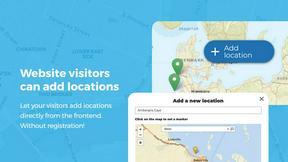
Open User Map
Open User Map lets you build a collaborative, customizable map that grows with your community through simple frontend submissions and approvals.

Shadcn Examples
Ship production-ready UI faster with premium Shadcn components built for scalable React and Tailwind apps.
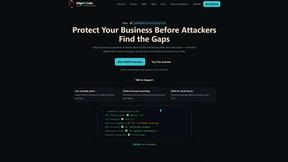
EdgeIQ Labs
EdgeIQ Labs gives small businesses a full security platform to find risks, automate monitoring, and scale protection without a security team.
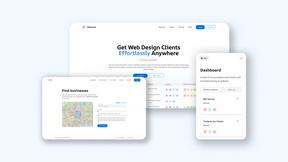
Webleadr
Webleadr empowers you to effortlessly find and contact web design leads and businesses without websites, turning prospects into clients in clicks.
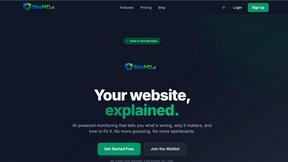
SiteMd
SiteMd is your all-in-one website health scanner that identifies issues, impacts, and fixes in under 60 seconds, ensuring optimal performance and.

Idearium
Idearium is a Toronto agency that crafts impactful websites and drives digital growth for businesses ready to scale.
FilexHost
Effortlessly host and share files in seconds with drag-and-drop simplicity and secure, shareable links.