
SupaSidebar
SupaSidebar is your essential Mac tool for quickly saving and accessing links, files, and folders from any app.
Visit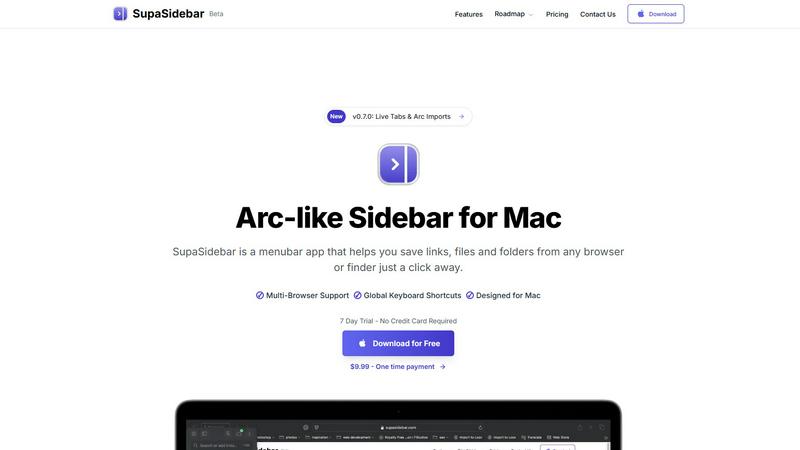
About SupaSidebar
SupaSidebar is an innovative productivity engine specifically designed for Mac users, aiming to enhance the way you manage your workflow and ideas. This beautifully crafted sidebar and command panel is inspired by the Arc browser and conveniently resides in your menubar. It provides instant, universal access to a variety of resources, including links, files, folders, and applications. Ideal for creators, researchers, developers, and anyone juggling multiple tasks across different browsers and applications, SupaSidebar is a solution to the common challenges of tab overload, disorganized bookmarks, and slow context-switching. Its core value lies in its profound simplicity: a unified hub that boosts organization, accelerates browsing, and fosters deep focus. By utilizing powerful global keyboard shortcuts, SupaSidebar works seamlessly across major browsers like Safari, Chrome, Arc, Firefox, and Brave, ensuring that your essential resources are always just a keystroke away. More than just a utility, SupaSidebar serves as a foundational layer for an efficient digital workspace, prioritizing user privacy while propelling productivity to new heights.
Features of SupaSidebar
Instant Access to Resources
SupaSidebar allows users to save links, files, and folders from any browser or Finder with just a click. This feature ensures that your essential resources are always at your fingertips, significantly reducing the time spent searching for information.
Global Keyboard Shortcuts
Designed to enhance productivity, SupaSidebar features global keyboard shortcuts that enable users to save or copy URLs quickly. With commands like CMD CTRL S to save and CMD CTRL C to copy the current website link, you can streamline your workflow and eliminate unnecessary clicks.
Recents Tracking
The Recents feature tracks every website you've visited in the last 48 hours, making it easy to find your work without sifting through countless tabs. This functionality allows for efficient retrieval of previously accessed resources, enhancing your work efficiency.
Pinned Items for Quick Access
SupaSidebar lets you pin your favorite items at the top of the list for quick access. This feature is particularly useful for users who frequently open the same resources, allowing them to organize their workspace better and save time.
Use Cases of SupaSidebar
Research Projects
For researchers, SupaSidebar offers a streamlined way to manage links, files, and resources. By pinning important sites and tracking recent visits, users can efficiently navigate through their research without losing focus.
Creative Workflows
Creative professionals can benefit from SupaSidebar by keeping their favorite tools and resources readily accessible. With global shortcuts, switching between inspiration sources and tools becomes seamless, fostering creativity and productivity.
Web Development
Developers juggling multiple applications and browser tabs can use SupaSidebar to organize their coding resources. Quick access to documentation, code snippets, and project files allows for a more efficient workflow and reduces context-switching time.
Everyday Productivity
Anyone looking to enhance their daily productivity can leverage SupaSidebar. By consolidating frequently used apps, files, and links in one place, users can maintain organization in their digital workspace, allowing for a smoother workflow throughout the day.
Frequently Asked Questions
Is SupaSidebar a browser extension?
No, SupaSidebar is a standalone menubar application for Mac that integrates with all major browsers, providing a unified interface for managing resources without the need for a browser extension.
Which browsers does SupaSidebar work with?
SupaSidebar works seamlessly with major browsers including Safari, Chrome, Firefox, Arc, and Brave, ensuring users can access their resources regardless of their preferred browsing platform.
What macOS version do I need?
SupaSidebar requires macOS 13 or higher to function optimally. Make sure your system is up to date to take full advantage of its features.
Where is my data stored?
All data within SupaSidebar remains on your Mac, ensuring your privacy and security. The application does not store your information on external servers, giving you peace of mind while using the tool.
Explore more in this category:
Similar to SupaSidebar
Build Mode for Mac
Build Mode is a Mac app that turns focused sessions into visible progress, so you can see the work adding up before the results arrive.

MySOP.guru
Capture any workflow in your browser and export a branded, step-by-step SOP with screenshots. €5 per document, no subscription.

PerPageFax
PerPageFax lets you send a fax online from any browser for a flat $0.50 per page — no account, no subscription, no fax machine.

Video2Jpg
Convert video to JPG, PNG, or WebP frames in your browser. High-quality video to image converter with no uploads—fast, private, and free.


Construction Calculator
Free construction calculators with transparent formulas, steps, assumptions, and metric or imperial units.


Glanced
Follow news, blogs, newsletters, and podcasts in a free RSS reader, with AI summaries, top stories, full-text search, saved searches, and a catalog.