
RemoveTexts vs TinyFast
Side-by-side comparison to help you choose the right product.

RemoveTexts
RemoveTexts is an AI tool that instantly erases text from images, simplifying your design process without the need for Photoshop skills.
Last updated: March 11, 2026

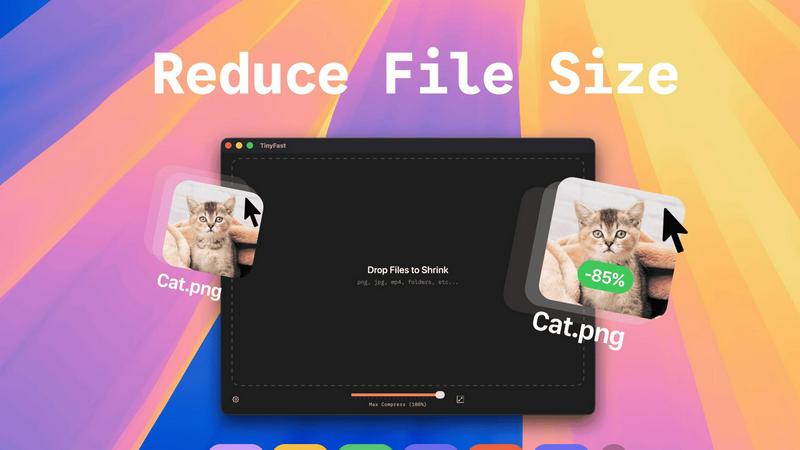
TinyFast instantly compresses your files locally on Mac for faster, private workflows.
Last updated: February 28, 2026
Visual Comparison
RemoveTexts

TinyFast
Feature Comparison
RemoveTexts
Paint to Remove
The Paint to Remove feature allows users to precisely control which text is eliminated by simply brushing over specific areas in the image. This level of control ensures that only the unwanted text is targeted, maintaining the integrity of the surrounding visuals.
Auto Remove All
With the Auto Remove All feature, users can automatically detect and erase all text elements in an image with just a single click. This feature leverages the power of AI to quickly process images, saving time while delivering impeccable results.
Edit & Replace Text
The Edit & Replace Text option empowers users to not only remove text but also substitute it with new content. The AI intelligently matches the original font style, allowing for seamless integration of the new text into the image.
Remove Objects
The Remove Objects feature extends beyond text removal, enabling users to eliminate unwanted visual elements such as logos or people from their images. This function is particularly useful for marketers looking to create clean product shots or presentations.
TinyFast
Blazing-Fast Local Compression
Experience file size reduction at the speed of your Mac's hardware. TinyFast utilizes highly optimized native compression engines to process batches of files in seconds, not minutes. This eliminates the entire cycle of uploading to a server, waiting in a queue, and downloading back—a massive time save that compounds over hundreds of files. Your workflow maintains its momentum without ever hitting a compression bottleneck.
100% Private & Secure by Design
Your confidential files and sensitive intellectual property remain exclusively on your device. TinyFast is architected with a privacy-first mindset, ensuring no asset is ever uploaded to a cloud server or third-party system. This is critical for professionals working under Non-Disclosure Agreements (NDAs), with client materials, or any proprietary content, providing total peace of mind and control.
Universal File Type Support
TinyFast is your single, universal tool for compression across a vast spectrum of formats. Comprehensively support images (PNG, JPG, WebP, SVG, HEIC, GIF, BMP, TIFF), videos (MP4, MOV, M4V), documents (PDF, DOCX), code files (JS, CSS, JSON), and audio (MP3). This eliminates the need to juggle multiple specialized online tools, streamlining your entire asset optimization workflow into one powerful application.
Batch Processing & Smart Resizing
Scale your optimization efforts effortlessly by dragging and dropping entire folders of files for simultaneous compression. Beyond just reducing file size, TinyFast includes intelligent resolution resizing for images and videos, allowing you to automatically scale dimensions to meet specific platform requirements or storage constraints, all within the same lightning-fast, local operation.
Use Cases
RemoveTexts
E-commerce Product Photos
E-commerce sellers can utilize RemoveTexts to clean up product images by removing watermarks or distracting text overlays. This results in polished visuals that enhance product appeal and boost conversion rates.
Legal Document Redaction
Legal professionals can employ RemoveTexts to redact sensitive information from documents and images. With the ability to remove date stamps and personal details, they can ensure privacy while maintaining the document's professional appearance.
Social Media Content Creation
Content creators on social media can benefit from RemoveTexts by quickly editing out unwanted text from images or videos. This allows them to maintain a consistent and professional aesthetic across their platforms without time-consuming editing.
Academic Research and Presentations
Researchers and students can use RemoveTexts to prepare clean images for presentations or publications by removing irrelevant text or watermarks. This ensures that their work appears polished and credible, enhancing their academic impact.
TinyFast
Web Developer Asset Optimization
Front-end developers and web engineers can drastically improve site performance by locally compressing all website assets before deployment. Optimize hundreds of product images, hero graphics, SVG icons, and JavaScript/CSS bundles in seconds, ensuring faster page load times and better SEO scores without ever exposing code or assets to external services.
Content Creator Workflow Acceleration
Bloggers, social media managers, and video creators can prepare content for publication at unprecedented speed. Batch compress screen recordings, edited video clips, and high-resolution photos directly from their editing software. This keeps their content pipeline moving quickly and ensures files are perfectly sized for platforms like WordPress, YouTube, or Instagram without quality loss.
Design Agency Client Deliverables
Design agencies handling sensitive client branding materials, high-fidelity mockups, and prototype videos can use TinyFast to securely prepare files for delivery and presentation. Compressing large PSD exports, PDF portfolios, and 4K video proofs locally guarantees client confidentiality and professional, manageable file sizes for email or client portals.
App Developer Build Size Management
Mobile and desktop app developers can integrate TinyFast into their build process to reduce the final application bundle size. Compressing embedded images, textures, audio files, and documentation locally helps meet strict app store size limits, leading to faster download times for end-users and more efficient use of resources.
Overview
About RemoveTexts
RemoveTexts is a cutting-edge AI-powered image editing tool designed to effortlessly remove unwanted text from images in mere seconds. With its user-friendly interface, you can upload any image and utilize advanced generative AI to eliminate watermarks, subtitles, captions, and branded overlays without requiring any Photoshop skills. The technology behind RemoveTexts utilizes deep learning inpainting, ensuring that backgrounds are intelligently reconstructed, resulting in clean, professional-grade images. Ideal for creators, marketers, designers, and anyone needing quick and effective text removal, RemoveTexts has gained the trust of over 100,000 users globally. This innovative tool supports various languages and works seamlessly with multiple image formats, making it an invaluable asset for anyone who values clean visuals and efficiency.
About TinyFast
TinyFast is the definitive local file compression engine for the modern macOS creator, built to scale your productivity while safeguarding your intellectual property. In an era where digital workflows are bottlenecked by slow uploads, data caps, and privacy concerns, TinyFast delivers a revolutionary solution: professional-grade file optimization that happens entirely on your Mac. It empowers designers, developers, marketers, and content creators to instantly shrink images, videos, documents, and audio files through a supremely intuitive drag-and-drop interface. The core value is uncompromising speed and absolute security. Your files never leave your machine, eliminating the risks associated with online tools. By processing everything locally with optimized native engines, TinyFast removes waiting, protects sensitive assets under NDAs, and integrates seamlessly into any high-velocity creative or development pipeline. It's more than a tool; it's a strategic upgrade for anyone looking to accelerate their output and maintain complete control over their digital assets.
Frequently Asked Questions
RemoveTexts FAQ
How does RemoveTexts work?
RemoveTexts utilizes advanced AI-powered deep learning inpainting technology to analyze surrounding pixels and intelligently reconstruct the background after text removal. This results in seamless, professional-grade images.
What image formats does RemoveTexts support?
RemoveTexts supports JPG, PNG, and WebP image formats, accommodating user needs across various platforms. Users can upload images up to 10MB for processing.
Can I remove watermarks with RemoveTexts?
Yes, RemoveTexts is specifically designed to remove watermarks and other unwanted text elements from images. The AI ensures that the background is reconstructed seamlessly, leaving no traces behind.
Is RemoveTexts suitable for non-designers?
Absolutely! RemoveTexts is designed for users of all skill levels. With its intuitive interface, anyone can easily remove text from images without requiring any design expertise.
TinyFast FAQ
Is TinyFast really completely free?
Yes, TinyFast offers a fully-featured Free Forever plan. You can compress up to 5 files per day with access to all compression features and supported file types, entirely for free. This allows you to thoroughly test the app's speed and integration into your workflow before considering an upgrade for unlimited use.
What happens to my files during compression?
Nothing leaves your Mac. TinyFast processes all compression and resizing tasks 100% locally on your machine. Your original files are read, an optimized version is created, and then you choose where to save the new file. The app does not transmit any data over the internet, ensuring total privacy.
What is the difference between the Lifetime and Monthly plans?
The Lifetime plan requires a single, one-time payment of €17.99 for unlimited compressions, all features, lifetime updates, and future support. The Monthly plan is a subscription at €2.99/month (after a 3-day trial) for the same unlimited access. The Lifetime plan is designed for maximum long-term value and cost savings.
Can I compress an entire folder of files at once?
Absolutely. TinyFast supports robust batch processing. Simply drag and drop an entire folder onto the app, and it will automatically compress all supported files within it. This is ideal for optimizing project assets, photo libraries, or video batches in one go, saving you immense time and manual effort.
Alternatives
RemoveTexts Alternatives
RemoveTexts is an innovative AI-powered tool designed to effortlessly remove unwanted text from images, making it a vital asset in the realm of image editing. As a member of the image and photo editing category, it caters to a diverse range of users, including creators, marketers, and designers who need quick and effective solutions for cleaning images. While RemoveTexts offers powerful features, users often seek alternatives for various reasons, such as pricing structures, feature sets, or compatibility with specific platforms. When choosing an alternative to RemoveTexts, it’s crucial to consider the ease of use, the quality of output, and whether the tool meets specific needs such as language support and advanced editing capabilities. Users should also evaluate the pricing model to ensure it aligns with their budget while providing the necessary functionality for their projects.
TinyFast Alternatives
TinyFast is a revolutionary macOS application that instantly compresses images, videos, and documents directly on your device. It belongs to the category of local file optimization tools, designed for creators and professionals who prioritize speed and uncompromising data privacy. By processing files entirely on your Mac, it eliminates the security risks and workflow bottlenecks of cloud-based services. Users often explore alternatives for various reasons. These can include budget considerations, the need for cross-platform compatibility beyond macOS, or a desire for different feature sets like batch processing styles or support for additional file formats. The search for the right tool is a natural part of scaling a productive and efficient digital workflow. When evaluating an alternative, key factors to consider are the core processing location for security, the range of supported file types, the speed and simplicity of the user interface, and the overall value for your specific use case. The ideal solution should seamlessly integrate into your creative or technical process without compromising on performance or control over your assets.