
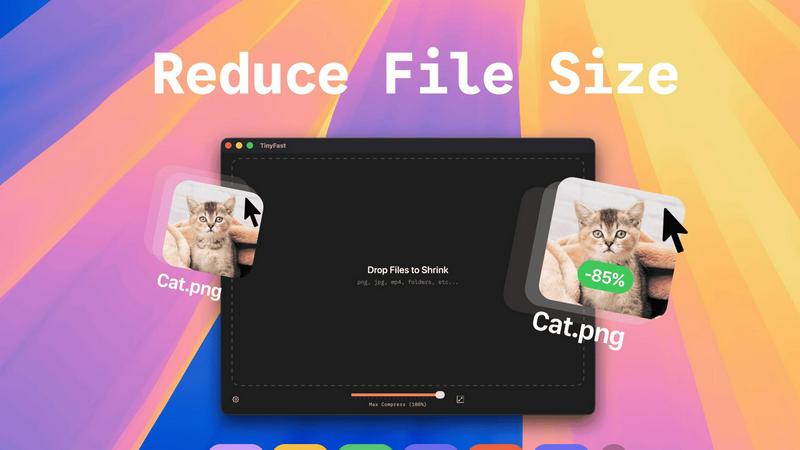
About TinyFast
TinyFast is the definitive local file compression engine for the modern macOS creator, built to scale your productivity while safeguarding your intellectual property. In an era where digital workflows are bottlenecked by slow uploads, data caps, and privacy concerns, TinyFast delivers a revolutionary solution: professional-grade file optimization that happens entirely on your Mac. It empowers designers, developers, marketers, and content creators to instantly shrink images, videos, documents, and audio files through a supremely intuitive drag-and-drop interface. The core value is uncompromising speed and absolute security. Your files never leave your machine, eliminating the risks associated with online tools. By processing everything locally with optimized native engines, TinyFast removes waiting, protects sensitive assets under NDAs, and integrates seamlessly into any high-velocity creative or development pipeline. It's more than a tool; it's a strategic upgrade for anyone looking to accelerate their output and maintain complete control over their digital assets.
Features of TinyFast
Blazing-Fast Local Compression
Experience file size reduction at the speed of your Mac's hardware. TinyFast utilizes highly optimized native compression engines to process batches of files in seconds, not minutes. This eliminates the entire cycle of uploading to a server, waiting in a queue, and downloading back—a massive time save that compounds over hundreds of files. Your workflow maintains its momentum without ever hitting a compression bottleneck.
100% Private & Secure by Design
Your confidential files and sensitive intellectual property remain exclusively on your device. TinyFast is architected with a privacy-first mindset, ensuring no asset is ever uploaded to a cloud server or third-party system. This is critical for professionals working under Non-Disclosure Agreements (NDAs), with client materials, or any proprietary content, providing total peace of mind and control.
Universal File Type Support
TinyFast is your single, universal tool for compression across a vast spectrum of formats. Comprehensively support images (PNG, JPG, WebP, SVG, HEIC, GIF, BMP, TIFF), videos (MP4, MOV, M4V), documents (PDF, DOCX), code files (JS, CSS, JSON), and audio (MP3). This eliminates the need to juggle multiple specialized online tools, streamlining your entire asset optimization workflow into one powerful application.
Batch Processing & Smart Resizing
Scale your optimization efforts effortlessly by dragging and dropping entire folders of files for simultaneous compression. Beyond just reducing file size, TinyFast includes intelligent resolution resizing for images and videos, allowing you to automatically scale dimensions to meet specific platform requirements or storage constraints, all within the same lightning-fast, local operation.
Use Cases of TinyFast
Web Developer Asset Optimization
Front-end developers and web engineers can drastically improve site performance by locally compressing all website assets before deployment. Optimize hundreds of product images, hero graphics, SVG icons, and JavaScript/CSS bundles in seconds, ensuring faster page load times and better SEO scores without ever exposing code or assets to external services.
Content Creator Workflow Acceleration
Bloggers, social media managers, and video creators can prepare content for publication at unprecedented speed. Batch compress screen recordings, edited video clips, and high-resolution photos directly from their editing software. This keeps their content pipeline moving quickly and ensures files are perfectly sized for platforms like WordPress, YouTube, or Instagram without quality loss.
Design Agency Client Deliverables
Design agencies handling sensitive client branding materials, high-fidelity mockups, and prototype videos can use TinyFast to securely prepare files for delivery and presentation. Compressing large PSD exports, PDF portfolios, and 4K video proofs locally guarantees client confidentiality and professional, manageable file sizes for email or client portals.
App Developer Build Size Management
Mobile and desktop app developers can integrate TinyFast into their build process to reduce the final application bundle size. Compressing embedded images, textures, audio files, and documentation locally helps meet strict app store size limits, leading to faster download times for end-users and more efficient use of resources.
Frequently Asked Questions
Is TinyFast really completely free?
Yes, TinyFast offers a fully-featured Free Forever plan. You can compress up to 5 files per day with access to all compression features and supported file types, entirely for free. This allows you to thoroughly test the app's speed and integration into your workflow before considering an upgrade for unlimited use.
What happens to my files during compression?
Nothing leaves your Mac. TinyFast processes all compression and resizing tasks 100% locally on your machine. Your original files are read, an optimized version is created, and then you choose where to save the new file. The app does not transmit any data over the internet, ensuring total privacy.
What is the difference between the Lifetime and Monthly plans?
The Lifetime plan requires a single, one-time payment of €17.99 for unlimited compressions, all features, lifetime updates, and future support. The Monthly plan is a subscription at €2.99/month (after a 3-day trial) for the same unlimited access. The Lifetime plan is designed for maximum long-term value and cost savings.
Can I compress an entire folder of files at once?
Absolutely. TinyFast supports robust batch processing. Simply drag and drop an entire folder onto the app, and it will automatically compress all supported files within it. This is ideal for optimizing project assets, photo libraries, or video batches in one go, saving you immense time and manual effort.
Explore more in this category:
Similar to TinyFast

AI Email Filter
AI Email Filter sorts incoming mail into folders using plain-language prompts you write. Works with any IMAP mailbox; bring your own LLM if you want.

Kody Tools
Free collection of online developer utilities, code formatters, and digital converters designed to streamline your daily workflow.

Tally Counter
Online tally counter for tracking attendance, workouts, inventory, visitors, sports scores, habits, and everyday counting tasks.

AI Face Swap
Swap Faces Online in Seconds with AI Upload a photo or video, add the face you want to swap in, and create clean edits for memes, profile photos,
Forms Plugin
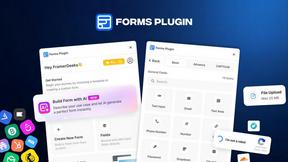
The #1 Native Form Builder Plugin for Framer - No Code, No Embeds, No External Platforms.

Product Launch Checklist
A free launch checklist for SaaS, apps, AI tools and more. Every step says why it matters and when you can skip it.

Qwen Image Edit
Browser-based AI image editing and generation with natural-language instructions for backgrounds, text, products, posters, and creative visuals.

HomeAnswerBook
Practical, independent guides to home repairs, maintenance, costs, troubleshooting, and everyday fixes.