
SureThing.io vs TinyFast
Side-by-side comparison to help you choose the right product.

SureThing.io
SureThing.io is your autonomous business partner, intelligently managing tasks and remembering your preferences while you focus on growth.
Last updated: March 19, 2026

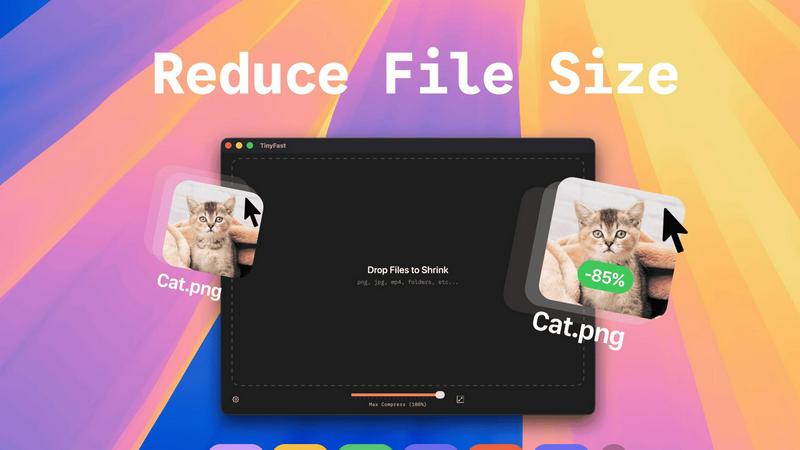
TinyFast instantly compresses your files locally on Mac for faster, private workflows.
Last updated: February 28, 2026
Visual Comparison
SureThing.io

TinyFast
Feature Comparison
SureThing.io
Autonomous Operation
SureThing operates 24/7, autonomously managing your tasks without waiting for your commands. This feature allows users to focus on strategic initiatives while their AI agent handles routine inquiries, making productivity seamless.
Persistent Memory
The unique agentic memory of SureThing ensures it remembers your goals, preferences, and voice across multiple sessions. This tailored approach means less time explaining your needs and more time executing tasks efficiently, enhancing overall productivity.
Cross-Application Action
SureThing integrates seamlessly with various connected applications, enabling it to take actions based on your requirements. Whether it’s scheduling meetings or drafting emails, this feature ensures a cohesive workflow across platforms, minimizing friction in task execution.
Security and Compliance
SureThing is designed with a strong focus on security, being SOC 2 certified and Google CASA Tier 2 compliant. This feature gives users peace of mind, knowing that their sensitive data is protected while they leverage AI for their business needs.
TinyFast
Blazing-Fast Local Compression
Experience file size reduction at the speed of your Mac's hardware. TinyFast utilizes highly optimized native compression engines to process batches of files in seconds, not minutes. This eliminates the entire cycle of uploading to a server, waiting in a queue, and downloading back—a massive time save that compounds over hundreds of files. Your workflow maintains its momentum without ever hitting a compression bottleneck.
100% Private & Secure by Design
Your confidential files and sensitive intellectual property remain exclusively on your device. TinyFast is architected with a privacy-first mindset, ensuring no asset is ever uploaded to a cloud server or third-party system. This is critical for professionals working under Non-Disclosure Agreements (NDAs), with client materials, or any proprietary content, providing total peace of mind and control.
Universal File Type Support
TinyFast is your single, universal tool for compression across a vast spectrum of formats. Comprehensively support images (PNG, JPG, WebP, SVG, HEIC, GIF, BMP, TIFF), videos (MP4, MOV, M4V), documents (PDF, DOCX), code files (JS, CSS, JSON), and audio (MP3). This eliminates the need to juggle multiple specialized online tools, streamlining your entire asset optimization workflow into one powerful application.
Batch Processing & Smart Resizing
Scale your optimization efforts effortlessly by dragging and dropping entire folders of files for simultaneous compression. Beyond just reducing file size, TinyFast includes intelligent resolution resizing for images and videos, allowing you to automatically scale dimensions to meet specific platform requirements or storage constraints, all within the same lightning-fast, local operation.
Use Cases
SureThing.io
Enhanced Communication Management
SureThing excels in managing your communications by monitoring your inbox and drafting responses in your voice. This feature is especially beneficial for busy professionals who need to maintain a consistent communication style without dedicating hours to email management.
Project Tracking and Management
For teams juggling multiple projects, SureThing tracks ongoing initiatives and deadlines, providing updates and reminders. This use case is crucial for project managers who want to ensure that nothing falls through the cracks while maintaining oversight of team activities.
Personalized Scheduling
SureThing takes the hassle out of scheduling by managing your calendar according to your preferences. It can automatically suggest meeting times, send invites, and even reschedule as necessary, allowing users to maintain a streamlined calendar effortlessly.
Solo Founders and Entrepreneurs
Solo founders can leverage SureThing to manage their entire go-to-market strategy without overwhelming themselves. From drafting marketing emails to tracking engagement metrics, this use case demonstrates how SureThing can serve as a reliable partner in the entrepreneurial journey.
TinyFast
Web Developer Asset Optimization
Front-end developers and web engineers can drastically improve site performance by locally compressing all website assets before deployment. Optimize hundreds of product images, hero graphics, SVG icons, and JavaScript/CSS bundles in seconds, ensuring faster page load times and better SEO scores without ever exposing code or assets to external services.
Content Creator Workflow Acceleration
Bloggers, social media managers, and video creators can prepare content for publication at unprecedented speed. Batch compress screen recordings, edited video clips, and high-resolution photos directly from their editing software. This keeps their content pipeline moving quickly and ensures files are perfectly sized for platforms like WordPress, YouTube, or Instagram without quality loss.
Design Agency Client Deliverables
Design agencies handling sensitive client branding materials, high-fidelity mockups, and prototype videos can use TinyFast to securely prepare files for delivery and presentation. Compressing large PSD exports, PDF portfolios, and 4K video proofs locally guarantees client confidentiality and professional, manageable file sizes for email or client portals.
App Developer Build Size Management
Mobile and desktop app developers can integrate TinyFast into their build process to reduce the final application bundle size. Compressing embedded images, textures, audio files, and documentation locally helps meet strict app store size limits, leading to faster download times for end-users and more efficient use of resources.
Overview
About SureThing.io
SureThing.io is a groundbreaking autonomous AI agent designed to enhance productivity and streamline workflows for individuals and teams alike. Unlike traditional AI chatbots that require continuous prompts, SureThing operates independently, monitoring your inbox, drafting responses in your unique voice, managing your calendar, and overseeing ongoing projects. Its proactive approach allows you to focus on high-priority tasks while it efficiently handles routine communications and scheduling.
Built with enterprise-level security, SureThing is SOC 2 certified and Google CASA Tier 2 compliant, ensuring that it is a trustworthy companion for users who require reliability in their professional lives. Its standout feature is its state-of-the-art memory, which allows it to remember your preferences, contacts, and goals over extended periods. As a result, the longer you collaborate with SureThing, the more it aligns with your working style, reducing the need for repetitive explanations. Early adopters, including technical directors and solo founders, praise SureThing as an invaluable tool that transforms how they operate, making it an essential asset for anyone looking to gain a competitive edge in their workflow.
About TinyFast
TinyFast is the definitive local file compression engine for the modern macOS creator, built to scale your productivity while safeguarding your intellectual property. In an era where digital workflows are bottlenecked by slow uploads, data caps, and privacy concerns, TinyFast delivers a revolutionary solution: professional-grade file optimization that happens entirely on your Mac. It empowers designers, developers, marketers, and content creators to instantly shrink images, videos, documents, and audio files through a supremely intuitive drag-and-drop interface. The core value is uncompromising speed and absolute security. Your files never leave your machine, eliminating the risks associated with online tools. By processing everything locally with optimized native engines, TinyFast removes waiting, protects sensitive assets under NDAs, and integrates seamlessly into any high-velocity creative or development pipeline. It's more than a tool; it's a strategic upgrade for anyone looking to accelerate their output and maintain complete control over their digital assets.
Frequently Asked Questions
SureThing.io FAQ
How does SureThing.io ensure data security?
SureThing.io is SOC 2 certified and Google CASA Tier 2 compliant, which means it adheres to strict security protocols to protect user data. This level of certification ensures that sensitive information is handled with the utmost care and security.
Can SureThing.io integrate with my existing tools?
Yes, SureThing is designed to work seamlessly with a variety of connected applications. This integration capability allows it to perform actions across different platforms, enhancing your workflow efficiency.
How does the persistent memory feature work?
The persistent memory of SureThing allows it to remember your goals, preferences, and communication style over time. This means that as you continue to use the platform, it becomes increasingly attuned to your needs, requiring less frequent explanations.
Is SureThing suitable for large teams and enterprises?
Absolutely! SureThing is built with enterprise-level security and functionality, making it an excellent choice for large teams that need a reliable AI assistant to manage communications, schedules, and project tracking effectively.
TinyFast FAQ
Is TinyFast really completely free?
Yes, TinyFast offers a fully-featured Free Forever plan. You can compress up to 5 files per day with access to all compression features and supported file types, entirely for free. This allows you to thoroughly test the app's speed and integration into your workflow before considering an upgrade for unlimited use.
What happens to my files during compression?
Nothing leaves your Mac. TinyFast processes all compression and resizing tasks 100% locally on your machine. Your original files are read, an optimized version is created, and then you choose where to save the new file. The app does not transmit any data over the internet, ensuring total privacy.
What is the difference between the Lifetime and Monthly plans?
The Lifetime plan requires a single, one-time payment of €17.99 for unlimited compressions, all features, lifetime updates, and future support. The Monthly plan is a subscription at €2.99/month (after a 3-day trial) for the same unlimited access. The Lifetime plan is designed for maximum long-term value and cost savings.
Can I compress an entire folder of files at once?
Absolutely. TinyFast supports robust batch processing. Simply drag and drop an entire folder onto the app, and it will automatically compress all supported files within it. This is ideal for optimizing project assets, photo libraries, or video batches in one go, saving you immense time and manual effort.
Alternatives
SureThing.io Alternatives
SureThing.io is an innovative AI-powered business management tool designed to operate autonomously, enabling users to focus on their core tasks while it handles various operational responsibilities. By proactively monitoring your inbox, managing your calendar, and tracking projects, SureThing.io stands out in the productivity and management category, offering a seamless, intelligent experience. Users often seek alternatives to SureThing.io due to varying needs in pricing, specific feature sets, or integration capabilities with other platforms. When choosing an alternative, it’s crucial to consider factors such as functionality, ease of use, security standards, and the ability to adapt to your unique workflows, ensuring that the chosen solution aligns with your operational goals and enhances productivity.
TinyFast Alternatives
TinyFast is a revolutionary macOS application that instantly compresses images, videos, and documents directly on your device. It belongs to the category of local file optimization tools, designed for creators and professionals who prioritize speed and uncompromising data privacy. By processing files entirely on your Mac, it eliminates the security risks and workflow bottlenecks of cloud-based services. Users often explore alternatives for various reasons. These can include budget considerations, the need for cross-platform compatibility beyond macOS, or a desire for different feature sets like batch processing styles or support for additional file formats. The search for the right tool is a natural part of scaling a productive and efficient digital workflow. When evaluating an alternative, key factors to consider are the core processing location for security, the range of supported file types, the speed and simplicity of the user interface, and the overall value for your specific use case. The ideal solution should seamlessly integrate into your creative or technical process without compromising on performance or control over your assets.