
SimpleDraw vs vaethat
Side-by-side comparison to help you choose the right product.

SimpleDraw
Create stunning scale drawings and floor plans effortlessly online with SimpleDraw's powerful and intuitive web tools.
Last updated: March 1, 2026

vaethat
Vaethat is an AI tool that effortlessly enhances your architectural renders, boosting detail and clarity with ease.
Last updated: February 26, 2026
Visual Comparison
SimpleDraw
vaethat

Feature Comparison
SimpleDraw
Floor Plan Mode
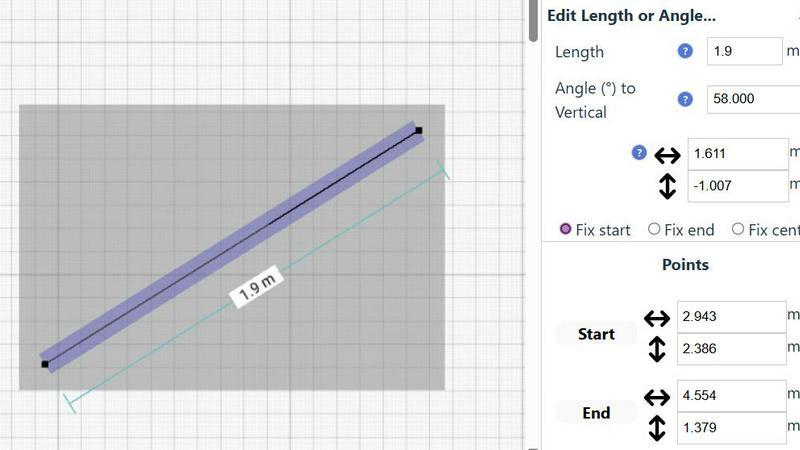
The dedicated Floor Plan Mode allows users to create highly accurate floor plans of rooms, apartments, and houses effortlessly. With intuitive tools to draw walls, add doors and windows, and visualize layouts, users can see measurements in real-time as they make adjustments.
Smart Alignment System
SimpleDraw features a Smart Alignment System that helps users position points and lines with precision. By simply pointing the mouse, users can align their drawings accurately, with visual indicators guiding them. This feature facilitates intuitive placement and ensures the highest level of detail.
Flexible Zoom and Variable Precision
With SimpleDraw, users can easily zoom in and out at will. The system adapts its precision based on the zoom level, allowing for greater control when needed. This flexibility ensures that every detail is captured accurately, no matter the scale of the drawing.
Comprehensive Measurement System
SimpleDraw boasts a comprehensive measurement system that offers fine control over displayed measurements. Users can toggle between metric and US units, with contextual measurements displayed dynamically as they work, ensuring that drawings are created exactly as intended.
vaethat
AI Render Upscaling
Vaethat's AI render upscaling feature allows users to significantly increase the resolution and sharpness of their 3D architectural renders. This ensures that the geometry remains clean and consistent, creating stunning visuals that capture every detail of the design.
Detail Refinement
With advanced detail refinement capabilities, Vaethat enhances fine textures, edges, and small architectural elements, resulting in crisper, more polished images. This feature is essential for highlighting the subtleties in design that make a significant impact on overall visual quality.
Material and Lighting Enhancement
Vaethat improves the perceived realism of architectural images by boosting material definition, contrast, and lighting balance. This enhancement ensures that surfaces appear more lifelike, making the final output more appealing and true to the original design intent.
Noise and Artifact Cleanup
The noise and artifact cleanup feature of Vaethat effectively reduces unwanted noise and common rendering artifacts, producing cleaner presentation-ready images. This is crucial for professionals who aim to showcase their work without distractions, ensuring that every render communicates their design vision clearly.
Use Cases
SimpleDraw
Home Renovation Planning
Homeowners can utilize SimpleDraw to create precise floor plans for renovations, allowing them to visualize layouts before starting. This feature helps ensure that design ideas are practical and within budget.
Furniture Layout Design
Casual users can design room layouts for bedrooms, living rooms, or offices to see if furniture fits before making a purchase. This capability simplifies the planning process, saving time and reducing the likelihood of costly mistakes.
Rental Property Planning
Real estate agents and landlords can create detailed floor plans for rental listings, helping potential tenants visualize the space. SimpleDraw's user-friendly interface makes it easy to showcase properties effectively.
DIY Project Planning
DIY enthusiasts can leverage SimpleDraw to draft technical sketches for various home projects. Whether it's building a new deck or remodeling a bathroom, the intuitive tools provide the necessary precision without requiring extensive CAD experience.
vaethat
Portfolio Development
Architectural visualizers can utilize Vaethat to enhance their portfolio images, transforming standard renders into stunning visuals that stand out to potential clients and collaborators. This tool ensures that every project showcased reflects the highest standards of quality.
Client Presentations
When presenting designs to clients, clarity and realism are paramount. Vaethat allows professionals to elevate their 3D renders, ensuring that presentations are impactful and that clients can fully appreciate the design concepts being proposed.
Marketing Materials
For marketing purposes, high-quality visuals are essential. Vaethat helps architectural firms generate compelling images for brochures, websites, and social media, ensuring that their work is represented in the best possible light to attract new business.
Project Approvals
Vaethat aids in the project approval process by delivering enhanced renders that clearly communicate design intent. With sharper images and improved realism, stakeholders can make informed decisions, facilitating smoother approvals and project advancements.
Overview
About SimpleDraw
SimpleDraw is a revolutionary free online platform designed to democratize precision scale drawing and make technical drafting accessible to everyone. It transforms complex tasks into a straightforward, browser-based experience, catering to a vast, underserved market of casual users, DIY enthusiasts, homeowners, and small business owners. These users often require accurate floor plans, renovation layouts, or technical sketches but may feel daunted by the high costs and complexity of professional CAD software. SimpleDraw's core value proposition lies in delivering powerful precision in a profoundly simple manner. By eliminating unnecessary features and focusing on a curated selection of intelligent tools, SimpleDraw allows users to create professional-grade drawings with the ease of using pen and paper. With no downloads, installations, or user logins required, it effectively removes barriers to entry, empowering users to start realizing their visions in mere seconds. SimpleDraw is not just a tool; it represents the foundation for a new wave of user-generated spatial design.
About vaethat
Vaethat AI is an innovative tool designed specifically for architectural visualization professionals, enabling them to upscale and enhance 3D renders with ease. This AI-powered solution streamlines the enhancement process, ensuring that users can achieve high-quality, visually striking architectural images without the complexity often associated with general-purpose AI tools. Vaethat caters to architects, designers, and visualizers looking to improve clarity, sharpness, and realism in their projects. With its unique capabilities, Vaethat maintains the integrity of design intent while transforming renders into presentation-ready images suitable for portfolios, client approvals, and marketing materials. Its user-friendly interface allows for a straightforward upload-and-export workflow, making it the go-to choice for professionals in the archviz field seeking efficiency and excellence.
Frequently Asked Questions
SimpleDraw FAQ
Is SimpleDraw really free to use?
Yes, SimpleDraw is completely free to use, providing users with access to a powerful suite of drawing tools without any cost.
Do I need to create an account to use SimpleDraw?
No, SimpleDraw does not require any sign-up or user login. You can start drawing immediately in your browser without any barriers.
Can I save my drawings on SimpleDraw?
While the current version focuses on immediate use without downloads, users can export their drawings as images or PDFs for future reference.
Is SimpleDraw suitable for professional use?
Yes, while it is designed for casual users, SimpleDraw's precision and powerful features make it a viable option for small business owners and professionals looking for an accessible drawing tool.
vaethat FAQ
How does the AI render enhancer calculate credits?
The AI render enhancer calculates credits based on the number of images processed and the complexity of the enhancements applied. Each enhancement task consumes a specific number of credits, allowing users to manage their usage effectively.
Can I use the archviz AI upscaler with V-Ray, Lumion, Enscape, 3ds Max, and SketchUp?
Yes, Vaethat is compatible with various architectural visualization software including V-Ray, Lumion, Enscape, 3ds Max, and SketchUp. This versatility allows users to integrate Vaethat seamlessly into their existing workflows.
What makes this AI post-production tool different from manual editing?
Vaethat streamlines the enhancement process by utilizing AI technology, which reduces the time and effort required compared to manual editing. It eliminates the need for complex adjustments, allowing users to focus on creativity rather than technicalities.
Can I upgrade or downgrade my AI enhancement plan anytime?
Yes, users have the flexibility to upgrade or downgrade their AI enhancement plans at any time, allowing them to tailor their subscription to fit their evolving needs without hassle. This flexibility ensures that users can scale their usage as their projects grow.
Alternatives
SimpleDraw Alternatives
SimpleDraw is a revolutionary web-based tool designed to make precision scale drawing accessible to everyone. Falling under the category of design tools, it targets casual users, DIY enthusiasts, homeowners, and small business owners who require accurate floor plans or technical sketches without the steep learning curve of professional CAD software. Users often seek alternatives to SimpleDraw for various reasons, including specific feature requirements, integration with other platforms, or pricing considerations. When searching for an alternative, it's essential to evaluate the user interface, the range of tools available, and how well the tool meets your particular design needs. The right choice should provide a similar level of precision and ease while catering to your unique project requirements.
vaethat Alternatives
Vaethat is an innovative AI tool designed specifically for architectural visualization professionals, enabling users to upscale 3D renders and enhance their clarity and detail. As the demand for high-quality architectural images continues to rise, users often seek alternatives due to various reasons such as pricing constraints, specific feature requirements, or compatibility with different platforms and workflows. When searching for an alternative, it's essential to consider the specific features that meet your needs, the ease of use of the interface, and how well the tool integrates into your existing design processes. Additionally, evaluating customer support and community engagement can help ensure that you make an informed decision tailored to your architectural visualization projects.