
vaethat
Vaethat is an AI tool that effortlessly enhances your architectural renders, boosting detail and clarity with ease.
Visit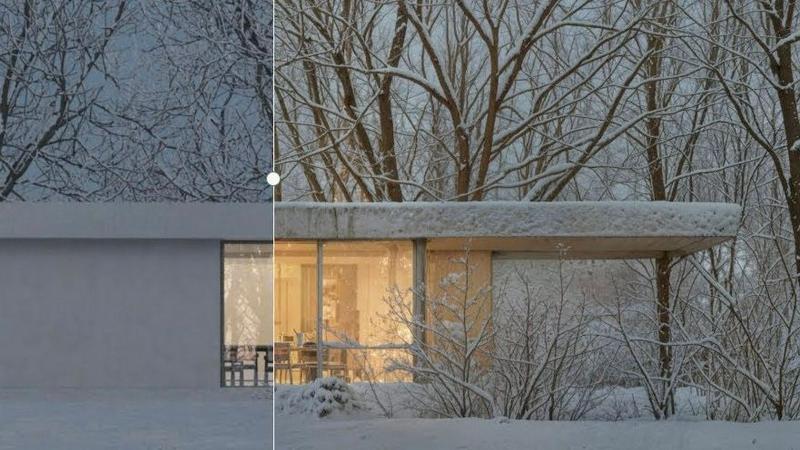
About vaethat
Vaethat AI is an innovative tool designed specifically for architectural visualization professionals, enabling them to upscale and enhance 3D renders with ease. This AI-powered solution streamlines the enhancement process, ensuring that users can achieve high-quality, visually striking architectural images without the complexity often associated with general-purpose AI tools. Vaethat caters to architects, designers, and visualizers looking to improve clarity, sharpness, and realism in their projects. With its unique capabilities, Vaethat maintains the integrity of design intent while transforming renders into presentation-ready images suitable for portfolios, client approvals, and marketing materials. Its user-friendly interface allows for a straightforward upload-and-export workflow, making it the go-to choice for professionals in the archviz field seeking efficiency and excellence.
Features of vaethat
AI Render Upscaling
Vaethat's AI render upscaling feature allows users to significantly increase the resolution and sharpness of their 3D architectural renders. This ensures that the geometry remains clean and consistent, creating stunning visuals that capture every detail of the design.
Detail Refinement
With advanced detail refinement capabilities, Vaethat enhances fine textures, edges, and small architectural elements, resulting in crisper, more polished images. This feature is essential for highlighting the subtleties in design that make a significant impact on overall visual quality.
Material and Lighting Enhancement
Vaethat improves the perceived realism of architectural images by boosting material definition, contrast, and lighting balance. This enhancement ensures that surfaces appear more lifelike, making the final output more appealing and true to the original design intent.
Noise and Artifact Cleanup
The noise and artifact cleanup feature of Vaethat effectively reduces unwanted noise and common rendering artifacts, producing cleaner presentation-ready images. This is crucial for professionals who aim to showcase their work without distractions, ensuring that every render communicates their design vision clearly.
Use Cases of vaethat
Portfolio Development
Architectural visualizers can utilize Vaethat to enhance their portfolio images, transforming standard renders into stunning visuals that stand out to potential clients and collaborators. This tool ensures that every project showcased reflects the highest standards of quality.
Client Presentations
When presenting designs to clients, clarity and realism are paramount. Vaethat allows professionals to elevate their 3D renders, ensuring that presentations are impactful and that clients can fully appreciate the design concepts being proposed.
Marketing Materials
For marketing purposes, high-quality visuals are essential. Vaethat helps architectural firms generate compelling images for brochures, websites, and social media, ensuring that their work is represented in the best possible light to attract new business.
Project Approvals
Vaethat aids in the project approval process by delivering enhanced renders that clearly communicate design intent. With sharper images and improved realism, stakeholders can make informed decisions, facilitating smoother approvals and project advancements.
Frequently Asked Questions
How does the AI render enhancer calculate credits?
The AI render enhancer calculates credits based on the number of images processed and the complexity of the enhancements applied. Each enhancement task consumes a specific number of credits, allowing users to manage their usage effectively.
Can I use the archviz AI upscaler with V-Ray, Lumion, Enscape, 3ds Max, and SketchUp?
Yes, Vaethat is compatible with various architectural visualization software including V-Ray, Lumion, Enscape, 3ds Max, and SketchUp. This versatility allows users to integrate Vaethat seamlessly into their existing workflows.
What makes this AI post-production tool different from manual editing?
Vaethat streamlines the enhancement process by utilizing AI technology, which reduces the time and effort required compared to manual editing. It eliminates the need for complex adjustments, allowing users to focus on creativity rather than technicalities.
Can I upgrade or downgrade my AI enhancement plan anytime?
Yes, users have the flexibility to upgrade or downgrade their AI enhancement plans at any time, allowing them to tailor their subscription to fit their evolving needs without hassle. This flexibility ensures that users can scale their usage as their projects grow.
Explore more in this category:
Similar to vaethat
SciDrawer AI
AI scientific diagram maker for publication-ready visuals from research questions, sketches, and reference figures.
postersize ai
AI-powered poster creation and sizing for polished posters in seconds.

Vikas Editor AI
AI photo and video creative studio for cinematic portraits, fashion edits, festival greetings, and photo-to-video concepts.
PavoAI
All-in-one AI video creation platform for text-to-video, image-to-video, editing, avatars, music, subtitles, and upscaling.

CognitiveWP Free B2B Tools & Calculato
CognitiveWP provides free online business calculators and B2B tools for pricing, profitability, marketing, staffing, and operations. Estimate costs, c
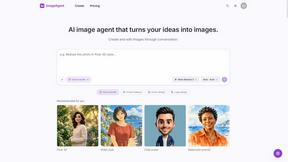
ImageAgent
Create and edit AI images through conversation, using text or reference images and refining results in chat.

CloneWebsite
Clone any webpage pixel-perfect, export HTML/CSS/ZIP or React/Vue components.
Adobe Alternatives
Explore open-source creative software by workflow, platform and development stage, with comparisons and official project links.