
SimpleDraw
Create stunning scale drawings and floor plans effortlessly online with SimpleDraw's powerful and intuitive web tools.
Visit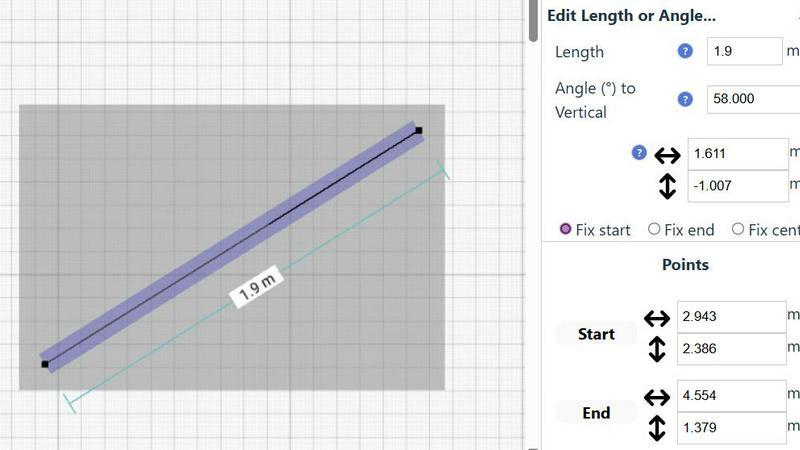
About SimpleDraw
SimpleDraw is a revolutionary free online platform designed to democratize precision scale drawing and make technical drafting accessible to everyone. It transforms complex tasks into a straightforward, browser-based experience, catering to a vast, underserved market of casual users, DIY enthusiasts, homeowners, and small business owners. These users often require accurate floor plans, renovation layouts, or technical sketches but may feel daunted by the high costs and complexity of professional CAD software. SimpleDraw's core value proposition lies in delivering powerful precision in a profoundly simple manner. By eliminating unnecessary features and focusing on a curated selection of intelligent tools, SimpleDraw allows users to create professional-grade drawings with the ease of using pen and paper. With no downloads, installations, or user logins required, it effectively removes barriers to entry, empowering users to start realizing their visions in mere seconds. SimpleDraw is not just a tool; it represents the foundation for a new wave of user-generated spatial design.
Features of SimpleDraw
Floor Plan Mode
The dedicated Floor Plan Mode allows users to create highly accurate floor plans of rooms, apartments, and houses effortlessly. With intuitive tools to draw walls, add doors and windows, and visualize layouts, users can see measurements in real-time as they make adjustments.
Smart Alignment System
SimpleDraw features a Smart Alignment System that helps users position points and lines with precision. By simply pointing the mouse, users can align their drawings accurately, with visual indicators guiding them. This feature facilitates intuitive placement and ensures the highest level of detail.
Flexible Zoom and Variable Precision
With SimpleDraw, users can easily zoom in and out at will. The system adapts its precision based on the zoom level, allowing for greater control when needed. This flexibility ensures that every detail is captured accurately, no matter the scale of the drawing.
Comprehensive Measurement System
SimpleDraw boasts a comprehensive measurement system that offers fine control over displayed measurements. Users can toggle between metric and US units, with contextual measurements displayed dynamically as they work, ensuring that drawings are created exactly as intended.
Use Cases of SimpleDraw
Home Renovation Planning
Homeowners can utilize SimpleDraw to create precise floor plans for renovations, allowing them to visualize layouts before starting. This feature helps ensure that design ideas are practical and within budget.
Furniture Layout Design
Casual users can design room layouts for bedrooms, living rooms, or offices to see if furniture fits before making a purchase. This capability simplifies the planning process, saving time and reducing the likelihood of costly mistakes.
Rental Property Planning
Real estate agents and landlords can create detailed floor plans for rental listings, helping potential tenants visualize the space. SimpleDraw's user-friendly interface makes it easy to showcase properties effectively.
DIY Project Planning
DIY enthusiasts can leverage SimpleDraw to draft technical sketches for various home projects. Whether it's building a new deck or remodeling a bathroom, the intuitive tools provide the necessary precision without requiring extensive CAD experience.
Frequently Asked Questions
Is SimpleDraw really free to use?
Yes, SimpleDraw is completely free to use, providing users with access to a powerful suite of drawing tools without any cost.
Do I need to create an account to use SimpleDraw?
No, SimpleDraw does not require any sign-up or user login. You can start drawing immediately in your browser without any barriers.
Can I save my drawings on SimpleDraw?
While the current version focuses on immediate use without downloads, users can export their drawings as images or PDFs for future reference.
Is SimpleDraw suitable for professional use?
Yes, while it is designed for casual users, SimpleDraw's precision and powerful features make it a viable option for small business owners and professionals looking for an accessible drawing tool.
Explore more in this category:
Similar to SimpleDraw

Ideogram Studio
Create text-rich logos, posters, ads, packaging, and ecommerce visuals with Ideogram 4 AI workflows and guided prompts.

Qwen Image Edit
Browser-based AI image editing and generation with natural-language instructions for backgrounds, text, products, posters, and creative visuals.

Cursive Text Generator
Cursive Text Generator is a free online tool for creating stylish cursive fonts and copy-paste text for social media, names, bios and more.

AI STL Generator
The fastest AI STL generator to turn prompts and images into 3D printable STL files.

ArchOne AI
All-in-one AI spatial design visualization platform for interior, exterior and landscape design.

Presentation Intelligence
AI-native presentation and visual content platform that turns prompts, documents, images, videos, and data into polished, shareable decks.

Try This Skill
One-click AI photo stylization for e-commerce & portraits
Text Logo
Create custom text, wordmark, and typography logos with editable fonts, colors, icons, shapes, and flexible exports.