
ScreenDemos vs Seedance 2 AI Video Generator
Side-by-side comparison to help you choose the right product.

ScreenDemos
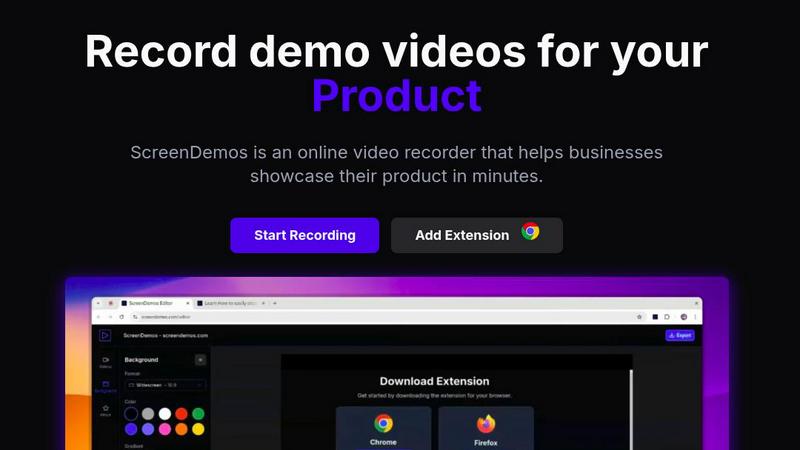
ScreenDemos lets you effortlessly create professional product demo videos with automatic effects in just minutes.
Last updated: February 28, 2026

Seedance 2.0 instantly creates cinematic videos from text, images, or clips for scalable content creation.
Last updated: March 1, 2026
Visual Comparison
ScreenDemos
Seedance 2 AI Video Generator

Feature Comparison
ScreenDemos
Automatic Zoom Effects
ScreenDemos enhances viewer engagement by automatically adding professional zooms and pans during recordings. This feature directs the viewer's attention to critical elements of the demo, ensuring that important information is highlighted effectively without requiring manual editing.
Smooth Animated Cursor
The platform incorporates a smooth animated cursor that increases visibility and ease of understanding in videos. This feature allows viewers to follow along effortlessly, especially during complex demonstrations, making the content more approachable and user-friendly.
Shortcuts Hints
To enrich the viewer experience, ScreenDemos displays keyboard shortcuts on the screen during recordings. This feature not only aids comprehension but also empowers viewers to replicate actions quickly, enhancing the overall instructional value of the demos.
Custom Backgrounds
With customizable backgrounds, users can align their videos with their branding and aesthetic preferences. This feature allows for greater creativity and personalization, making it easier to create visually appealing content that resonates with the intended audience.
Seedance 2 AI Video Generator
Multimodal Generation Engine
Seedance 2.0 offers three distinct generation modes to fit any creative workflow. The Text-to-Video mode turns descriptive prompts into dynamic scenes, Image-to-Video animates and extends still images while preserving their core style, and Video-to-Video allows for the restyling and enhancement of existing source footage. This multimodal flexibility ensures you can start from any asset, providing maximum creative freedom and efficiency for scaling video production across diverse projects.
Reference-First Creative Control
Move beyond vague prompt wording and anchor your results with precise visual references. This feature allows you to upload images or clips to guide character design, artistic style, color palette, and camera feel. By prioritizing reference inputs, Seedance 2.0 delivers more predictable, consistent, and on-brand results, drastically reducing the trial-and-error often associated with AI video generation and streamlining the path to a final, usable asset.
Integrated Audio-Video Synthesis
Go beyond silent clips with Seedance 2.0's joint audio generation capability. In a single generation pass, the model can synthesize synchronized audio that includes background sound effects (SFX), musical scores, and even voiceovers with lip-sync support for over 10 languages. This all-in-one approach eliminates the need for separate audio editing tools, accelerating the production of complete, engaging video content ready for immediate publication.
Production-Ready Output Specifications
Designed for professional use, Seedance 2.0 generates videos with cinema-standard quality. Outputs can reach up to 1080p resolution at 24 frames per second for smooth playback, with support for multiple aspect ratios (16:9, 9:16, 1:1) optimized for all platforms from YouTube to TikTok. Videos are delivered in the universal MP4 (H.264) format, ensuring immediate compatibility and ease of integration into any editing suite or social media platform.
Use Cases
ScreenDemos
Recording Product Demos
ScreenDemos is ideal for businesses looking to showcase their products in an engaging manner. By recording product demos quickly and effortlessly, teams can highlight features and benefits, helping to drive user interest and engagement.
Creating Onboarding Tutorials
The platform excels at producing onboarding tutorials that streamline the learning process for new users. With its automated features, teams can create informative videos that significantly reduce the time required for training, enhancing the onboarding experience.
Announcing Features
When launching new features, ScreenDemos facilitates swift and effective communication. Teams can create announcement videos that visually demonstrate the functionality of new updates, ensuring that users are well-informed and excited about the innovations.
Sharing on Social Media
ScreenDemos makes it easy to create shareable content for social media platforms. By producing high-quality, engaging videos quickly, teams can enhance their social media presence, driving brand awareness and audience engagement.
Seedance 2 AI Video Generator
Rapid Social Media Content Creation
Marketing teams and social media managers can leverage Seedance 2.0 to rapidly produce a high volume of engaging, platform-optimized video clips. Quickly turn product announcements, blog post summaries, or trending topic ideas into eye-catching videos for Instagram Reels, TikTok, or YouTube Shorts, maintaining a consistent brand aesthetic while dramatically speeding up the content calendar.
Prototyping and Storyboarding for Agencies
Creative and advertising agencies can use the tool to visually prototype concepts and create dynamic storyboards for client presentations. By converting text briefs or mood board images into short video sequences, teams can communicate complex ideas more effectively, gather faster feedback, and secure client buy-in before committing to expensive full-scale production shoots.
Personalized Video Marketing and Ads
E-commerce brands and marketers can generate personalized video ads at scale. Using the image-to-video mode, they can animate product photos into lifestyle clips, or use video-to-video to create multiple stylistic variations of a core advertisement tailored to different target demographics or A/B testing campaigns, all while ensuring product consistency.
Educational and Explainer Video Production
Educators, trainers, and SaaS companies can efficiently produce explainer videos and educational content. The text-to-video functionality is ideal for visualizing abstract concepts or historical events, while the integrated audio synthesis can provide clear narration, making it a powerful tool for creating engaging learning materials and product tutorials without a full production studio.
Overview
About ScreenDemos
ScreenDemos is an innovative, browser-based platform revolutionizing how teams create professional-grade video content. Tailored for growth-focused professionals across various sectors such as marketing, product development, design, and customer support, it enables users to produce high-quality video demos in mere minutes. The main value proposition of ScreenDemos lies in its ability to automate the tedious aspects of video production. By intelligently applying cinematic zoom effects, smooth cursor animations, and various visual enhancements in real-time, it eliminates the need for extensive post-production editing. This all-in-one solution empowers modern teams to communicate their ideas quickly and effectively, whether they need to announce new features, create onboarding tutorials, craft sales videos, or share insights on social media. By removing the barriers of installation and complex editing suites, ScreenDemos scales with your ambitions, driving user acquisition, improving customer education, and accelerating product-led growth.
About Seedance 2 AI Video Generator
Seedance 2.0 is a next-generation AI video generator engineered to scale content creation for the modern digital era. It transforms simple inputs—text prompts, reference images, or existing source footage—into polished, cinematic-quality videos through a fast, all-in-one workflow. Built for creators, marketers, and agencies, its core value proposition is delivering faster video output without the traditional heavy editing overhead. The platform empowers users to move from concept to final clip with unprecedented speed, maintaining high levels of stylistic consistency and motion smoothness. Whether you're ideating from scratch or iterating on existing assets, Seedance 2.0 provides the control and production-ready quality needed for professional ads, social media content, and product demos. It represents a significant leap in controllable AI video generation, prioritizing a reference-first workflow to reduce guesswork and enable rapid iteration for teams looking to accelerate their content pipelines and dominate their visual storytelling.
Frequently Asked Questions
ScreenDemos FAQ
Is ScreenDemos privacy-friendly?
Yes, ScreenDemos prioritizes user privacy by never collecting or storing any user data. All recordings are processed locally, allowing users to save videos on their devices or on the ScreenDemos website. However, it is advisable not to record sensitive information.
What devices are supported?
ScreenDemos is compatible with all major browsers that support extensions for Chrome and Firefox. It works seamlessly across various operating systems, including Windows, macOS, and Linux, making it accessible for a wide range of users.
Why do I need to give permission to the extension?
The ScreenDemos extension requires permissions to access your screen for recording purposes. This ensures that the platform can capture your screen activity effectively, allowing you to create high-quality video content without compromising your device's security.
Can I edit my recordings after they are made?
Yes, ScreenDemos allows users to preview and edit their recordings after completing the capture. This feature provides additional flexibility, enabling users to refine their videos and ensure they meet their desired quality before sharing.
Seedance 2 AI Video Generator FAQ
What are the main input methods for Seedance 2.0?
Seedance 2.0 accepts three primary types of input for video generation. You can start with a detailed text prompt describing your scene, upload a reference image to define style and composition, or provide existing source footage to be restyled or extended. This multimodal approach offers flexibility whether you're creating from scratch or enhancing current assets.
How does Seedance 2.0 ensure character and style consistency?
The platform uses a sophisticated reference-first workflow. By analyzing your uploaded reference images or source video, the AI anchors the generation on those visual cues for character appearance, artistic style, color grading, and camera angles. This method provides significantly more control and consistent results compared to relying on text prompts alone, which can be interpreted variably by the AI.
What video specifications and formats does it support?
Seedance 2.0 generates videos with professional specifications. It supports resolutions up to 1080p, durations typically between 5 to 10 seconds per generation (with extension capabilities), and aspect ratios of 16:9, 9:16, and 1:1. Outputs are delivered as MP4 files encoded with the universal H.264 codec, ensuring compatibility with all major editing software and social media platforms.
Does Seedance 2.0 include audio generation?
Yes, it features integrated audio-video synthesis. In a single process, it can generate synchronized audio that includes background sound effects (SFX), musical scores, and voiceovers. A standout feature is its multilingual lip-sync capability, supporting over 10 languages to create convincing dialogue, making your videos complete and ready for audience engagement right out of the tool.
Alternatives
ScreenDemos Alternatives
ScreenDemos is an innovative, browser-based tool designed for creating professional product demo videos effortlessly. It falls into the category of online screen recording solutions, catering to diverse teams in marketing, product development, design, and customer support. Users often seek alternatives to ScreenDemos due to factors such as pricing, specific feature sets, platform compatibility, or personal preferences regarding user interface and experience. When searching for an alternative, it's crucial to consider the ease of use, the extent of automation in video production, and the quality of visual enhancements offered. Look for platforms that streamline the recording process, provide robust editing features, and support seamless sharing capabilities to ensure they meet your team's needs while facilitating rapid content creation.
Seedance 2 AI Video Generator Alternatives
Seedance 2 AI Video Generator is a powerful AI tool in the video creation category, designed to help creators and teams transform text, images, and clips into cinematic videos quickly. Its all-in-one workflow emphasizes consistent character references, smooth scene extensions, and intuitive prompt control, making it a strong contender for scaling content production. Even with its robust feature set, users often explore alternatives to find the perfect fit for their operational needs. Common drivers include budget considerations, the need for specific platform integrations, or requirements for niche functionalities that align with a unique growth strategy. The search for the right tool is a natural part of optimizing a scalable content engine. When evaluating other options, focus on core capabilities that match your velocity. Key considerations are the quality of output, the speed of generation, the flexibility of the input methods, and how well the tool integrates into your existing tech stack. The goal is to secure a solution that not only creates stunning videos but also seamlessly accelerates your entire content pipeline.