
Refbox vs Supermachine
Side-by-side comparison to help you choose the right product.

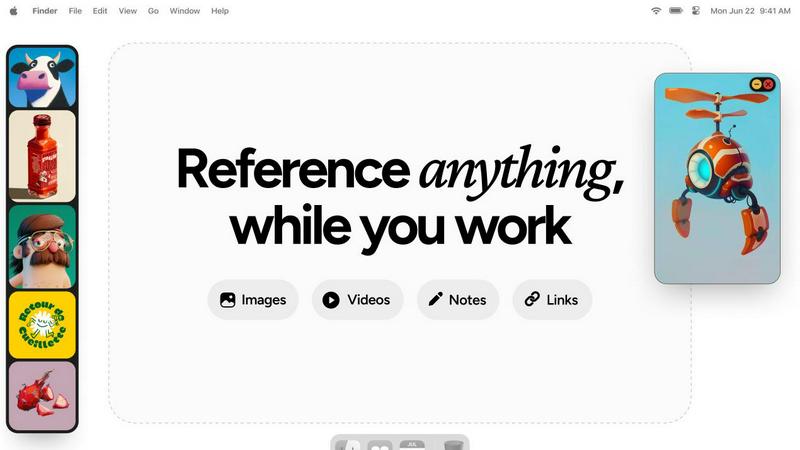
Refbox keeps your reference images and notes accessible above any workspace, enhancing your productivity and creativity.
Last updated: February 28, 2026

Supermachine
Supermachine empowers creators to generate stunning, commercial-grade AI images and videos at scale with over 60 models.
Last updated: March 18, 2026
Visual Comparison
Refbox
Supermachine

Feature Comparison
Refbox
Floating Reference Frames
Refbox offers resizable frames that float above any application, ensuring that your references are always visible. This feature allows you to maintain focus on your creative tasks without the need to switch between different windows or applications.
Project-Specific Collections
Organize your media into specific collections for each project, making it easy to access relevant references quickly. This feature enhances productivity by allowing for effortless navigation through your curated inspiration.
Frame-by-Frame GIF Scrubbing
With Refbox, you can scrub through GIFs frame by frame, making it easy to analyze motion and timing in your artworks. This feature is particularly beneficial for animators and designers looking to capture the nuances of movement.
Markdown-Enabled Notes
Take structured notes with markdown support that allows for styling options and checklists. This feature enables users to jot down ideas and thoughts alongside their visual references, ensuring that all necessary information is easily accessible.
Supermachine
Curated AI Model Library
Supermachine provides selective access to a powerhouse collection of over 60 high-performing AI models. This isn't about having every model; it's about having the right models. The platform continuously evaluates and integrates only the most reliable and effective models for image and video generation, ensuring you get consistent, professional-quality outputs without the guesswork or instability of untested alternatives.
Rapid Video Generation
Transform your creative vision into dynamic video content at the speed of thought. This feature allows you to generate short-form videos and motion graphics directly from text prompts or images, perfect for social media reels, ads, and promotional content. It encapsulates the platform's ethos of speed, enabling you to produce engaging video assets in seconds to keep your content pipeline full and your audience captivated.
AI Image Edit Tool (Photoshop AI)
Go beyond generation with powerful in-platform editing. This suite of tools allows for granular control over your creations. Effortlessly remove unwanted elements, modify specific details, expand images beyond their original borders, or apply complex edits using intuitive AI-powered brushes and prompts, all without ever needing to export to separate, complicated editing software.
ControlNet & Advanced Control
Achieve precise artistic direction and maintain consistency in your creations. The integration of ControlNet technology gives you advanced control over AI generations by allowing you to use input images, sketches, or poses as a guiding blueprint. This is essential for maintaining brand identity, following specific artistic styles, or iterating on a concept while keeping core compositional elements intact.
Use Cases
Refbox
Streamlined Design Process
Graphic designers can utilize Refbox to keep their reference images and mood boards visible while working on new projects. This streamlined access can significantly speed up the design process and improve the overall quality of the output.
Animation Workflow Enhancement
Animators can benefit from the frame-by-frame GIF scrubbing feature to study motion closely. By having references readily available, they can ensure their animations are fluid and accurate, ultimately elevating their final work.
UI/UX Prototyping
UI/UX designers can organize their research, user interface designs, and inspiration into specific collections. This organized approach helps them quickly compare and implement new ideas during prototyping sessions, enhancing creativity.
Photography Projects
Photographers can use Refbox to keep inspiration images, editing notes, and reference materials accessible during shoots or editing sessions. This ability to have everything at hand boosts both speed and accuracy in their workflow.
Supermachine
Social Media Content Scaling
For social media managers and influencers, Supermachine is a force multiplier. Instantly generate a week's worth of unique, platform-optimized visuals—from Instagram carousels and Facebook ads to TikTok thumbnails and YouTube channel art—in a single sitting. Maintain a fresh, professional, and engaging feed that drives growth and audience retention without exhausting your creative resources or budget.
Agile Marketing Campaigns
Empower marketing teams to move at the speed of culture. Rapidly prototype and produce visual assets for A/B testing, create on-brand imagery for time-sensitive campaigns, and generate a diverse set of ad creatives to maximize performance across digital channels. This agility allows for data-driven creative iteration and ensures your visual messaging is always relevant and high-impact.
Digital Art & NFT Creation
Artists and NFT creators can use Supermachine as an infinite source of inspiration and a powerful production tool. Explore new styles, generate unique character concepts, and create cohesive collections with ease. The advanced control features and curated models help artists maintain their unique signature while leveraging AI to expand their creative output and explore novel digital mediums.
Small Business Brand Building
Small business owners and solopreneurs can build a powerful visual brand from the ground up. Create professional logos, product mockups, website graphics, and email newsletter visuals without hiring a designer. Supermachine levels the playing field, allowing small teams to present a polished, cohesive, and trustworthy brand identity that competes with established players, all on a lean budget.
Overview
About Refbox
Refbox is a groundbreaking floating reference app designed to elevate the creative workflow of professionals in various fields, including illustration, 3D art, UI/UX design, animation, and photography. By providing an always-on-top solution for accessing visual and textual references, Refbox eliminates the disruptive context switching that can hinder creativity. Its main value proposition lies in the ability to keep all forms of references—images, videos, GIFs, notes, and bookmarks—consolidated in a sleek, resizable sidebar. This unique approach allows users to maintain their focus and inspiration without the hassle of constant alt-tabbing between applications or folders. With features tailored to meet the demands of modern creatives, Refbox transforms the way individuals organize and interact with their reference materials, ensuring that inspiration is always at their fingertips.
About Supermachine
Supermachine is the all-in-one creative studio engineered for the modern creator. It democratizes professional-grade visual content creation by harnessing the power of artificial intelligence, eliminating the traditional barriers of technical skill, expensive software, and time-consuming processes. Designed for a dynamic user base—from agile social media managers and growth-focused marketers to innovative digital artists and scaling small businesses—Supermachine delivers stunning images and videos in seconds. Its core value proposition is unmatched speed and radical simplicity: generate production-ready stock photos, compelling illustrations, click-worthy thumbnails, unique NFTs, and engaging short-form videos in under 15 seconds, all without mastering complex prompt engineering. Trusted by a thriving community of over 100,000 creators who generate more than one million images weekly, Supermachine's strategic advantage lies in its curated model library. Instead of overwhelming users with every new AI release, the platform meticulously selects and integrates over 60 high-performing, reliable models that have proven their utility, ensuring consistent, top-tier results that scale with your creative ambitions and project demands.
Frequently Asked Questions
Refbox FAQ
How does Refbox integrate with other applications?
Refbox is designed to float above any application, providing instant access to your references without interrupting your workflow. You can minimize or hide the sidebar as needed, making it compatible with any creative software.
Can I customize the layout of my references in Refbox?
Yes, Refbox allows you to organize your references into project-specific collections and view them in a dynamic Masonry grid. You can also resize and reposition frames to best suit your workflow.
Is there a mobile version of Refbox?
Currently, Refbox is optimized for desktop use, allowing professionals to keep their references visible while working across various creative applications. Mobile support may be considered for future updates.
What types of media can I use with Refbox?
Refbox supports a wide range of media types, including images, videos, GIFs, and notes. You can also paste website links to create screenshots and view SVG files, making it a versatile tool for all your reference needs.
Supermachine FAQ
How quickly can I create content with Supermachine?
The platform is engineered for speed. You can generate professional-quality images and short-form videos from a simple text prompt in under 15 seconds. This rapid turnaround is core to our value proposition, enabling you to ideate, iterate, and finalize visual assets at an unprecedented pace to keep up with demanding content schedules.
Do I need to be an expert in AI prompt engineering?
Absolutely not. Supermachine is designed with simplicity and accessibility at its core. While advanced users can utilize detailed prompts for finer control, the platform is built to deliver excellent results with straightforward, natural language descriptions. Its curated models and intuitive interface are specifically crafted to help creators of all skill levels succeed immediately.
What makes Supermachine's model selection different?
Unlike platforms that add every new model, Supermachine takes a curated, quality-first approach. Our team continuously tests and selects only the most stable, high-performing, and useful models from the broader AI ecosystem. This means you get reliable, top-tier results from a trusted set of over 60 models without the noise, inconsistency, or technical debt of chasing fleeting trends.
Can I use Supermachine for commercial projects?
Yes, you own the assets you create. Content generated with Supermachine can be used for commercial purposes, including in advertising, marketing materials, social media, and product sales. This makes it an ideal tool for businesses, freelancers, and creators looking to produce royalty-free, original visuals for their commercial ventures and client work.
Alternatives
Refbox Alternatives
Refbox is a cutting-edge floating app designed to enhance creative workflows by allowing users to keep their reference images and notes visible above any workspace. As a productivity tool, it appeals to a wide range of creative professionals, including illustrators, 3D artists, UI/UX designers, animators, and photographers. However, users often seek alternatives due to various reasons such as pricing, specific feature sets, or compatibility with different platforms and operating systems. When considering an alternative to Refbox, it’s essential to evaluate factors such as the app’s usability, organization capabilities, and how well it integrates with your existing workflow. Look for features that align with your creative process, such as customizable views, media management options, and the ability to maintain focus without interruptions.
Supermachine Alternatives
Supermachine is a leading AI-powered creative studio in the design tools category, enabling creators to generate commercial-grade images and videos with remarkable speed. It consolidates over 60 high-performing models into one intuitive platform, democratizing professional visual creation for users of all skill levels. Users often explore alternatives for various strategic reasons. These can include budget considerations, the need for a different feature set like advanced editing controls or specific model access, or a requirement to integrate with other tools in their existing tech stack. As projects scale, the demands on a creative platform naturally evolve. When evaluating other platforms, focus on core metrics that impact your workflow's efficiency and output quality. Key considerations should include the reliability and curation of the AI models offered, the true cost relative to your volume of creation, the platform's ease of use and learning curve, and the overall coherence of the tool for your specific use cases, from social media to advertising.