
LuxSign vs Refbox
Side-by-side comparison to help you choose the right product.

LuxSign enables fast, secure, and legally compliant electronic signatures for documents across the EU, all hosted in.
Last updated: February 26, 2026

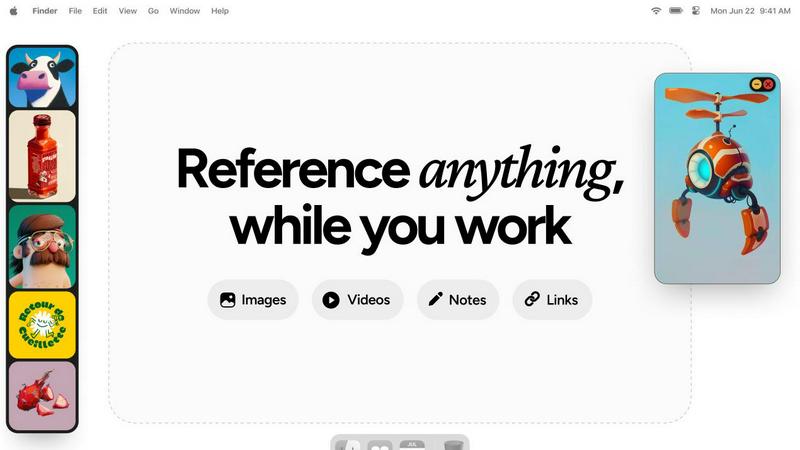
Refbox keeps your reference images and notes accessible above any workspace, enhancing your productivity and creativity.
Last updated: February 28, 2026
Visual Comparison
LuxSign

Refbox
Feature Comparison
LuxSign
Multiple Signature Methods
LuxSign supports various signature methods to cater to different user preferences. Users can draw their signature using a mouse, type their name, or upload a signature image. This flexibility allows for a personalized signing experience, making it quicker and easier to finalize documents.
Advanced Security
Security is paramount with LuxSign. The platform employs industry-standard encryption during the upload, storage, and transmission of documents. With secure servers located in Luxembourg and compliance with GDPR, users can trust that their sensitive information remains protected at all times.
Collaboration Workspaces
LuxSign enables teams to collaborate effectively through shared workspaces. Users can organize documents into folders, manage access permissions, and work together on signing workflows. This feature enhances teamwork and efficiency, particularly for businesses with multiple contributors involved in document processing.
Complete Audit Trail
For businesses requiring accountability, LuxSign provides a comprehensive audit trail. Each action taken on a document is logged with timestamps, IP addresses, and signer information. This level of detail ensures transparency and serves as a vital tool for compliance and verification purposes.
Refbox
Floating Reference Frames
Refbox offers resizable frames that float above any application, ensuring that your references are always visible. This feature allows you to maintain focus on your creative tasks without the need to switch between different windows or applications.
Project-Specific Collections
Organize your media into specific collections for each project, making it easy to access relevant references quickly. This feature enhances productivity by allowing for effortless navigation through your curated inspiration.
Frame-by-Frame GIF Scrubbing
With Refbox, you can scrub through GIFs frame by frame, making it easy to analyze motion and timing in your artworks. This feature is particularly beneficial for animators and designers looking to capture the nuances of movement.
Markdown-Enabled Notes
Take structured notes with markdown support that allows for styling options and checklists. This feature enables users to jot down ideas and thoughts alongside their visual references, ensuring that all necessary information is easily accessible.
Use Cases
LuxSign
Streamlining Contract Management
Businesses can utilize LuxSign to streamline their contract management processes. By uploading contracts and sending them for signature, organizations can reduce turnaround times significantly, ensuring that agreements are finalized swiftly and efficiently.
Facilitating Remote Work
In today's remote work environment, LuxSign provides an essential solution for teams spread across different locations. The platform allows users to sign and manage documents from anywhere, making it easier for remote teams to collaborate without the need for physical signatures.
Enhancing Compliance for Regulated Industries
Industries such as finance, healthcare, and legal require strict adherence to compliance standards. LuxSign supports these sectors by offering secure and compliant electronic signatures that meet regulatory requirements, thus minimizing risks associated with paper-based processes.
Simplifying Bulk Signing
LuxSign is ideal for organizations that need to manage multiple documents requiring signatures. The bulk signing feature allows users to send out multiple documents for signature simultaneously, saving time and reducing the administrative burden on teams.
Refbox
Streamlined Design Process
Graphic designers can utilize Refbox to keep their reference images and mood boards visible while working on new projects. This streamlined access can significantly speed up the design process and improve the overall quality of the output.
Animation Workflow Enhancement
Animators can benefit from the frame-by-frame GIF scrubbing feature to study motion closely. By having references readily available, they can ensure their animations are fluid and accurate, ultimately elevating their final work.
UI/UX Prototyping
UI/UX designers can organize their research, user interface designs, and inspiration into specific collections. This organized approach helps them quickly compare and implement new ideas during prototyping sessions, enhancing creativity.
Photography Projects
Photographers can use Refbox to keep inspiration images, editing notes, and reference materials accessible during shoots or editing sessions. This ability to have everything at hand boosts both speed and accuracy in their workflow.
Overview
About LuxSign
LuxSign is a cutting-edge electronic signature platform designed for businesses that prioritize compliance and security. Built in Luxembourg, this cloud-based solution ensures that all your documents are encrypted end-to-end and stored exclusively within the country, guaranteeing full adherence to GDPR regulations. LuxSign is tailored for organizations that require legally valid contracts across the European Union, as it complies with eIDAS SES standards. The platform offers a seamless user experience, making it easy to sign and manage documents online in just a few clicks. With functionalities like parallel and sequential signing workflows, automated email notifications, and advanced security features, LuxSign empowers businesses to streamline their signing processes while ensuring the highest level of data protection. Whether you are a small business or a large enterprise, LuxSign's scalable solutions are designed to meet your document signing needs with efficiency and reliability.
About Refbox
Refbox is a groundbreaking floating reference app designed to elevate the creative workflow of professionals in various fields, including illustration, 3D art, UI/UX design, animation, and photography. By providing an always-on-top solution for accessing visual and textual references, Refbox eliminates the disruptive context switching that can hinder creativity. Its main value proposition lies in the ability to keep all forms of references—images, videos, GIFs, notes, and bookmarks—consolidated in a sleek, resizable sidebar. This unique approach allows users to maintain their focus and inspiration without the hassle of constant alt-tabbing between applications or folders. With features tailored to meet the demands of modern creatives, Refbox transforms the way individuals organize and interact with their reference materials, ensuring that inspiration is always at their fingertips.
Frequently Asked Questions
LuxSign FAQ
What types of documents can I sign with LuxSign?
LuxSign supports various document formats, including PDF, DOC, and DOCX. Users can easily upload files up to 10MB, which are automatically converted for signing.
How does LuxSign ensure the security of my documents?
LuxSign employs end-to-end encryption during the upload, storage, and transmission of your documents. Additionally, all data is stored securely in Luxembourg, complying with GDPR and local data protection regulations.
Can I track the status of my sent documents?
Yes, LuxSign provides real-time tracking for documents sent for signature. Users receive automatic email notifications when documents are sent, viewed, and signed, allowing for efficient follow-up.
Is LuxSign suitable for large enterprises?
Absolutely. LuxSign offers scalable solutions that cater to both small teams and large enterprises. The platform includes features like collaboration workspaces, API access, and custom branding to meet the needs of diverse organizations.
Refbox FAQ
How does Refbox integrate with other applications?
Refbox is designed to float above any application, providing instant access to your references without interrupting your workflow. You can minimize or hide the sidebar as needed, making it compatible with any creative software.
Can I customize the layout of my references in Refbox?
Yes, Refbox allows you to organize your references into project-specific collections and view them in a dynamic Masonry grid. You can also resize and reposition frames to best suit your workflow.
Is there a mobile version of Refbox?
Currently, Refbox is optimized for desktop use, allowing professionals to keep their references visible while working across various creative applications. Mobile support may be considered for future updates.
What types of media can I use with Refbox?
Refbox supports a wide range of media types, including images, videos, GIFs, and notes. You can also paste website links to create screenshots and view SVG files, making it a versatile tool for all your reference needs.
Alternatives
LuxSign Alternatives
LuxSign is an innovative electronic signature platform based in Luxembourg, designed for businesses that prioritize high compliance and security. As an eIDAS SES compliant solution, it ensures that digital signatures are recognized as legally valid across all EU member states. Users often seek alternatives to LuxSign for various reasons, including pricing, specific feature sets, integration capabilities, or unique platform needs that may not be fully met by LuxSign. When exploring alternatives, it is essential to consider factors such as security measures, ease of use, compatibility with existing systems, and scalability to support growing business demands. Additional aspects like customer support, pricing structures, and the ability to customize workflows can significantly influence the choice of an e-signature platform.
Refbox Alternatives
Refbox is a cutting-edge floating app designed to enhance creative workflows by allowing users to keep their reference images and notes visible above any workspace. As a productivity tool, it appeals to a wide range of creative professionals, including illustrators, 3D artists, UI/UX designers, animators, and photographers. However, users often seek alternatives due to various reasons such as pricing, specific feature sets, or compatibility with different platforms and operating systems. When considering an alternative to Refbox, it’s essential to evaluate factors such as the app’s usability, organization capabilities, and how well it integrates with your existing workflow. Look for features that align with your creative process, such as customizable views, media management options, and the ability to maintain focus without interruptions.