
Image3D AI vs SimpleDraw
Side-by-side comparison to help you choose the right product.

Image3D AI
Transform any 2D image into stunning 3D models for printing or games in minutes with Image3D AI's powerful technology.
Last updated: March 1, 2026

SimpleDraw
Create stunning scale drawings and floor plans effortlessly online with SimpleDraw's powerful and intuitive web tools.
Last updated: March 1, 2026
Visual Comparison
Image3D AI

SimpleDraw
Feature Comparison
Image3D AI
Rapid Mode
Rapid Mode allows users to generate 3D models quickly from a single image. This feature is particularly useful for those who need fast results, such as designers in a hurry or creators looking to test concepts without investing much time.
Pro Mode
Pro Mode enhances the 3D modeling process by enabling users to upload multiple views of an object. This mode focuses on high precision, producing detailed models that are ideal for professional applications, ensuring that every angle is accurately captured.
Image Formats Supported
Image3D AI supports multiple image formats, including PNG, JPEG, and WEBP. This flexibility means users can start their 3D modeling journey using images in the format they are most comfortable with, allowing for a seamless transition from 2D to 3D.
Advanced Parameters
With advanced parameters, users can customize their 3D generation experience. This feature allows for the selection of different modes, such as Normal, Low Poly, and Geometry, catering to various needs, whether for games, AR applications, or 3D printing.
SimpleDraw
Floor Plan Mode
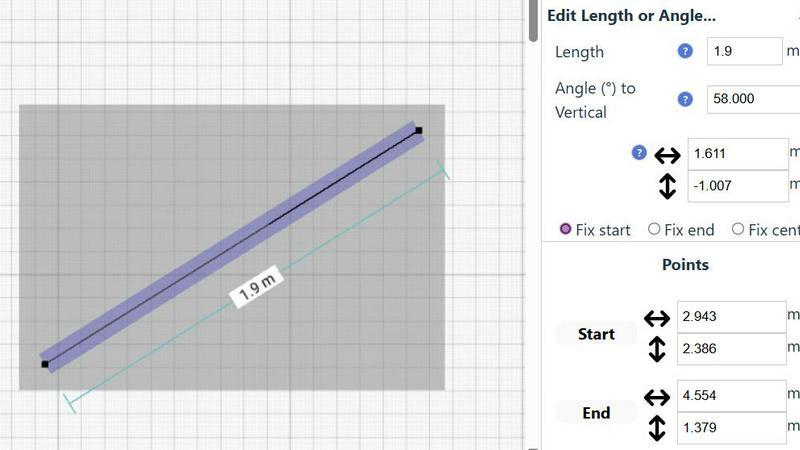
The dedicated Floor Plan Mode allows users to create highly accurate floor plans of rooms, apartments, and houses effortlessly. With intuitive tools to draw walls, add doors and windows, and visualize layouts, users can see measurements in real-time as they make adjustments.
Smart Alignment System
SimpleDraw features a Smart Alignment System that helps users position points and lines with precision. By simply pointing the mouse, users can align their drawings accurately, with visual indicators guiding them. This feature facilitates intuitive placement and ensures the highest level of detail.
Flexible Zoom and Variable Precision
With SimpleDraw, users can easily zoom in and out at will. The system adapts its precision based on the zoom level, allowing for greater control when needed. This flexibility ensures that every detail is captured accurately, no matter the scale of the drawing.
Comprehensive Measurement System
SimpleDraw boasts a comprehensive measurement system that offers fine control over displayed measurements. Users can toggle between metric and US units, with contextual measurements displayed dynamically as they work, ensuring that drawings are created exactly as intended.
Use Cases
Image3D AI
Game Development
Game developers can leverage Image3D AI to rapidly generate game-ready 3D assets. The software supports PBR materials and allows for easy integration into popular game engines like Unity and Unreal Engine, significantly speeding up the asset creation process.
E-commerce
For e-commerce businesses, Image3D AI transforms product images into interactive 3D models. This functionality enhances online shopping experiences, allowing customers to view products from every angle and even engage with augmented reality previews.
3D Printing
Enthusiasts in 3D printing benefit from the platform's ability to convert images directly into STL files. These high-precision, print-ready files simplify the transition from digital designs to physical models, making it easier for creators to bring their ideas to life.
Architecture & Design
Architects and designers can utilize Image3D AI to quickly generate architectural models. By reducing the time spent on manual modeling, they can focus more on creativity and design, improving overall efficiency in project workflows.
SimpleDraw
Home Renovation Planning
Homeowners can utilize SimpleDraw to create precise floor plans for renovations, allowing them to visualize layouts before starting. This feature helps ensure that design ideas are practical and within budget.
Furniture Layout Design
Casual users can design room layouts for bedrooms, living rooms, or offices to see if furniture fits before making a purchase. This capability simplifies the planning process, saving time and reducing the likelihood of costly mistakes.
Rental Property Planning
Real estate agents and landlords can create detailed floor plans for rental listings, helping potential tenants visualize the space. SimpleDraw's user-friendly interface makes it easy to showcase properties effectively.
DIY Project Planning
DIY enthusiasts can leverage SimpleDraw to draft technical sketches for various home projects. Whether it's building a new deck or remodeling a bathroom, the intuitive tools provide the necessary precision without requiring extensive CAD experience.
Overview
About Image3D AI
Image3D AI is a groundbreaking platform designed to revolutionize the realm of 3D creation, enabling users to convert static 2D images into high-quality 3D models within seconds. Leveraging Tencent's state-of-the-art Hunyuan 3D engine, this tool automates the intricate and often time-consuming process of 3D modeling. The primary goal is to democratize access to high-fidelity 3D modeling, making it accessible to everyone—from solo entrepreneurs with an initial product concept to game developers requiring rapid asset prototyping. By streamlining the workflow from concept to production-ready models, Image3D AI eliminates the need for expensive software like Blender and specialized skills. Users can turn a single photo or a series of multi-view images into detailed, textured 3D assets suitable for various applications. This tool is perfect for the modern creator who prioritizes speed and efficiency, dramatically reducing project timelines from weeks to mere minutes while maintaining exceptional quality.
About SimpleDraw
SimpleDraw is a revolutionary free online platform designed to democratize precision scale drawing and make technical drafting accessible to everyone. It transforms complex tasks into a straightforward, browser-based experience, catering to a vast, underserved market of casual users, DIY enthusiasts, homeowners, and small business owners. These users often require accurate floor plans, renovation layouts, or technical sketches but may feel daunted by the high costs and complexity of professional CAD software. SimpleDraw's core value proposition lies in delivering powerful precision in a profoundly simple manner. By eliminating unnecessary features and focusing on a curated selection of intelligent tools, SimpleDraw allows users to create professional-grade drawings with the ease of using pen and paper. With no downloads, installations, or user logins required, it effectively removes barriers to entry, empowering users to start realizing their visions in mere seconds. SimpleDraw is not just a tool; it represents the foundation for a new wave of user-generated spatial design.
Frequently Asked Questions
Image3D AI FAQ
What types of images work best for conversion?
Images with clear outlines and simple backgrounds yield the best results. High-contrast visuals help the AI understand the subject better, ensuring accurate 3D model generation.
How long does it take to generate a 3D model?
The processing speed for generating a 3D model typically takes around 60 seconds, making it a quick solution for users who need fast results without compromising on quality.
What file formats can I export my 3D models in?
Users can export their 3D models in various formats including STL for 3D printing, OBJ for traditional 3D editing, and GLB for modern web and AR applications, providing flexibility for different use cases.
Is there a limit to the number of images I can upload?
While the platform allows for multi-view uploads in Pro Mode, each individual image file must be under a maximum size of 10MB. This ensures optimal processing and quality in your 3D models.
SimpleDraw FAQ
Is SimpleDraw really free to use?
Yes, SimpleDraw is completely free to use, providing users with access to a powerful suite of drawing tools without any cost.
Do I need to create an account to use SimpleDraw?
No, SimpleDraw does not require any sign-up or user login. You can start drawing immediately in your browser without any barriers.
Can I save my drawings on SimpleDraw?
While the current version focuses on immediate use without downloads, users can export their drawings as images or PDFs for future reference.
Is SimpleDraw suitable for professional use?
Yes, while it is designed for casual users, SimpleDraw's precision and powerful features make it a viable option for small business owners and professionals looking for an accessible drawing tool.
Alternatives
Image3D AI Alternatives
Image3D AI is an innovative platform that enables users to convert 2D images into high-quality 3D models quickly and efficiently. Positioned in the design tools category, it leverages advanced AI technology to simplify the complex process of 3D modeling, making it accessible to a broader audience, including entrepreneurs, game developers, and printing enthusiasts. Users often seek alternatives to Image3D AI for reasons like pricing, specific feature sets, or compatibility with their existing workflows. When exploring alternatives, it's essential to consider factors such as ease of use, output quality, format compatibility, and the level of support provided. This approach ensures that you select a solution that aligns with your creative needs and project requirements.
SimpleDraw Alternatives
SimpleDraw is a revolutionary web-based tool designed to make precision scale drawing accessible to everyone. Falling under the category of design tools, it targets casual users, DIY enthusiasts, homeowners, and small business owners who require accurate floor plans or technical sketches without the steep learning curve of professional CAD software. Users often seek alternatives to SimpleDraw for various reasons, including specific feature requirements, integration with other platforms, or pricing considerations. When searching for an alternative, it's essential to evaluate the user interface, the range of tools available, and how well the tool meets your particular design needs. The right choice should provide a similar level of precision and ease while catering to your unique project requirements.