
Beesift vs ScreenDemos
Side-by-side comparison to help you choose the right product.
BeeSift uses AI to extract actionable insights from any webpage, helping you focus on what truly matters for your goals.
Last updated: March 1, 2026

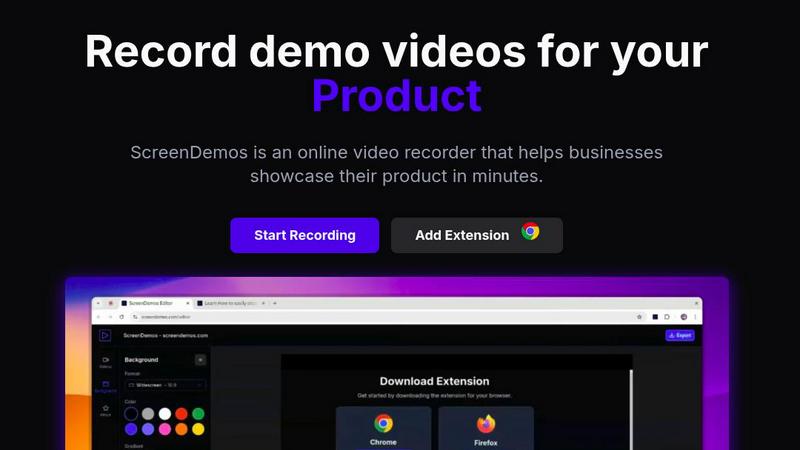
ScreenDemos lets you effortlessly create professional product demo videos with automatic effects in just minutes.
Last updated: February 28, 2026
Visual Comparison
Beesift
ScreenDemos
Feature Comparison
Beesift
Goal-Driven Insights
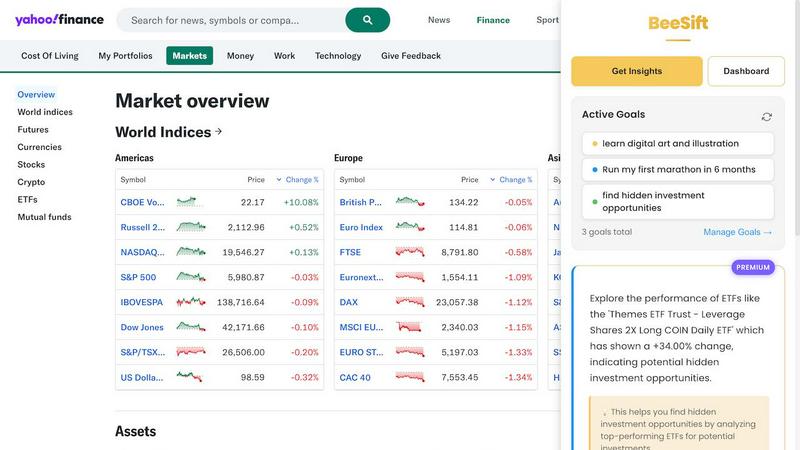
Beesift's primary feature allows you to set specific personal or professional goals, allowing the AI to filter content accordingly. This means that every time you browse, you receive only those insights that directly contribute to your objectives, saving you time and enhancing productivity.
Privacy-Centric Design
Protecting your privacy is paramount at Beesift. The tool does not track your browsing history or store any personal data. Your goals and insights are saved locally in your browser, ensuring that your online activities remain confidential and secure.
Seamless Integration
Beesift is designed to integrate effortlessly into your existing browsing habits. Simply press Ctrl+Shift+K on any webpage to instantly transform it into a personalized opportunity scanner, allowing you to extract relevant insights without altering your routine.
Insight Management Dashboard
With Beesift, users can easily manage their extracted insights through a user-friendly dashboard. Each insight is automatically tagged according to your goals, enabling quick searches and organized access to valuable information whenever you need it.
ScreenDemos
Automatic Zoom Effects
ScreenDemos enhances viewer engagement by automatically adding professional zooms and pans during recordings. This feature directs the viewer's attention to critical elements of the demo, ensuring that important information is highlighted effectively without requiring manual editing.
Smooth Animated Cursor
The platform incorporates a smooth animated cursor that increases visibility and ease of understanding in videos. This feature allows viewers to follow along effortlessly, especially during complex demonstrations, making the content more approachable and user-friendly.
Shortcuts Hints
To enrich the viewer experience, ScreenDemos displays keyboard shortcuts on the screen during recordings. This feature not only aids comprehension but also empowers viewers to replicate actions quickly, enhancing the overall instructional value of the demos.
Custom Backgrounds
With customizable backgrounds, users can align their videos with their branding and aesthetic preferences. This feature allows for greater creativity and personalization, making it easier to create visually appealing content that resonates with the intended audience.
Use Cases
Beesift
For Students
Beesift is an ideal tool for students aiming to extract key concepts from educational materials. For instance, while reading about web development, Beesift identifies relevant frameworks and tutorials tailored to the learner's skill level, facilitating a more effective study process.
For Professionals
Busy professionals can leverage Beesift to cut through the noise of industry news. By extracting pertinent trends and insights from lengthy reports, users can make informed decisions that impact their careers, ensuring they stay ahead in their respective fields.
For Entrepreneurs
Startup founders can utilize Beesift to find actionable insights buried in extensive documentation. Whether researching market strategies or technical solutions, Beesift reveals critical information that can drive innovation and improve operational efficiency.
For Lifelong Learners
Anyone committed to continuous learning can benefit from Beesift. By extracting curated resources and recommended pathways from various online content, users can pursue their interests more effectively, turning browsing into a focused exploration of knowledge.
ScreenDemos
Recording Product Demos
ScreenDemos is ideal for businesses looking to showcase their products in an engaging manner. By recording product demos quickly and effortlessly, teams can highlight features and benefits, helping to drive user interest and engagement.
Creating Onboarding Tutorials
The platform excels at producing onboarding tutorials that streamline the learning process for new users. With its automated features, teams can create informative videos that significantly reduce the time required for training, enhancing the onboarding experience.
Announcing Features
When launching new features, ScreenDemos facilitates swift and effective communication. Teams can create announcement videos that visually demonstrate the functionality of new updates, ensuring that users are well-informed and excited about the innovations.
Sharing on Social Media
ScreenDemos makes it easy to create shareable content for social media platforms. By producing high-quality, engaging videos quickly, teams can enhance their social media presence, driving brand awareness and audience engagement.
Overview
About Beesift
In today's fast-paced digital landscape, where information overload is the norm, Beesift emerges as a revolutionary tool designed to streamline your online experience. As an intelligent Chrome extension, Beesift empowers users to efficiently sift through the vast sea of content on the web. Its core functionality revolves around understanding your personal or professional goals, allowing its advanced AI to extract only the most relevant and actionable insights from any webpage. Whether you are a student, a busy professional, a startup founder, or a lifelong learner, Beesift transforms passive browsing into active knowledge acquisition. Instead of wading through lengthy articles in search of valuable information, users receive concise, goal-aligned bullet points that propel their objectives forward. Committed to user privacy, Beesift does not track your browsing history or store your data, ensuring a secure and focused experience. With Beesift, you can build your personal knowledge arsenal efficiently, enabling you to stop reading everything and start uncovering the digital gold that truly matters.
About ScreenDemos
ScreenDemos is an innovative, browser-based platform revolutionizing how teams create professional-grade video content. Tailored for growth-focused professionals across various sectors such as marketing, product development, design, and customer support, it enables users to produce high-quality video demos in mere minutes. The main value proposition of ScreenDemos lies in its ability to automate the tedious aspects of video production. By intelligently applying cinematic zoom effects, smooth cursor animations, and various visual enhancements in real-time, it eliminates the need for extensive post-production editing. This all-in-one solution empowers modern teams to communicate their ideas quickly and effectively, whether they need to announce new features, create onboarding tutorials, craft sales videos, or share insights on social media. By removing the barriers of installation and complex editing suites, ScreenDemos scales with your ambitions, driving user acquisition, improving customer education, and accelerating product-led growth.
Frequently Asked Questions
Beesift FAQ
How is this different from ChatGPT?
ChatGPT is a general-purpose AI model, while Beesift is specifically tailored to filter information based on your defined goals. It focuses on extracting insights that are aligned with what you are actively working toward.
Does it work on all websites?
Yes, Beesift is versatile and operates on any webpage. Whether you are browsing articles, research papers, social media, or documentation, Beesift can extract relevant insights from all forms of content.
Is my data private?
Absolutely. Beesift prioritizes user privacy by processing page content for insight extraction without storing your browsing history or tracking your activities across the web. Your goals and insights are stored locally in your browser.
Can I change my goals anytime?
Yes, you have the flexibility to update your goals as often as necessary. Beesift adapts instantly to ensure that the insights extracted align with your current objectives, providing a dynamic and responsive browsing experience.
ScreenDemos FAQ
Is ScreenDemos privacy-friendly?
Yes, ScreenDemos prioritizes user privacy by never collecting or storing any user data. All recordings are processed locally, allowing users to save videos on their devices or on the ScreenDemos website. However, it is advisable not to record sensitive information.
What devices are supported?
ScreenDemos is compatible with all major browsers that support extensions for Chrome and Firefox. It works seamlessly across various operating systems, including Windows, macOS, and Linux, making it accessible for a wide range of users.
Why do I need to give permission to the extension?
The ScreenDemos extension requires permissions to access your screen for recording purposes. This ensures that the platform can capture your screen activity effectively, allowing you to create high-quality video content without compromising your device's security.
Can I edit my recordings after they are made?
Yes, ScreenDemos allows users to preview and edit their recordings after completing the capture. This feature provides additional flexibility, enabling users to refine their videos and ensure they meet their desired quality before sharing.
Alternatives
Beesift Alternatives
Beesift is an innovative AI-driven tool that falls within the productivity and management category, designed to help users streamline their online research and information gathering. By focusing on extracting goal-oriented insights from web pages, Beesift transforms overwhelming amounts of information into concise, actionable knowledge. Users often seek alternatives due to various reasons, including pricing, specific feature sets, or compatibility with their preferred platforms. When considering alternatives, it is essential to prioritize features that align with personal or professional objectives, evaluate the ease of use and integration into existing workflows, and assess the level of privacy and data security offered by the tool.
ScreenDemos Alternatives
ScreenDemos is an innovative, browser-based tool designed for creating professional product demo videos effortlessly. It falls into the category of online screen recording solutions, catering to diverse teams in marketing, product development, design, and customer support. Users often seek alternatives to ScreenDemos due to factors such as pricing, specific feature sets, platform compatibility, or personal preferences regarding user interface and experience. When searching for an alternative, it's crucial to consider the ease of use, the extent of automation in video production, and the quality of visual enhancements offered. Look for platforms that streamline the recording process, provide robust editing features, and support seamless sharing capabilities to ensure they meet your team's needs while facilitating rapid content creation.