
AI Formatter vs CleanPaste.org
Side-by-side comparison to help you choose the right product.
Transform raw text into polished professional documents with AI Formatter's 1000+ customizable templates instantly.
Last updated: March 1, 2026

CleanPaste.org
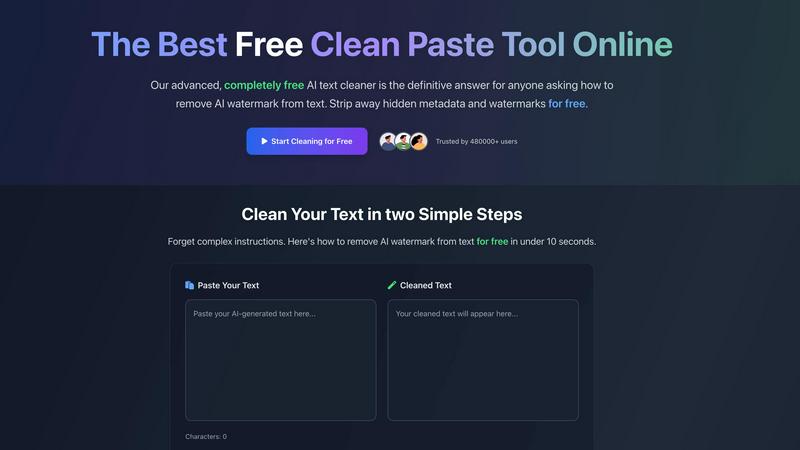
CleanPaste.org instantly removes AI watermarks and invisible characters from your text for free, ensuring clean.
Last updated: March 2, 2026
Visual Comparison
AI Formatter
CleanPaste.org
Feature Comparison
AI Formatter
ATS-Optimized Templates
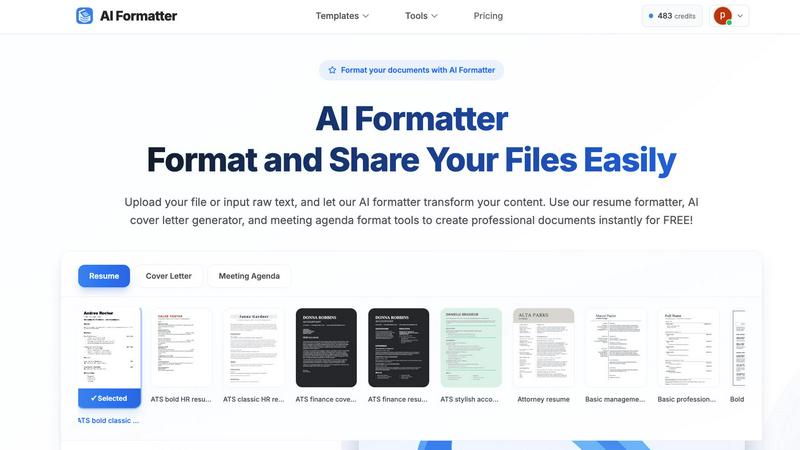
AI Formatter offers a library of 162 professional templates specifically designed to be ATS-optimized. These templates help ensure that your resumes and cover letters not only look great but also pass automated screening systems, increasing your chances of landing interviews.
Multi-Format Upload Support
Users can upload documents in various formats, including PDF, DOC, DOCX, and TXT, with a maximum size of 10MB. This flexibility allows for a seamless experience whether you are formatting existing documents or starting from scratch with raw text input.
Intuitive Editing Tools
Once your document is formatted, AI Formatter provides an intuitive editor that allows you to review and customize your content. You can make necessary adjustments and download your documents in multiple formats, including Word and PDF, ensuring versatility in sharing.
Document Sharing Features
AI Formatter simplifies the sharing process by allowing users to share their formatted documents directly from the platform. This feature streamlines collaboration and enhances productivity, making it easy to distribute professional-grade documents to colleagues or clients.
CleanPaste.org
Instant Processing
CleanPaste.org offers an instantaneous cleaning experience. Users can simply paste their content into the tool, and with a click, all invisible characters and hidden metadata are stripped away, ensuring that the output is clean and ready for use.
Watermark Removal Mode
This feature focuses specifically on erasing AI-generated watermarks from text. By utilizing advanced algorithms, CleanPaste.org guarantees that your content passes detection tests, maintaining a seamless, human-like quality that enhances readability.
Deep-Scan Algorithm
The tool employs a sophisticated deep-scan algorithm that is adept at identifying and eliminating various invisible characters, such as zero-width spaces and hidden formatting artifacts. This ensures that the content is not only clean but also retains its original intent and message.
User-Friendly Interface
CleanPaste.org is designed with simplicity in mind. The user interface allows anyone to easily navigate the tool without needing technical expertise. No sign-ups or complicated processes are required, making it accessible for all users.
Use Cases
AI Formatter
Job Seekers
Job seekers can utilize AI Formatter to create standout resumes and cover letters that are tailored to specific job applications. With ATS-optimized templates, they can significantly improve their chances of getting noticed by recruiters.
Professionals Standardizing Reports
Businesses and professionals can use AI Formatter to standardize their reports, meeting agendas, and invoices. This ensures a cohesive brand image while saving time on formatting, allowing them to focus on content quality.
Students Preparing Academic Documents
Students can benefit from AI Formatter when preparing academic documents such as theses, dissertations, or project reports. The platform helps them maintain a professional appearance while adhering to institutional formatting guidelines.
Freelancers Managing Client Work
Freelancers can leverage AI Formatter to quickly format documents for various clients, whether it's invoices, project proposals, or contracts. This capability allows them to deliver polished work efficiently, enhancing client satisfaction.
CleanPaste.org
For Students
Students can utilize CleanPaste.org to refine their essays and assignments. By removing hidden characters and AI watermarks, they can submit work that reflects their genuine effort and avoids any potential plagiarism issues, all without any cost.
For Content Creators
Bloggers and content creators can ensure their articles resonate with authenticity. CleanPaste.org helps maintain the brand's voice by cleaning drafts of invisible characters, allowing for a natural tone that engages audiences effectively.
For Professionals
Project managers and business professionals can use CleanPaste.org to enhance their communications. Whether drafting emails or reports, this tool helps in making AI-assisted content sound more natural and human-like, ensuring clear communication.
For Marketers
Digital marketers can benefit from CleanPaste.org by ensuring that their promotional content is free of AI indicators. This allows for the creation of marketing materials that appear original and engaging, fostering greater trust with their audience.
Overview
About AI Formatter
AI Formatter is an innovative, cloud-based SaaS solution designed to revolutionize the way documents are formatted. It effectively eliminates the time-consuming process of manual formatting, allowing users to convert raw, unstructured text or uploaded files into polished, professional documents in mere seconds. Whether you are a job seeker aiming to create ATS-optimized resumes and cover letters, or a professional looking to standardize meeting agendas, invoices, and reports, AI Formatter meets your diverse document needs. By leveraging advanced AI technology, the platform comprehends context and structure, applying the most suitable formatting that adheres to industry standards while ensuring a 95% success rate in passing Automated Tracking Systems. The value proposition is clear: save over 2 hours per document while guaranteeing professional results. With a generous free tier and scalable options, AI Formatter is an indispensable tool for individuals and teams eager to enhance productivity and elevate their document quality.
About CleanPaste.org
CleanPaste.org is a revolutionary tool designed for anyone looking to enhance their content creation process while maintaining authenticity and credibility. In an age where AI-generated content is becoming increasingly common, it is vital to ensure that your writing remains indistinguishable from genuine human output. CleanPaste.org excels in this area by offering a powerful online solution that effectively removes invisible characters, hidden metadata, and AI watermarks, all of which can compromise the integrity of your work. This tool is ideal for students, content creators, marketers, and professionals who seek to leverage AI's efficiency without sacrificing originality. With a mission to empower creators and a user base exceeding 480,000, CleanPaste.org stands out as a trusted resource that provides enterprise-level text refinement without any paywalls or limitations. It is more than just a utility; it represents a strategic asset for anyone aiming to produce high-quality, undetectable content at scale, ensuring that every piece of writing meets the highest standards for originality and quality.
Frequently Asked Questions
AI Formatter FAQ
How does AI Formatter ensure ATS compatibility?
AI Formatter uses advanced AI algorithms to format documents according to industry standards, ensuring that they are compatible with Automated Tracking Systems and increasing your chances of being shortlisted.
Can I edit my document after formatting?
Yes, AI Formatter provides an intuitive editing tool that allows you to review and customize your formatted document before downloading it in your preferred format.
What file formats does AI Formatter support?
AI Formatter supports multiple file formats including PDF, DOC, DOCX, and TXT, allowing you to upload existing documents or input raw text seamlessly.
Is there a free tier available?
Yes, AI Formatter offers a generous free tier that allows users to start formatting documents without any upfront cost, making it accessible for individuals and teams looking to improve their document quality.
CleanPaste.org FAQ
How does CleanPaste.org remove invisible characters?
CleanPaste.org utilizes advanced algorithms that detect and eliminate invisible characters, such as zero-width spaces and hidden metadata, as well as AI watermarks. Users simply need to paste their content and click clean for instant results.
Is CleanPaste.org truly free? What's the catch?
Yes, CleanPaste.org is completely free to use with no hidden catches. There are no usage limits, premium features, or sign-up requirements, allowing users to access the tool without any barriers.
What types of hidden characters does CleanPaste.org remove?
The tool effectively removes all types of invisible characters, including zero-width spaces, hidden metadata, AI watermarks, and various formatting artifacts. Every feature is accessible to all users at no cost.
Can I count on the output from CleanPaste.org?
Absolutely. CleanPaste.org is designed to maintain the integrity and natural flow of your content while removing unwanted elements. This ensures that the final output meets high standards for quality and authenticity, passing detection tests confidently.
Alternatives
AI Formatter Alternatives
AI Formatter is a state-of-the-art, cloud-based platform designed to revolutionize document creation by transforming raw text into polished, professional documents using advanced AI technology. It falls under the Productivity & Management category, catering to job seekers, professionals, and businesses alike by streamlining the formatting process. Users often seek alternatives due to varying needs such as pricing concerns, specific feature requirements, or compatibility with their existing workflows and platforms. When exploring alternatives, it is crucial to consider factors like ease of use, the breadth of template options, the effectiveness of the formatting engine, and the ability to scale with your evolving requirements. A solution should not only enhance productivity but also ensure that the final documents maintain a high standard of quality and professionalism.
CleanPaste.org Alternatives
CleanPaste.org is a cutting-edge online tool designed for individuals and businesses looking to enhance their content creation process. As part of the AI Assistants category, it specializes in removing AI watermarks and hidden characters from text, ensuring that the final output appears entirely human-written. Users often seek alternatives for various reasons, including pricing structures, feature sets, or compatibility with specific platforms. When searching for an alternative, it's essential to consider factors such as ease of use, the effectiveness of watermark removal, and the range of features offered. Look for tools that provide seamless integration into your workflow and ensure that they uphold high standards of text quality and security, enabling you to create undetectable content that meets your unique needs.