
xyOps
xyOps is the next-gen ops platform that automates, monitors, and scales your entire infrastructure from one place.
Visit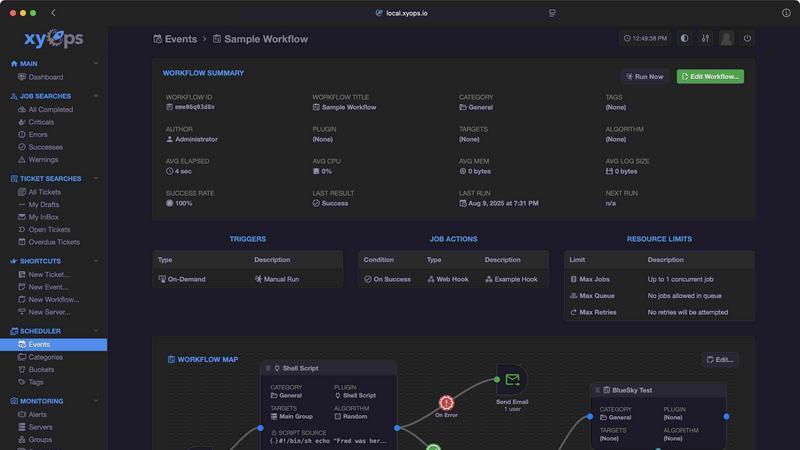
About xyOps
xyOps is a next-generation, open-source platform that unifies job scheduling, workflow automation, server monitoring, alerting, and incident response into one cohesive system. Built for developers and operations teams who need to scale their infrastructure without sacrificing control, xyOps provides a single pane of glass to orchestrate everything from simple cron jobs to complex, multi-step pipelines across fleets of servers. Unlike traditional tools that hide critical features behind paywalls or push telemetry back to vendors, xyOps is 100% free and open source under the BSD 3-Clause license, ensuring your data, freedom, and visibility remain yours. The platform is designed to run anywhere, from a single laptop to thousands of worker nodes in a cluster, with agents available for macOS, Linux, and Windows. With a visual workflow builder, flexible job scheduling, real-time tracking, smart alerting, an integrated ticketing system, and a plugin marketplace, xyOps empowers teams to automate with confidence. Whether you are a startup scaling rapidly or an enterprise managing complex infrastructure, xyOps gives you the tools to build, monitor, and respond without limits. It is developer-friendly, extensible via a simple JSON over STDIO Plugin API that supports any language, and features hot backup redundancy to ensure zero downtime. xyOps is not just a tool; it is a philosophy of open automation that grows with you.
Features of xyOps
Visual Workflow Builder
Design complex automation pipelines with a graphical editor that connects events, triggers, actions, and monitors into meaningful workflows. Chain multiple jobs with conditional logic, pass data and files between steps, and attach limiters like timeouts, memory caps, and log size caps. Run jobs in parallel or create custom queues, all without writing boilerplate code.
Flexible Job Scheduler
Go beyond traditional cron with a scheduler that targets individual servers or groups, supports multiple schedules per event, and includes blackout ranges for holidays or downtime. Import existing crontab configurations, schedule one-time jobs, and extend scheduling capabilities with a plugin-based architecture that adapts to your unique needs.
Active Job Tracking
Monitor every job in real-time with progress updates, time remaining estimates, and resource usage enforcement. Run unlimited parallel jobs with optional max parallel limits that queue the rest. Jobs can emit their own progress and stats, and you can trigger custom actions based on results, all while enforcing CPU, memory, and disk limits per job.
Smart Alerts and Integrated Ticketing
Set up complex trigger expressions with flexible rules and receive notifications via email, webhook, or custom channels. Every alert includes a server snapshot for context, and alerts can automatically create tickets or trigger remediation jobs. The built-in ticketing system supports file attachments and CI/CD integrations, with a fully scriptable API for incident response automation.
Use Cases of xyOps
Scaling Infrastructure Automation Across a Growing Fleet
As your startup grows from five to five thousand servers, xyOps scales with you. Use group-based scheduling and automatic hostname detection to manage jobs across your entire fleet. Monitor CPU, memory, network, and disk usage per job, and set up smart alerts that prevent new jobs from launching during active incidents. This ensures your automation stack remains reliable as you scale.
Building a Continuous Integration and Deployment Pipeline
Use the visual workflow builder to chain multiple jobs that build, test, and deploy your code. Pass artifacts between steps, enforce resource limits, and trigger notifications on failure. Integrate with GitHub, AWS S3, and other tools via the plugin marketplace. The integrated ticketing system can automatically create tickets for failed builds, streamlining your DevOps processes.
Incident Response and Automated Remediation
When a server monitor detects high CPU or memory usage, xyOps can automatically create a ticket, run a diagnostic job, and even trigger a remediation workflow. Alerts include a snapshot of the server at the time of the incident, and active alerts can prevent new jobs from launching to avoid exacerbating the issue. This end-to-end automation reduces mean time to resolution.
Managing Scheduled Data Processing and ETL Pipelines
Schedule complex data processing tasks across multiple servers with blackout ranges for maintenance windows. Use the plugin-based scheduler to extend functionality for custom data sources. Track job progress in real-time and enforce memory caps to prevent runaway processes. Pass data and files between workflow steps to build robust ETL pipelines that run reliably.
Frequently Asked Questions
Is xyOps really free and open source?
Yes, xyOps is 100% free and open source under the BSD 3-Clause license. The license will never be modified, split, or amended with additional restrictive terms. All current and future app features will remain open source forever. Professional and enterprise support plans are available separately, but the core platform is always free.
What languages are supported for writing plugins?
xyOps uses a simple JSON over STDIO Plugin API that supports any programming language. No SDK is required. You can write plugins in Python, Go, Ruby, Node.js, Bash, or any language that can read from standard input and write to standard output. This makes it incredibly easy to extend the platform with custom functionality.
Can xyOps handle thousands of servers?
Absolutely. xyOps is built for fleets of any size, from five servers to five thousand. It scales to thousands of worker servers in your cluster and supports both manual and automatic server grouping based on hostname. Multiple hot backups ensure no jobs are interrupted during primary failover, providing enterprise-grade reliability.
How do I get started with xyOps?
Getting started is simple. Download xyOps from GitHub or the official website, and you can go from download to deployment in minutes. Install agents on macOS, Linux, or Windows servers, and use the web interface to start scheduling jobs, building workflows, and setting up monitors. The documentation and community plugins make it easy to hit the ground running.
Pricing of xyOps
xyOps is 100% free and open source under the BSD 3-Clause license. There are no paywalls, no feature restrictions, and no telemetry. Professional and enterprise support plans are available separately for teams that need dedicated assistance, but the core platform and all its features are free forever.
Similar to xyOps


benchmark.directory
146 AI tools across 20 categories, indexed by the job they do. Every listing earned its place. None of them paid for it.

saasgrow.ai
Find SaaS growth tools worth your time. Every tool is reviewed before it's listed, so the shortlist is already made for you.

Tools Network
Tools Network is a curated directory of the best AI tools across 25+ categories. Compare ratings, pricing, and features to find the right one, fast.

UseWok
Done-for-You SaaS Visibility for Search & AI | UseWok

Postqued
Schedule and publish social content across 10 platforms with one dashboard, API, and MCP built for teams and AI agents.

EntreDash
Turn daily annoyances and raw ideas into inventions, products, and businesses. EntreDash provides a virual personal advisory board using AI automation

Omentir
Omentir is an AI LinkedIn sales agent that finds qualified buyers, sends personalized outreach, follows up automatically, and organizes replies by int