SubtitlesFast
Effortlessly create and publish stunning subtitles for your videos in minutes with SubtitlesFast's intuitive all-in-one.
VisitPublished on:
August 30, 2025
Pricing:
About SubtitlesFast
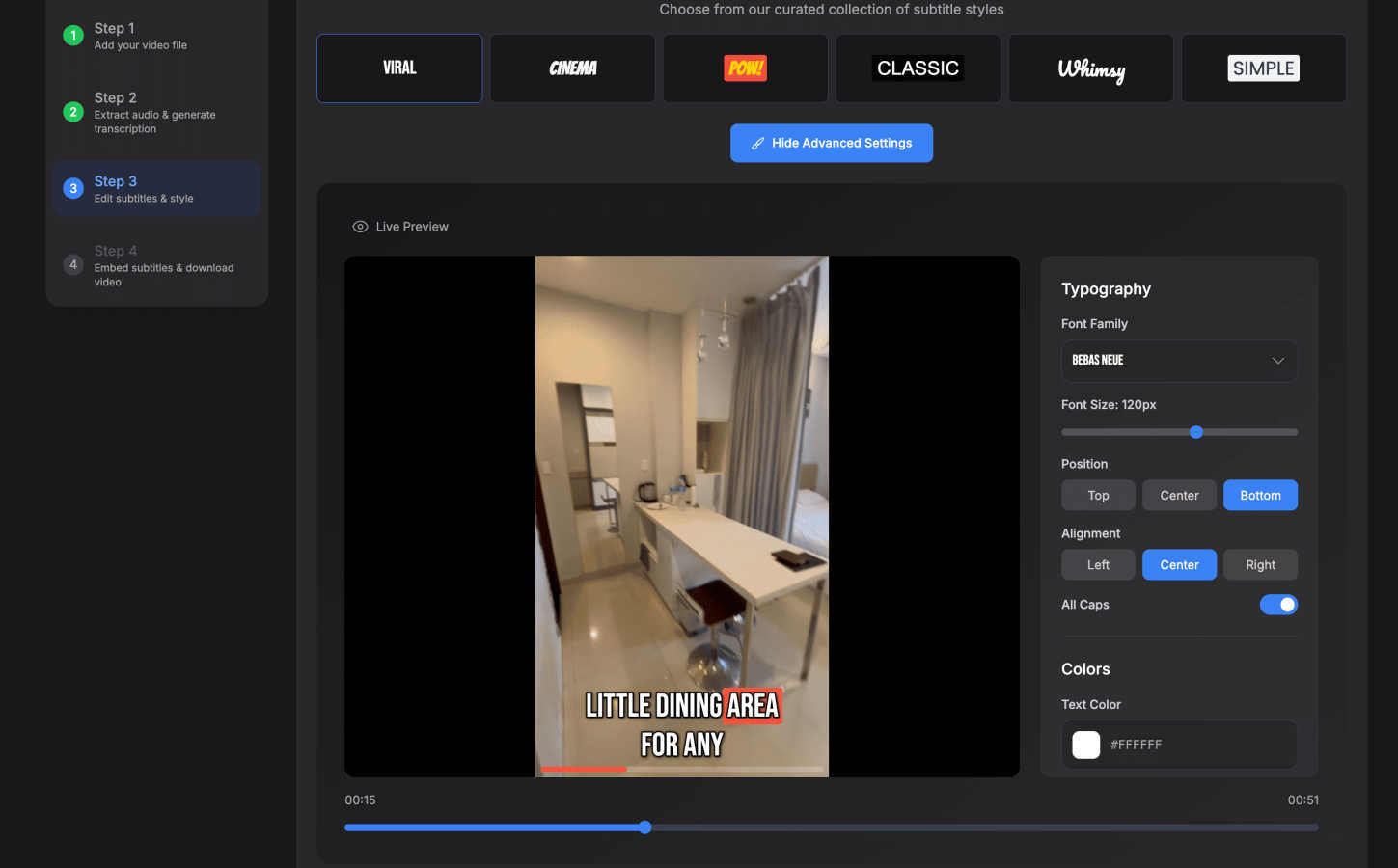
SubtitlesFast is a groundbreaking online tool that revolutionizes the way subtitles are added to videos. Designed with content creators, marketers, and accessibility advocates in mind, it simplifies the often tedious task of subtitle generation through an intuitive, browser-based platform. Users can effortlessly upload their video files, and in a matter of minutes, SubtitlesFast automatically transcribes the audio into accurate, readable subtitles available in over 50 languages. The platform not only prioritizes speed but also offers extensive customization options, allowing users to style subtitles to align with their brand identity. With features like one-click export, multi-language support, and a user-friendly editing interface, SubtitlesFast emerges as the ultimate solution for enhancing video engagement and accessibility. It is tailored for creators who publish content daily, ensuring that adding subtitles becomes a seamless component of their content creation workflow.
Features of SubtitlesFast
Auto-Transcription
SubtitlesFast utilizes advanced AI technology to provide auto-transcription of audio in over 50 languages. This feature allows users to quickly convert spoken content into written text without manual effort, ensuring accuracy and saving valuable time.
Custom Styling Options
The platform offers a variety of styling options to customize subtitles according to user preferences. Creators can choose from 30+ animated styles, adjusting font size, color, and positioning to ensure that the subtitles not only enhance readability but also fit perfectly with their brand aesthetic.
One-Click Export
With the one-click export feature, users can seamlessly download their videos with subtitles burned in, ready for immediate posting on platforms like YouTube, TikTok, and Instagram. This eliminates the hassle of multiple export steps, streamlining the publishing process.
Simple Editor
The easy-to-use editor allows users to make adjustments to subtitles directly on the timeline. Users can add text, images, and music, providing flexibility to enhance their videos while ensuring that the subtitle timing aligns perfectly with the audio.
Use Cases of SubtitlesFast
Daily Content Creation
For vloggers and content creators who publish daily, SubtitlesFast is an essential tool. It enables them to quickly add subtitles to their videos, enhancing accessibility and engagement while maintaining a fast-paced workflow.
Marketing Promotions
Marketers can leverage SubtitlesFast to create promotional videos that are accessible to a wider audience. By adding subtitles, they ensure that their messaging is clear and impactful, regardless of the viewer's language or hearing ability.
Educational Videos
Educators and trainers can utilize SubtitlesFast to create instructional videos that are easier to follow. Subtitles help to reinforce learning by providing a written reference, making it easier for students to absorb information.
Social Media Clips
Creators who share short clips on social media platforms benefit from SubtitlesFast by quickly generating engaging subtitles that capture viewers' attention. This feature is particularly useful for platforms like TikTok and Instagram, where viewers often watch videos without sound.
Frequently Asked Questions
How does SubtitlesFast work?
SubtitlesFast allows users to upload their video files, which are then processed by the platform's AI to transcribe the audio into subtitles. Users can then customize the subtitles and export the final video in minutes.
Is there a free trial available?
Yes, SubtitlesFast offers a free trial without watermarks, allowing users to experience the platform's features and capabilities before committing to a subscription.
Can I edit the subtitles after they are generated?
Absolutely! SubtitlesFast includes a simple editor that enables users to make adjustments to the generated subtitles, including timing, text modifications, and styling options.
What formats are supported for video uploads?
SubtitlesFast supports a wide range of video formats, making it easy for users to upload their preferred video files and start the subtitle generation process without compatibility issues.
Similar to SubtitlesFast
Build Mode for Mac
Build Mode is a Mac app that turns focused sessions into visible progress, so you can see the work adding up before the results arrive.

Motiofy
Motiofy is an AI creative workspace that helps creators and teams turn ideas into polished visual stories.

SubmitMap
A directory of launch platforms: who each accepts, what disqualifies you, and how to submit. Free to read, and your agent can do the submitting.
VidRush AI
AI-powered long video generator. Create multi-modal AI videos by combining images, video, audio, and text.
MySOP.guru
Capture any workflow in your browser and export a branded, step-by-step SOP with screenshots. €5 per document, no subscription.