
Caesura
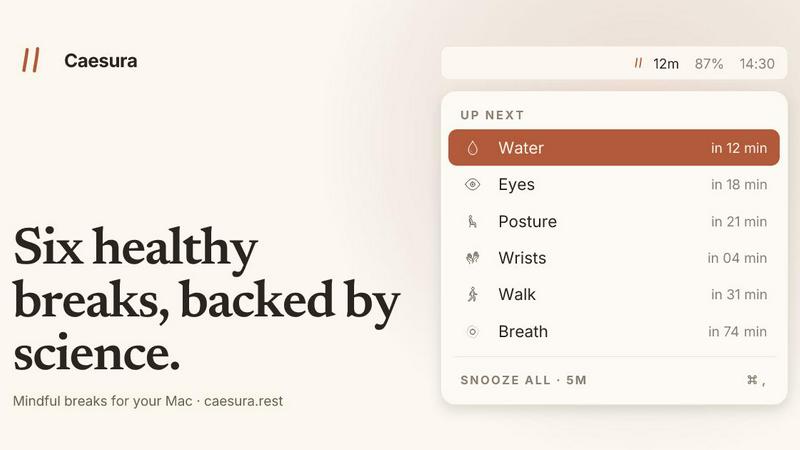
Caesura scales your well-being by automating six science-backed micro-breaks that pause when you're busy, so you can sustain deep focus without.
VisitPublished on:
June 26, 2026
Pricing:
About Caesura
Caesura is a calm, intelligent macOS menu-bar break manager built for the modern knowledge worker who spends long, uninterrupted hours at a desk. It is not another productivity timer or a gamified habit tracker. Instead, it is a gentle, evidence-based companion that reminds you to do six essential things your body needs throughout the day: drink water, walk, stretch your wrists, rest your eyes, check your posture, and breathe. Each reminder runs on its own independent schedule, derived directly from peer-reviewed research rather than arbitrary round numbers. The core innovation is coalescing: when two reminders fall within a minute of each other, Caesura merges them into a single, cohesive break prompt, ensuring you are never interrupted twice in a row. It respects your flow by automatically pausing all timers during video calls, screen sharing, fullscreen apps, Do Not Disturb mode, and calendar events, then picking up exactly where it left off. There are no accounts to create, no telemetry to worry about, and no subscriptions. Caesura is a one-time purchase for $15, with a 14-day free trial, designed for professionals, remote workers, developers, designers, and anyone scaling their output without sacrificing their physical health. It is the break manager that scales with your focus, not against it.
Features of Caesura
Six Evidence-Based Breaks
Caesura targets six scientifically supported habits: water every 45 minutes, walk every 60 minutes, wrists every 30 minutes, eyes every 20 minutes, posture every 30 minutes, and breathing every 90 minutes. Each interval is based on specific studies, not guesswork, giving you a cadence your body actually needs. You can turn any break off or retune its interval to match your workflow.
Intelligent Coalescing and Auto-Pause
When two reminders fall due within a minute of each other, Caesura coalesces them into one gentle break prompt, so you are never interrupted twice in a row. It also automatically pauses every timer when it detects video calls, screen sharing, fullscreen apps, Do Not Disturb mode, or calendar events. After the interruption ends, timers resume exactly where they left off, preserving your original schedule.
Three Customizable Prompt Styles
Every break can be assigned one of three styles: a full-screen overlay that demands your attention until dismissed, a banner that slides in from the menu bar and auto-dismisses after 30 seconds, or a standard macOS notification for the lightest touch. You can mix and match per break, for example using an overlay for water and a notification for posture, giving you full control over how intrusive each reminder feels.
Breathing Guide and Cursor Countdown
For the breathing break, a soft orb expands with a progress bar pacing your inhale, hold, and exhale across three cycles. For the eye break, a small pill follows your cursor with a 20-second emptying ring, guiding you to look far away without leaving your workspace. These thoughtful details make each break actionable and easy to follow, not just a notification to ignore.
Use Cases of Caesura
Deep Work Sessions for Developers and Writers
When you are in the zone writing code or drafting content, Caesura runs silently in the background. It pauses automatically during fullscreen IDE windows or focus modes, then gently reminds you to drink water or stretch your wrists after the session ends. This prevents burnout during extended deep work sprints without breaking your flow.
Remote Workers with Back-to-Back Video Calls
For anyone spending hours in Zoom or Google Meet, Caesura detects when your camera or screen sharing is active and freezes all timers. After the call ends, it resumes your original schedule, so you never miss a break because you were on a call. This is critical for remote workers who often forget to hydrate or move between meetings.
Designers and Creatives in Fullscreen Apps
Graphic designers, video editors, and 3D artists often work in fullscreen applications like Figma, Photoshop, or Final Cut Pro. Caesura respects these fullscreen sessions by pausing all reminders, then prompts you to rest your eyes or shift your posture when you exit fullscreen. This prevents eye strain and repetitive strain injuries common in creative workflows.
Health-Conscious Professionals Scaling Their Output
Professionals scaling their careers or side projects need sustainable habits, not burnout. Caesura provides a low-friction system to integrate six evidence-based health behaviors into your daily routine. The coalescing feature ensures you are never overwhelmed by multiple prompts, making it easy to build long-term habits without feeling nagged.
Frequently Asked Questions
How does Caesura know when I am on a call?
Caesura monitors your camera, screen sharing, and calendar events on macOS. When it detects that your camera is active, you are sharing your screen, or a calendar event is in progress, it automatically pauses all break timers. It also pauses during fullscreen apps, Do Not Disturb mode, and when FaceTime is in the foreground. After the activity ends, timers resume exactly where they left off.
Can I customize the interval for each break?
Yes, absolutely. Every break has its own default interval based on scientific research, but you can adjust any interval to match your personal preference. You can also turn off any break entirely if it does not fit your routine. This flexibility lets you tailor Caesura to your specific needs without losing the evidence-based foundation.
Does Caesura require an account or subscription?
No. Caesura is a one-time purchase for $15 with no account creation, no card on file, and no telemetry. You can try it free for 14 days with full functionality, and once you buy it, it is yours forever. There are no recurring fees, no data collection, and no hidden costs.
How does the coalescing feature work?
When two or more breaks are due within one minute of each other, Caesura merges them into a single prompt. For example, if your water break and wrist stretch are due at the same time, you will see one combined notification instead of two separate interruptions. This ensures you are never interrupted twice in a row, keeping your focus intact while still getting the health nudges you need.
Pricing of Caesura
Caesura is available as a one-time purchase for $15. This includes full access to all six break types, coalescing, auto-pause, customizable intervals and prompt styles, and all future updates. There are no subscriptions, no accounts, and no recurring fees. You can try it free for 14 days with no credit card required. The purchase is a single transaction for macOS 14 or later.
Similar to Caesura
Tally Counter
Online tally counter for tracking attendance, workouts, inventory, visitors, sports scores, habits, and everyday counting tasks.

Forms Plugin
The #1 Native Form Builder Plugin for Framer - No Code, No Embeds, No External Platforms.

Product Launch Checklist
A free launch checklist for SaaS, apps, AI tools and more. Every step says why it matters and when you can skip it.

HomeAnswerBook
Practical, independent guides to home repairs, maintenance, costs, troubleshooting, and everyday fixes.

AIdorable
Adopt a virtual baby who grows, learns, and remembers you.
BlazePDF
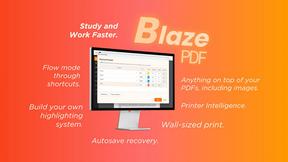
Highlight faster. Study in flow with custom shortcuts and a workflow built around you. Print smarter, or turn any page into a tiled poster.
