
Budgeting App
Walleta is a free iOS budgeting app that uses AI to scan receipts, track expenses, and set monthly budgets effortlessly.
Visit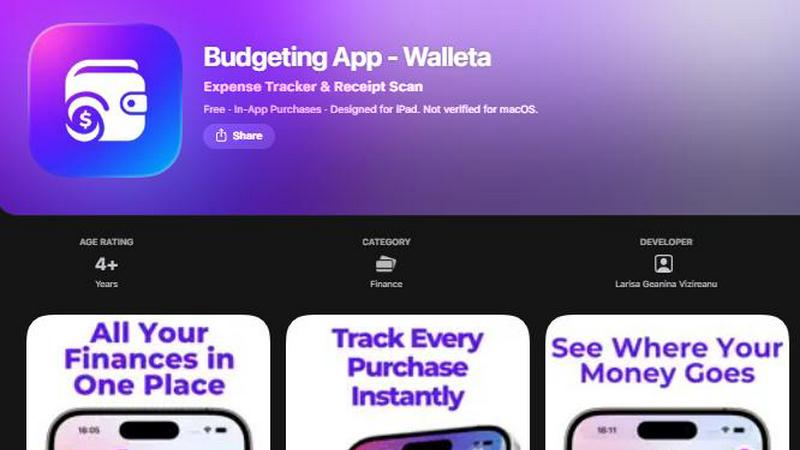
About Budgeting App
Budgeting App, also known as Walleta, is an innovative free budgeting tool designed for iOS users who seek an efficient way to manage their finances without the complexities of bank linking or account setups. This app combines an AI-powered expense tracker with a seamless receipt scanning feature, allowing users to log their spending effortlessly. With Walleta, you can set monthly budgets, categorize your expenses, and receive real-time alerts, making it an ideal solution for travelers, students, expats, and anyone prioritizing privacy in their financial management. It is a single app that replaces multiple budgeting tools, ensuring a streamlined and private money tracking experience. By focusing on user simplicity and data security, Walleta allows you to keep your financial information on your device, free from cloud sync or ad tracking, making it the perfect choice for anyone looking to take control of their spending habits.
Features of Budgeting App
AI Receipt Scanning
Walleta's advanced AI receipt scanning feature allows users to simply point their camera at any receipt. The app intelligently extracts crucial details such as the merchant, total amount, date, and category, minimizing manual entry. Users can verify the extracted information before saving, ensuring accuracy and ease of use.
Monthly Budgeting
With Walleta, you can set defined monthly spending limits tailored to your financial goals. The app provides real-time tracking of your expenditures against these limits and sends alerts when you're approaching or exceeding your budget, helping you maintain control over your finances.
Comprehensive Expense Tracking
The app offers a simple one-tap logging feature that categorizes expenses across 14 different categories, including food, groceries, transport, and more. This functionality allows users to log their spending in seconds, making it easy to keep track of where their money goes.
Beautiful Analytics
Walleta provides visually stunning analytics that help users understand their spending patterns. With pie charts, bar graphs, and detailed category summaries, users can review their expenses weekly, monthly, or yearly, facilitating informed financial decisions.
Use Cases of Budgeting App
Efficient Daily Expense Management
Users can efficiently manage their daily expenses by quickly logging purchases with Walleta. Whether it's a coffee run or grocery shopping, the app allows for immediate categorization, ensuring users stay aware of their spending habits in real-time.
Travel Expense Tracking
For travelers and expats, Walleta offers multi-currency support and the ability to scan receipts on the go. This feature simplifies tracking expenses while abroad, ensuring that users can manage their budgets without the hassle of currency conversion or manual logging.
Student Budgeting
College students can benefit significantly from Walleta's budgeting capabilities. With limited income and various expenses, the app helps students allocate funds wisely, set spending limits, and avoid overspending, promoting better financial habits.
Privacy-Conscious Spending
Individuals who prioritize privacy can use Walleta without concerns about data security. The app does not require any bank connections, email signups, or cloud sync, allowing users to keep their financial information completely private and secure on their devices.
Frequently Asked Questions
How does Walleta ensure my data privacy?
Walleta prioritizes user privacy by keeping all data on your device. There are no bank connections, email signups, or cloud storage, ensuring that your financial information remains secure and private.
Can I use Walleta without an internet connection?
Yes, Walleta works entirely on your device, allowing you to track expenses and scan receipts without the need for an internet connection. This feature is particularly useful for users who are traveling or in areas with limited connectivity.
What happens if my receipt is faded or unclear?
If a receipt is faded or unclear, Walleta's AI may struggle to extract the necessary details. In such cases, users can manually enter the information through the app's one-tap logging feature.
Is there a limit on the number of receipts I can scan?
Free users of Walleta can utilize the AI receipt scanning feature for up to three times. To unlock unlimited AI scans, users can opt for Walleta Pro, which offers this premium feature along with additional benefits.
Similar to Budgeting App


Money Tracker App
Money Tracker App scales your financial clarity with AI receipt scanning and on-device privacy, no bank link or signup required.
CalcFi
CalcFi offers 500+ free financial calculators for every money decision, delivering instant results and personalized PDF plans without signup.
kill the sub
Effortlessly uncover and cancel forgotten subscriptions in minutes with our AI tool, saving you money for just $3.
Fintrack
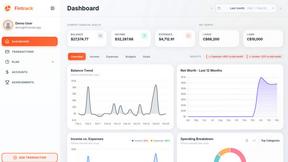
Fintrack is your AI money copilot that tracks spending and finds hidden savings for you.

Redbark
Redbark automatically syncs your Australian bank and brokerage data to apps like Google Sheets and YNAB.

Ricco - Financial Literacy Game
Ricco is a fun financial literacy game that teaches budgeting and investing through real-life scenarios and choices.