
GoodToolOnline vs Klipzy
Side-by-side comparison to help you choose the right product.

GoodToolOnline
GoodToolOnline is the ultimate platform for innovators to launch products and enthusiasts to discover cutting-edge.
Last updated: February 26, 2026

Klipzy instantly transforms your photos into cinematic videos with AI, no editing skills needed.
Last updated: March 1, 2026
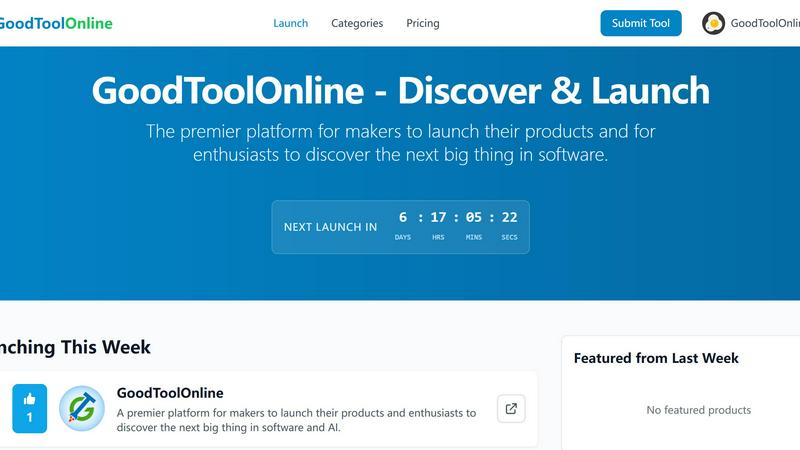
Visual Comparison
GoodToolOnline
Klipzy

Feature Comparison
GoodToolOnline
Curated Weekly Launches
Every week, GoodToolOnline showcases a select batch of software products, ensuring that users are exposed to only the most relevant and innovative tools in the market. This focus on quality over quantity helps users to avoid the clutter of traditional software directories.
Guaranteed Visibility for Makers
Makers can launch their products with the confidence that they will receive guaranteed visibility. This feature is essential for startups and developers looking to gain traction and gather valuable feedback from early users.
SEO-Optimized Backlinks
GoodToolOnline provides high-quality dofollow backlinks for all featured tools, enhancing the SEO capabilities of makers. This feature boosts the online presence of the products, making them easier to discover through search engines.
Diverse Categories
With a wide range of categories, including Productivity, AI, Automation, and more, GoodToolOnline caters to various user needs. This diversity allows enthusiasts to find tools that fit their specific requirements and interests seamlessly.
Klipzy
AI-Powered Cinematic Effects
Klipzy provides over 20 professionally designed motion styles that intelligently animate your images. From classic Ken Burns pans and zooms to dynamic effects like Parallax, Swing, and Motion Blur, the AI analyzes your photo to apply movement that feels natural and cinematic. This transforms a flat image into a living scene, capturing viewer attention and dramatically increasing the production value of your content without manual keyframing or editing expertise.
Native macOS Application & Local Processing
Built exclusively as a native Mac app, Klipzy offers a fast, responsive, and secure user experience that integrates seamlessly with the macOS ecosystem. All video processing happens locally on your machine, ensuring your original photos and videos never leave your computer. This guarantees privacy, enables faster export times without waiting for cloud uploads, and provides a reliable workflow that isn't dependent on internet connectivity.
Built-in Watermark Remover
Included in the core application is a powerful tool to remove unwanted watermarks, logos, or text from your images before animating them. This feature is essential for creators repurposing stock imagery or cleaning up visuals, allowing you to start with a pristine base for your video creation. It streamlines the workflow, eliminating the need for separate editing software and saving valuable time in the content preparation phase.
Flexible Export & Aspect Ratios
Klipzy is built for the multi-platform social media landscape, offering multiple export aspect ratios including vertical (9:16), square (1:1), and landscape (16:9) to perfectly fit Reels, TikTok, YouTube Shorts, and feeds. Videos are exported in high-definition MP4 format directly to your chosen location on your Mac, ready for immediate sharing or further integration into your broader content strategy and publishing calendar.
Use Cases
GoodToolOnline
Launching New Software Products
Makers looking to introduce their software products to a broader audience can leverage GoodToolOnline’s weekly launches to gain immediate visibility and feedback. This approach helps refine their offerings based on real user insights.
Discovering Niche Tools
Software enthusiasts can use GoodToolOnline to discover niche tools that specifically solve their unique problems. With curated content, users can easily find solutions tailored to their needs without sifting through irrelevant options.
Enhancing SEO Strategies
By featuring on GoodToolOnline, developers can improve their SEO strategies through high-quality backlinks. This feature is particularly beneficial for startups aiming to enhance their online presence and attract organic traffic.
Building Community Feedback
GoodToolOnline facilitates a space for makers to gather community feedback on their products. This interaction fosters an environment of collaboration and innovation, allowing developers to iterate and improve their tools based on user experiences.
Klipzy
Social Media Content Scaling
For influencers, marketers, and social media managers, Klipzy is a force multiplier. It enables the rapid creation of engaging video clips from photo libraries to maintain a constant stream of fresh content for Reels, TikTok, and Shorts. This solves the challenge of video content fatigue, allowing teams to repurpose existing assets into dynamic new formats that drive higher engagement and algorithm favorability without increasing production time or budget.
Real Estate & Property Showcases
Real estate agents can cinematically showcase property listings by transforming static interior and exterior photos into immersive video tours. Applying smooth pans, zooms, and parallax effects creates a sense of space and movement, giving potential buyers a more compelling and emotional connection to the property than a standard photo gallery, ultimately enhancing listing presentations and marketing materials.
E-commerce Product Highlighting
E-commerce brands and sellers can make their product photos come alive. Klipzy can animate product shots to highlight details, demonstrate features, or create eye-catching ads for social media and online stores. This dynamic presentation helps products stand out in crowded marketplaces, increases perceived value, and can lead to higher conversion rates compared to static imagery alone.
Travel & Personal Memory Sharing
Travel bloggers and enthusiasts can elevate their storytelling by turning vacation photos into captivating video montages and memories. Transforming a series of landscape or portrait shots into a moving sequence with effects like "Swing" or "Pan" adds a professional, emotional layer to travelogues, making them more shareable and memorable for audiences on platforms like Instagram and YouTube.
Overview
About GoodToolOnline
GoodToolOnline is a premier, curated directory that addresses the overwhelming noise often found in the software discovery landscape. It stands out by offering a structured "Weekly Launch" cycle, where a limited selection of meticulously hand-picked software projects is revealed every Monday at 0:00 AM UTC. This unique approach not only enhances user engagement but also ensures that every featured tool is relevant and high quality.
Designed for both makers and software enthusiasts, GoodToolOnline serves as a strategic launchpad for developers looking to gain visibility for their innovative products. By providing guaranteed exposure and high-quality dofollow backlinks, it facilitates better SEO outcomes while gathering early-adopter feedback. For enthusiasts, it's a weekly ritual to uncover tools that truly address their needs, spanning a diverse range of categories from developer utilities to cutting-edge AI-powered productivity applications. GoodToolOnline is where innovation meets discovery.
About Klipzy
Klipzy is a game-changing native Mac application that redefines video creation by transforming static images into dynamic, cinematic video clips. Designed for the modern creator, it empowers content creators, marketers, social media managers, real estate agents, and e-commerce entrepreneurs to produce professional-grade video content without the steep learning curve of complex editing software. At its core, Klipzy leverages AI-powered motion effects to animate still photos, adding depth, drama, and engagement with just a few clicks. Its main value proposition is delivering speed, simplicity, and scalability: users can go from a single photo to a shareable HD video in seconds, enabling rapid content iteration for platforms like Instagram Reels, TikTok, and YouTube Shorts. With a one-time purchase model and powerful local processing, Klipzy is built for growth-minded individuals and teams who need to scale their visual storytelling efficiently and maintain a consistent, high-quality content pipeline.
Frequently Asked Questions
GoodToolOnline FAQ
What types of software products can be featured on GoodToolOnline?
GoodToolOnline features a diverse range of software products, including those in categories like Productivity, AI, Automation, Developer Tools, and more. The focus is on innovative tools that solve real problems.
How often are new tools launched on GoodToolOnline?
New tools are launched every Monday at 0:00 AM UTC, showcasing a selected batch of hand-picked software projects. This weekly cycle ensures that users have fresh content to explore regularly.
How can makers submit their tools for consideration?
Makers can submit their tools through the "Submit Tool" feature on the GoodToolOnline website. The submission process is designed to be straightforward, allowing creators to present their offerings efficiently.
What benefits do users gain from visiting GoodToolOnline?
Users gain access to a curated selection of innovative software tools that are relevant to their needs. Additionally, they can discover unique solutions, engage with the maker community, and stay updated on the latest software trends.
Klipzy FAQ
What image formats are supported?
Klipzy supports popular image formats including JPG, PNG, and WebP. You can upload any image file up to 50MB in size, providing flexibility for high-resolution photos from modern cameras and smartphones, ensuring your source material is of the highest quality for video conversion.
Is Klipzy a subscription service?
No, Klipzy is not a subscription. It operates on a simple, one-time purchase model. You pay a single license fee (currently $10) to download and use the application permanently on your Mac, with no recurring charges, hidden fees, or feature limitations. This model provides predictable costs and long-term value.
What platforms are supported?
Klipzy is currently available as a native application for macOS. This ensures optimal performance, deep system integration, and a streamlined experience for Mac users. Videos created can, of course, be shared and published on any platform or social media channel that supports MP4 video uploads.
How many effects are available?
The application comes packed with over 20 distinct AI-powered cinematic motion effects. This includes a variety of pans, zooms, Ken Burns styles, orbits, and dynamic effects like Parallax and Motion Blur, giving you a wide creative palette to choose from for different types of images and desired moods.
Alternatives
GoodToolOnline Alternatives
GoodToolOnline is a premier platform designed for makers to launch their products and for enthusiasts to discover innovative software and AI solutions. It operates as a curated directory that addresses the overwhelming amount of information in the software discovery landscape. By offering a "Weekly Launch" cycle, GoodToolOnline ensures that users can focus on high-quality projects instead of sifting through extensive, unorganized lists. Users often seek alternatives to GoodToolOnline for various reasons, including pricing structures, specific feature sets, or particular platform compatibility. When evaluating alternatives, it's essential to consider factors such as user experience, the quality of featured projects, and the level of community engagement. Finding a platform that aligns with your needs as either a maker or an enthusiast can enhance your journey in discovering the next big thing in technology.
Klipzy Alternatives
Klipzy is a leading AI-powered video creation tool in the productivity and management category, designed to effortlessly transform static images into dynamic, cinematic videos. As teams scale and content demands evolve, users often explore alternatives to find a solution that better aligns with their specific budget, advanced feature requirements, or unique platform integration needs. When evaluating other tools, it's crucial to consider your core growth drivers. Look for a platform that not only matches your current creative workflow but also scales with your ambition, offering the right balance of automation, customization, and output quality to fuel your content engine. Focus on solutions that enhance your team's velocity without compromising on the professional polish needed to stand out. The ideal tool should streamline production, support multi-platform publishing, and ultimately drive higher engagement, allowing you to iterate and scale your visual storytelling with confidence.