
Admanage AI vs Gleem.AI Studio
Side-by-side comparison to help you choose the right product.

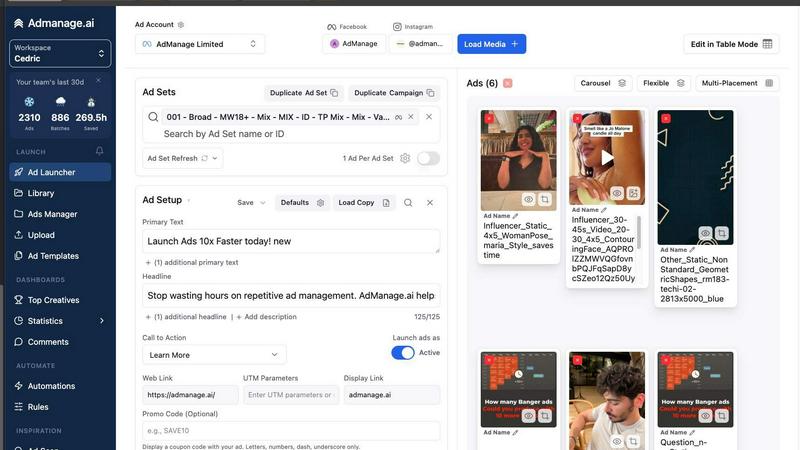
AdManage AI accelerates ad launches across multiple platforms, making your campaigns 10x faster and more efficient.
Last updated: February 26, 2026

Gleem.AI Studio streamlines your creative process, enabling effortless image generation, editing, and avatar creation.
Last updated: February 26, 2026
Visual Comparison
Admanage AI
Gleem.AI Studio

Feature Comparison
Admanage AI
Fast Ad Launching
Admanage AI features an ultra-fast user interface that allows marketers to launch ads ten times faster than traditional methods. This efficiency means you can focus on strategic decisions rather than getting lost in the minutiae of ad setup.
One-Click Ad Templates
With the ability to create one-click ad templates based on your best-performing creatives, Admanage AI streamlines the ad creation process. This feature ensures consistency and quality while saving time, allowing for rapid testing and iteration of ads.
Automated Multi-Format Grouping
Admanage AI automatically groups ads into various formats, including 9:16, 4:5, and 1:1, without requiring manual intervention. This feature significantly reduces the workload on marketers, enabling them to deploy ads tailored for different platforms quickly.
Google Sheets Integration
The free Google Sheets plugin allows for bulk ad launches directly from your spreadsheet. This seamless integration simplifies the process of managing multiple campaigns, making it easy to update and launch ads in bulk without the usual hassle.
Gleem.AI Studio
Text-to-Image Generator
Gleem.AI Studio's text-to-image generator allows users to transform their ideas into beautiful visuals effortlessly. By simply inputting their vision in natural language, users can create images in various sizes while the platform’s Prompt Enhance feature refines their words for optimal results.
AI Image Editing
With the integrated AI image editing capabilities, users can make adjustments without leaving the platform. Add or remove objects, modify poses, apply filters, and restore old images all within one intuitive editor, simplifying the editing process for everyone.
AI Avatars
Create and personalize AI avatars to integrate into any scene, all without the need for another photoshoot. Users can adjust poses, try on outfits, and explore numerous creative possibilities, making avatar generation both versatile and exciting.
Project Management
Gleem.AI Studio provides dedicated spaces for each project, keeping all saved prompts, edits, and versions organized. This feature enhances accessibility and ensures that users can easily build upon their previous work, facilitating faster and more efficient creative processes.
Use Cases
Admanage AI
High-Volume Campaigns
For brands running multiple campaigns simultaneously, Admanage AI provides the tools needed to launch hundreds of ads in seconds. This capability is essential for performance marketers who need to stay agile in a competitive landscape.
Creative Testing
Admanage AI is perfect for marketers focused on high-velocity creative testing. The platform allows users to quickly iterate and launch new creatives, enabling them to identify the most effective ads without wasting time on manual processes.
Streamlined Workflows
Integrating Admanage AI into your existing marketing stack can streamline workflows significantly. With its cloud storage integrations and automated rules, teams can manage their ad campaigns more efficiently, reducing errors and improving execution speed.
Enhanced Collaboration
Admanage AI supports collaboration among team members, making it easier to work together on campaigns. The platform’s user-friendly interface and template features facilitate teamwork, ensuring everyone is aligned and working towards the same goals.
Gleem.AI Studio
Marketing Campaigns
Marketers can leverage Gleem.AI Studio to create stunning visuals for campaigns, social media posts, and promotional materials. The streamlined workflow enables rapid iterations, allowing for creative exploration and quick adjustments based on feedback.
Content Creation for Social Media
Content creators can utilize the platform to generate eye-catching images and graphics tailored for various social media platforms. With the text-to-image generator and AI editing features, they can produce engaging visuals that captivate their audience.
Product Visualization
Small teams and entrepreneurs can use Gleem.AI Studio to design professional product images that enhance their brand presence. The ability to create and edit images in one place allows for quick adaptations to showcase products in unique ways.
Creative Projects
Artists and designers can explore their creativity without the constraints of complicated software. By using AI avatars and image editing tools, they can experiment with different styles and ideas, ultimately producing unique and compelling artwork.
Overview
About Admanage AI
Admanage AI is a revolutionary platform designed specifically for performance marketers who struggle with the inefficiencies of traditional Ads Managers. It enables users to launch ads at an unprecedented speed, allowing marketers to test hundreds of creatives daily instead of being bogged down by slow, clunky interfaces. The platform is tailored for high-velocity creative testing, ensuring that your ad workflow is faster, cleaner, and more reliable. With Admanage AI, you can automate tedious processes like media uploads and ad creation, freeing up valuable time to focus on strategy and creativity. Trusted by major brands like Bolt, Naked Wines, and Reading.com, Admanage AI empowers teams to execute high-volume ad campaigns with ease, launching nearly 1,000,000 ads a month across various platforms, including Meta and TikTok.
About Gleem.AI Studio
Gleem.AI Studio is an innovative AI image workspace designed to streamline the creative process for marketers, creators, and small teams. This unified platform eliminates the need for juggling multiple tools for image generation, editing, and revisions, allowing users to focus on creativity instead of technical configurations. With Gleem.AI Studio, creators can generate stunning visuals from text prompts, edit images with AI assistance, and manage projects all within a single, intuitive interface. This reduces the complexity often associated with graphic design, enabling faster iterations and seamless workflows. By providing comprehensive features like text-to-image generation, AI image editing, and avatar creation, Gleem.AI Studio empowers users to produce consistent and engaging visuals quickly and efficiently, making it an essential tool for anyone looking to enhance their visual content creation.
Frequently Asked Questions
Admanage AI FAQ
How does Admanage AI improve ad launch speed?
Admanage AI revolutionizes the ad launching process by providing a fast user interface and automated features, allowing users to launch ads up to ten times faster than traditional methods.
Can I customize my ad templates?
Yes, Admanage AI allows users to create one-click ad templates based on their best-performing ads. This feature ensures that your creatives maintain consistency while being optimized for performance.
Is there a way to manage ads in bulk?
Absolutely! Admanage AI includes a free Google Sheets plugin that enables marketers to manage and launch ads in bulk directly from their spreadsheets, simplifying the ad management process.
What types of integrations does Admanage AI support?
Admanage AI supports a range of integrations with popular cloud storage services such as Google Drive, Dropbox, and Frame.io, allowing for seamless media uploads and campaign management.
Gleem.AI Studio FAQ
What types of users can benefit from Gleem.AI Studio?
Gleem.AI Studio is designed for marketers, content creators, small teams, and anyone looking to produce high-quality visuals quickly and efficiently without the need for extensive technical knowledge.
How does the text-to-image generation work?
Users input their ideas in plain language, and the platform's AI processes these prompts, generating corresponding images. The Prompt Enhance feature further refines these prompts for improved outcomes.
Can I edit images after generating them?
Yes, Gleem.AI Studio allows users to edit images directly after generation. You can add or remove elements, adjust poses, and apply various filters all within the same workspace.
Is there a limit to the number of projects I can manage?
Gleem.AI Studio provides dedicated spaces for each project, allowing users to maintain multiple projects simultaneously. There is no stated limit, ensuring flexibility in managing creative workflows.
Alternatives
Admanage AI Alternatives
AdManage AI is an innovative advertising management platform designed for performance marketers. It streamlines the ad launch process across multiple platforms, allowing users to launch ads significantly faster and more efficiently than traditional native Ads Managers. This product is particularly useful for those engaged in high-velocity creative testing, enabling them to manage a large volume of ads seamlessly. Users often seek alternatives to AdManage AI due to various factors such as pricing, specific feature sets, integration capabilities, and overall platform compatibility with their unique marketing strategies. When searching for an alternative, it’s essential to consider features like ease of use, automation capabilities, integration with existing tools, and the ability to scale ad campaigns effectively without sacrificing quality or performance.
Gleem.AI Studio Alternatives
Gleem.AI Studio is an innovative all-in-one AI image workspace that streamlines the process of creating and editing visuals. Tailored for marketers, creators, and small teams, it eliminates the need for complex setups and tool switching, allowing users to focus on their creative flow. As a unified platform for image generation and editing, it promotes efficient workflows and fast iterations. Users often seek alternatives to Gleem.AI Studio due to varying needs in pricing, features, or specific platform requirements. When considering an alternative, it’s essential to evaluate factors such as ease of use, functionality, integration capabilities, and the overall support provided. Finding the right fit ensures that creators can maintain their momentum without unnecessary interruptions in their creative process.