
documentorium vs Vibrantsnap
Side-by-side comparison to help you choose the right product.

documentorium
Documentorium instantly creates professional contractor documents and PDFs with guided, trade-specific forms.
Last updated: March 26, 2026

Vibrantsnap
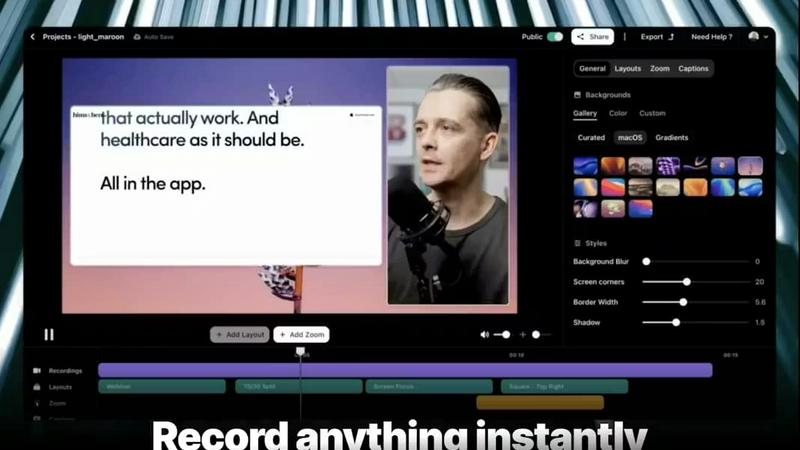
Transform screen recordings into polished, high-converting videos with AI editing, voiceovers, and real-time analytics.
Last updated: February 26, 2026
Visual Comparison
documentorium

Vibrantsnap
Feature Comparison
documentorium
Trade-Specific Template Library
Access a curated catalog of over 200 guided templates meticulously built for 26 distinct trades. Unlike generic form builders, each template—be it for a quote, inspection report, or warranty—contains fields and terminology specific to professions like electrical, plumbing, or roofing. This eliminates guesswork and ensures all necessary technical and compliance details are captured correctly from the start, projecting ultimate professionalism.
Guided Form Filling & Instant PDF Generation
Transform document creation from a chore into a swift, seamless process. Simply fill out the intuitive, step-by-step guided form. The platform then automatically structures and formats your inputs, delivering a clean, branded, and print-ready PDF document in mere seconds. There is no manual formatting, no wrestling with design tools—just instant, professional results that are ready to send to clients or file on the job site.
Complete Document History & Prefill
Every document you create is automatically saved in your personal, searchable history. This creates a powerful knowledge base for your business. More importantly, it allows the system to intelligently prefill information for repeat clients or similar projects on your next form, dramatically cutting down data entry time and ensuring consistency across all your business communications and records.
All-Access, Simple Subscription Model
Scale your documentation capabilities without complex tiered plans or per-document fees. documentorium operates on a straightforward, all-inclusive annual subscription. For one predictable price, you get full, unrestricted access to the entire template library and all platform features, enabling unlimited document creation and providing complete cost certainty as your business grows.
Vibrantsnap
Built-in Video Analytics
Gain valuable insights into viewer engagement with Vibrantsnap's built-in video analytics. Track who watched your videos, how many times they were viewed, and pinpoint where attention drops off. This information is crucial for understanding viewer behavior and optimizing your content strategy without any complicated setup.
Auto-Cut + Auto-Layout
The auto-cut and auto-layout features streamline the video creation process, removing silences and applying professional layouts automatically in just two clicks. This means users can produce high-quality, engaging videos in seconds, making it perfect for those without video editing experience.
Magic Edit
Vibrantsnap's Magic Edit feature automatically cleans your video by removing filler words and unnecessary pauses. This ensures that your content remains concise and engaging, allowing you to deliver your message effectively without spending hours on manual editing.
AI Voiceover
Enhance your videos with professional AI voiceovers that add a layer of polish and professionalism to your content. This feature is particularly beneficial for creators who may not have access to voiceover talent, ensuring that every video sounds as good as it looks.
Use Cases
documentorium
Winning More Jobs with Professional Proposals
A solar installer can move beyond back-of-the-napkin quotes. Using a trade-specific proposal template, they can quickly generate a detailed, polished document that outlines system specs, financing options, warranties, and timelines. This professional presentation builds immediate client trust, differentiates them from competitors using basic templates, and significantly increases their close rate on high-value projects.
Streamlining Field Service Reporting
An HVAC technician completing a maintenance call can use a guided service report form on their mobile device. With fields for model numbers, diagnostic readings, parts used, and recommendations, they capture all crucial data on-site. In seconds, they generate a PDF report to leave with the customer and save to the company's history, improving record-keeping and enabling clear, professional follow-up communication.
Managing Project Changes with Change Orders
For a general contractor, project scope changes are inevitable. Instead of creating ad-hoc documents, they use a dedicated change order template. The guided form ensures all legal and financial details—description of change, adjusted costs, new timelines, and client approval—are properly documented. This creates a clear, professional audit trail, prevents disputes, and ensures smooth project progression and billing.
Accelerating the Billing Cycle with Instant Invoices
A freelance electrician finishes a job and needs to invoice immediately to maintain cash flow. They select the invoice template, where client and job details are prefilled from the original quote. After adding hours and materials, they generate a professional PDF invoice on the spot and email it directly to the client before even leaving the site, dramatically reducing payment delays.
Vibrantsnap
Product Demos
Creating product demos has never been easier with Vibrantsnap. Record your screen to showcase your software or app in action. The polished videos help potential customers understand your product's value quickly, leading to higher conversion rates.
Educational Tutorials
Vibrantsnap is ideal for educators and trainers looking to create engaging tutorials. The auto-edit feature ensures that content is clear and focused, making learning more efficient and enjoyable for students.
Marketing Campaigns
Use Vibrantsnap to produce compelling marketing videos that capture attention. Whether for social media or email campaigns, the ability to create professional-looking videos quickly can significantly enhance your marketing efforts.
Sales Presentations
Sales teams can benefit from Vibrantsnap by creating impactful video presentations. With built-in analytics, you can track engagement and refine your approach based on viewer feedback, ultimately increasing your sales success.
Overview
About documentorium
documentorium is the growth-focused document engine engineered for the modern tradesperson. It eliminates the friction of starting from a blank page, empowering electricians, plumbers, contractors, HVAC techs, roofers, and every service professional in between to scale their operations with unparalleled efficiency. The platform is built on a simple, powerful premise: guided forms that generate professional, print-ready PDFs in seconds. With a deep catalog of over 200 purpose-built templates across 26 trade categories, documentorium ensures you're never wasting time adapting generic forms. Every field, from line items to technical specifications, is designed with your specific trade in mind, guaranteeing accuracy and professionalism. This isn't just about creating documents; it's about systematizing your business development, accelerating your sales cycle, and presenting a consistently polished brand image that wins more bids and builds greater trust. By transforming administrative overhead into a streamlined, repeatable process, documentorium becomes a core operational asset, freeing up valuable time to focus on what you do best—delivering exceptional service and driving revenue.
About Vibrantsnap
Vibrantsnap is an innovative AI-powered video creation tool designed specifically for startups, product founders, and creators looking to enhance their online presence. It addresses a common challenge faced by many: potential customers often leave websites without fully grasping the product's value due to lengthy explanations and static images. Vibrantsnap transforms this experience by enabling users to create engaging product videos quickly and efficiently. With its user-friendly interface and automated features, Vibrantsnap empowers users to produce polished videos that not only showcase their products but also significantly boost conversion rates. By eliminating the burdens of video editing, it allows founders to focus on what truly matters—growing their business and connecting with their audience.
Frequently Asked Questions
documentorium FAQ
Can I cancel my subscription anytime?
Absolutely. You are in full control of your subscription. You can cancel directly from your account settings at any time. Your access will remain active until the end of your current billing period, after which it will not renew. There are no penalties, lock-in contracts, or hidden fees—just simple, transparent flexibility.
What happens when my free trial ends?
When your one-month free trial concludes, all the documents you created remain securely stored in your account history and are fully accessible. To begin creating and editing new documents, you will need to activate a paid subscription. No data or existing documents are ever deleted upon trial expiration.
Do I lose my documents if I don't subscribe?
No, you do not lose access to your work. Your document history is preserved. You can log in, view, and download any documents you created during your active period (trial or subscription) at any time. A subscription is required to create and edit new documents, but your historical data remains yours.
Does documentorium provide legal advice?
No. documentorium is a powerful document generation tool designed to save time and ensure professionalism. The templates and forms are created for business use, but they are not a substitute for professional legal counsel. Users are responsible for ensuring their documents meet specific local, state, and contractual requirements for their business.
Vibrantsnap FAQ
How long does it take to create a video with Vibrantsnap?
Creating a video with Vibrantsnap can take just minutes. Once you record your screen, the auto-edit and layout features quickly polish your video, allowing you to focus on sharing your message.
Is Vibrantsnap suitable for beginners with no video editing experience?
Absolutely! Vibrantsnap is designed with ease of use in mind. Its automated features require no editing skills, making it accessible for beginners and busy founders alike.
What types of videos can I create with Vibrantsnap?
You can create a variety of videos, including product demos, tutorials, marketing videos, and sales presentations. The flexibility of the tool allows for diverse content creation tailored to your needs.
Can I track the performance of my videos?
Yes, Vibrantsnap includes built-in video analytics that allow you to monitor views, clicks, and engagement metrics in real time. This information helps you refine your strategy and improve future videos.
Alternatives
documentorium Alternatives
documentorium is a specialized document engine in the contractor productivity space, designed to help tradespeople generate professional PDFs like quotes and invoices from guided templates. Users often explore alternatives for various reasons, such as needing different pricing tiers, specific integrations with other job management software, or a platform that better matches their business's unique workflow and scale. When evaluating other solutions, it's crucial to look beyond generic features. The right tool should offer deep trade-specific functionality, streamline your entire document lifecycle from bid to payment, and scale efficiently as your client base and service offerings grow. Prioritize platforms that eliminate busywork, allowing you to focus on high-value work that drives business forward.
Vibrantsnap Alternatives
Vibrantsnap is an innovative screen recording tool designed to help users create polished product demos quickly and efficiently. As part of the productivity and management category, it empowers founders and marketers to transform their complex ideas into engaging videos that boost conversion rates. Users often search for alternatives due to various reasons, such as pricing concerns, specific feature requirements, or compatibility with different platforms. When choosing an alternative, consider factors like ease of use, the quality of the output, available analytics, and the ability to streamline the video creation process without requiring extensive editing skills.