
Customer Connect CRM vs Prompt Builder
Side-by-side comparison to help you choose the right product.

Customer Connect CRM
Customer Connect CRM uses AI to centralize leads and accelerate sales effortlessly.
Last updated: February 28, 2026

Prompt Builder
Generate, optimize, test, and manage AI prompts in one place. Turn an idea into a ready-to-use prompt in seconds.
Visual Comparison
Customer Connect CRM

Prompt Builder
Overview
About Customer Connect CRM
Customer Connect CRM is the intelligent sales engine purpose-built for ambitious startups and scaling SMBs. It transforms the chaotic, friction-filled process of lead management into a streamlined, high-velocity pipeline that accelerates growth. Designed for entrepreneurs and teams tired of overspending on bloated, complex systems their team avoids, it centralizes every inquiry—from website forms, email inboxes, and direct messages—into a single, visual command center. With a core philosophy of "less hassle, more deals," the platform empowers your team to follow up faster, never miss an opportunity, and close more business by leveraging smart AI automation without the administrative burden. It’s the essential tool for founders who value simplicity, speed, and scalable growth, turning lead management from a chore into a true competitive advantage. Customer Connect is specifically crafted to eliminate the small obstacles that have a big impact on sales, giving you full control and enabling scalable, efficient operations.
About Prompt Builder
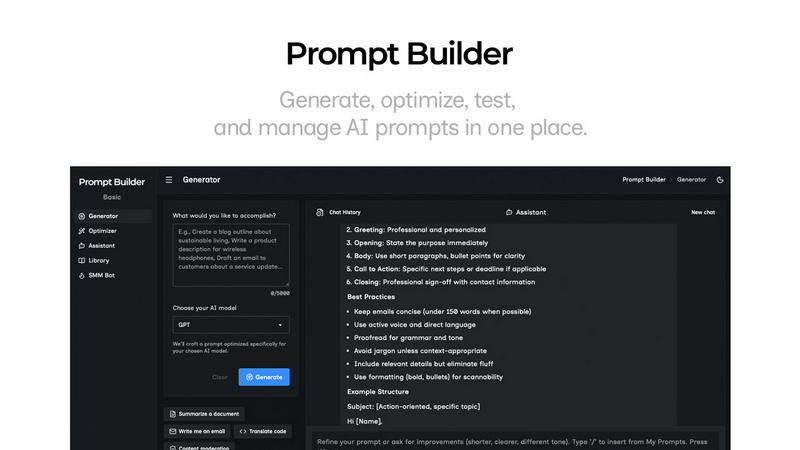
Prompt Builder is a prompt engineering workspace for writing, testing, and saving prompts. Describe the task in plain English, and it helps you create a prompt that matches the model you choose. Start with a draft, refine it in chat, save or pin versions, then run them when you are ready. It works with GPT, Claude, Gemini, Llama, Mistral, DeepSeek, Grok, Perplexity, and more. You also get an Optimizer, an assistant for quick tests, and a library of reusable prompts and templates from the community. Turn an idea into a ready-to-use prompt in seconds. Refine it in chat, save it to your Library, and run it anytime.