
Cosy vs Perkoon
Side-by-side comparison to help you choose the right product.

Cosy automates Slack onboarding and intros to grow your community effortlessly.
Last updated: February 28, 2026

Perkoon enables free unlimited peer-to-peer file transfers with no signup needed, keeping your files private and secure.
Last updated: March 4, 2026
Visual Comparison
Cosy
Perkoon

Feature Comparison
Cosy
Automated Onboarding Sequences
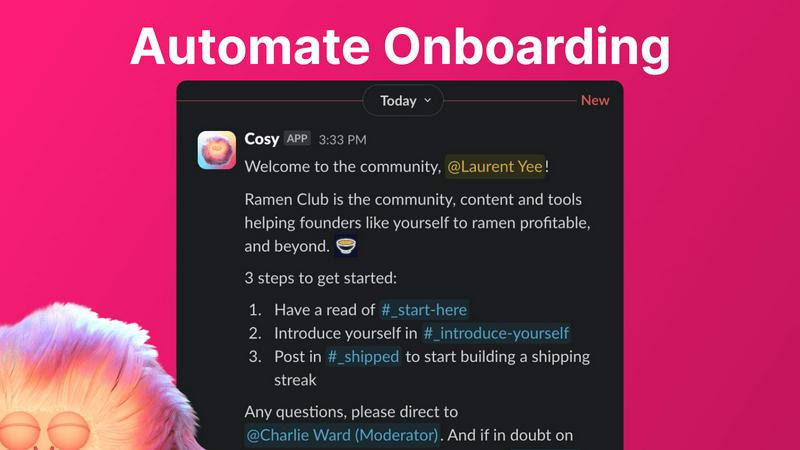
Effortlessly welcome every new member with personalized, automated direct messages. Configure up to 10 distinct DM sequences that trigger the moment someone joins your Slack workspace. Fully customize message content, include member names and links, and set precise time delays—from immediate sends to follow-ups months in the future. Sequences can be sent from you, a team member, or the Cosy bot, ensuring a warm, consistent welcome 24/7. This automation saves countless hours of manual outreach and guarantees no new member is ever overlooked, laying the foundation for immediate engagement.
Intelligent Member Introductions
Foster serendipitous connections and grow engagement by automatically introducing community members to each other via DMs. Opted-in members are randomly paired on a customizable cadence—every 1, 2, 3, or 4 weeks—at a time you choose. Introductions happen in a 3-person DM with the Cosy bot, complete with a customizable template message to kickstart the conversation. The system intelligently avoids recent matches, ensuring fresh connections and enhancing the sense of a dynamic, interconnected community where relationships form on autopilot.
Searchable In-Slack Member Directory
Build a rich, searchable knowledge base of your community without anyone ever leaving Slack. Create a custom directory with up to 10 fields (text, single-select, or multi-choice) for members to fill out. Prompt all members to build their profiles with one click, and new joiners automatically receive a profile prompt 24 hours after joining. Members can then search for keywords and filter profiles directly within Slack using the Cosy app or a simple /member-directory slash command, making it easy to find the right people and expertise.
Content Highlights & Moderation
Gain instant visibility into your community's pulse with powerful slash commands. Surface the top 10 most engaging posts in a specific channel or across all public channels to recognize valuable contributions and trending topics. Alternatively, quickly identify unanswered questions or overlooked messages with the /unreplied-messages command. Cosy also provides automated moderation, instantly flagging abusive and spam messages to maintain a safe, positive environment, giving leaders superpowers to guide community health and highlight excellence effortlessly.
Perkoon
Peer-to-Peer (P2P) File Transfer
Perkoon’s flagship feature allows users to send files directly to one another without the need for an account or server intervention. This P2P technology means unlimited file sizes and complete privacy, as files are transferred directly between browsers during real-time sessions.
Encrypted Cloud Storage
For occasions when recipients are offline, Perkoon provides a secure cloud storage option. This feature ensures that files are encrypted on the server, making them accessible only to intended recipients while covering the costs of server maintenance transparently.
Automation and AI Integration
Recognizing the growing role of AI in everyday tasks, Perkoon includes built-in tools for automation. This allows AI agents to interact with the service directly, streamlining the file transfer process without needing screen-scraping methods, which enhances usability and efficiency.
Unique Referral Program
Perkoon incentivizes users to share the service through its referral program. By sharing a unique link, users can earn additional storage space for themselves and their referrals, creating a community-driven ecosystem that rewards sharing and collaboration.
Use Cases
Cosy
Scaling Startup Communities
For fast-growing startups, manually managing a burgeoning Slack community is unsustainable. Cosy automates the critical touchpoints of member onboarding and connection, allowing founders and small teams to scale their community operations effortlessly. By ensuring every new member is welcomed personally and introduced to peers, Cosy helps maintain a high-touch, engaged atmosphere even as member counts soar, turning the community into a powerful asset for product feedback, support, and advocacy without proportional increases in manual effort.
Boosting Engagement for Paid Communities
Community managers of paid memberships or premium Slack groups need to demonstrate clear value to retain members. Cosy directly drives engagement by automating 1:1 introductions, fostering networking that members love. The searchable member directory helps members find collaborators, clients, or mentors, enhancing the perceived ROI of their membership. Automatically highlighting top content also rewards active contributors and sets quality benchmarks, creating a more vibrant and valuable ecosystem that justifies the subscription cost.
Streamlining Internal Team Culture
Beyond external communities, Cosy is perfect for unifying remote or hybrid internal teams. Use automated onboarding sequences for new hires to integrate them smoothly into company culture and channels. Schedule regular intro DMs between employees across different departments to break down silos and encourage cross-functional collaboration. The member directory helps team members quickly find colleagues with specific skills or interests, fostering a more connected, cohesive, and productive organizational culture directly within the company's primary communication hub.
Managing Large-Scale Events or Cohorts
For organizations running cohorts, accelerators, or virtual events, Cosy efficiently manages participant integration. Automate a sequence of welcome and informational DMs as participants join the dedicated Slack workspace. Use scheduled introductions to encourage networking among attendees, maximizing the value of the event. The content highlight feature allows organizers to easily spot and amplify the best discussions and questions from the community, ensuring key insights don't get lost in busy channels.
Perkoon
Quick File Sharing for Teams
Teams working on collaborative projects can utilize Perkoon for instant file sharing. By leveraging the P2P feature, team members can exchange large files in real time without worrying about size restrictions or complicated sign-up processes.
Secure Personal File Transfers
Individuals looking to transfer sensitive documents can rely on Perkoon’s encrypted cloud storage for added security. This feature is especially useful for sharing personal information, ensuring that files are only accessible to the intended recipient.
Automation for Developers
Developers can integrate Perkoon into their workflows using the CLI tool and automation features. This allows for seamless file transfers between development environments and production systems, enhancing productivity while maintaining security.
Community Engagement and Growth
Using the referral program, users can engage their networks while benefiting from additional storage. This makes Perkoon not just a file transfer service but a platform that grows through community involvement, rewarding users for sharing the experience.
Overview
About Cosy
Cosy is the essential automation engine for building vibrant, self-sustaining communities directly within Slack. Designed for forward-thinking community managers, startup founders, and team leaders, Cosy eliminates the manual, repetitive workload that stifles growth and engagement. Its core mission is to automate the fundamental pillars of community building—onboarding, connection, discovery, and moderation—so leaders can focus on strategy and scale. By operating natively inside Slack, Cosy seamlessly integrates into your team's existing workflow, saving hours every week while fostering deeper member connections and surfacing actionable insights. From the moment a new member joins, Cosy delivers personalized welcome sequences, even while you sleep. It then continuously works to spark meaningful 1:1 introductions and provides a powerful, searchable member directory to break down silos. Beyond fostering connections, Cosy empowers leaders with tools to automatically highlight top-performing content and instantly flag spam. For any team looking to transform a simple Slack group into a thriving, productive, and cohesive ecosystem, Cosy provides the scalable infrastructure to drive engagement, streamline operations, and ensure every member feels valued from day one.
About Perkoon
Perkoon is a revolutionary file transfer service designed with simplicity and privacy at its core. It caters to individuals and businesses tired of conventional file sharing methods that impose artificial limits and unnecessary sign-ups. Perkoon eliminates these barriers by enabling hassle-free file transfers directly between users. Built on peer-to-peer (P2P) technology, Perkoon allows users to send files directly from browser to browser when both parties are online, ensuring no size limits and no intermediary servers involved. This unique approach guarantees that your data remains private and secure. For situations where recipients are offline, Perkoon offers encrypted cloud storage as a paid feature, providing users with flexibility without compromising security. Additionally, Perkoon is designed for the modern age of AI, offering automation tools and a simple CLI tool for seamless integration with AI agents. With a commitment to providing a straightforward and powerful solution, Perkoon is the answer for those seeking a trustworthy file transfer service.
Frequently Asked Questions
Cosy FAQ
How does Cosy handle privacy and data?
Cosy operates with a strong commitment to privacy. It only accesses and uses data from your Slack workspace that is necessary to provide its features, such as member profiles and public channel messages for highlights. Introductions are only made between members who have opted into the matching feature. You maintain full control over the data collected for the member directory, and all interactions comply with Slack's platform policies and best practices for data security.
Can I customize the onboarding messages?
Absolutely. Cosy offers deep customization for onboarding sequences. You can create up to 10 different message steps, fully customizing the text, including emojis, links, and personalization tokens like the member's first name. You also have complete control over the timing, setting delays between messages in minutes, hours, or even months, allowing you to design a sophisticated, multi-touch welcome journey tailored to your community's needs.
What happens if a member replies to an automated DM?
If your onboarding or intro DMs are configured to be sent from you or a team member (using a shared workspace token), the recipient can reply just like a normal DM, and the reply will go to that person's Slack inbox. This allows for genuine, human follow-up. If messages are sent from the Cosy bot, the bot is currently designed not to respond to replies, keeping the interaction simple and expectation-free.
Is there a free plan available?
Yes, Cosy offers a generous free tier. You can use Cosy for free for communities with up to 250 members. For communities that need to scale beyond that, there is a full-featured, unlimited members plan that starts with a 30-day free trial, allowing you to test all premium features with your entire community before making any commitment.
Perkoon FAQ
How does Perkoon ensure my files remain private?
Perkoon uses P2P technology for file transfers, meaning your files do not pass through centralized servers. This ensures total privacy, as no one, including Perkoon, has access to your transferred data.
What happens if the recipient is offline?
If the recipient is offline, Perkoon offers encrypted cloud storage to hold the file safely until the recipient is available to download it. This ensures that your files are secure and accessible at their convenience.
Can I use Perkoon on any browser?
Perkoon works seamlessly with Chrome, Edge, and Brave browsers without any limitations. However, users of Firefox and Safari may encounter some restrictions due to the way these browsers handle P2P connections.
Is there a cost associated with using Perkoon?
The P2P file transfer service is completely free, as it incurs no costs for Perkoon to operate. However, if you choose to use the encrypted cloud storage feature when the recipient is offline, that will come with a fee to cover server costs.
Alternatives
Cosy Alternatives
Cosy is a Slack-native automation platform in the productivity and management category, designed to automate community onboarding and member connections. It saves community managers and founders hours by handling repetitive tasks directly within their Slack workspace. Users often explore alternatives for various reasons, such as budget constraints, the need for features beyond Slack integration, or a preference for a different user interface. The search for the right tool is driven by the unique scaling challenges and operational needs of each growing community. When evaluating options, focus on core automation capabilities, seamless platform integration, and scalability. The ideal solution should not only save time on manual tasks but also actively foster member engagement and provide actionable insights to support your community's growth trajectory.
Perkoon Alternatives
Perkoon is an innovative file transfer service that simplifies the process of sharing files without the usual constraints of sign-ups or limitations. It falls into the productivity and management category, appealing to users who value efficiency and privacy in their digital interactions. With its unique peer-to-peer technology, Perkoon allows for seamless file transfers directly between browsers, making it a go-to choice for individuals and teams who desire straightforward solutions to their file-sharing needs. Users often seek alternatives to Perkoon for various reasons, including pricing structures, feature sets, and compatibility with different platforms. Some may require more advanced functionalities or storage options, while others may be looking for services tailored to specific use cases. When selecting an alternative, it’s essential to consider factors such as ease of use, security measures, and the availability of features that align with your specific needs. A thoughtful comparison will help you find a solution that best fits your file transfer requirements.