
Code Word Solver - Missing Words Finder vs PseudoRun
Side-by-side comparison to help you choose the right product.

Code Word Solver - Missing Words Finder
Unlock your coding potential with our Code Word Solver, effortlessly finding missing words and solving puzzles fast.
Last updated: February 26, 2026

PseudoRun
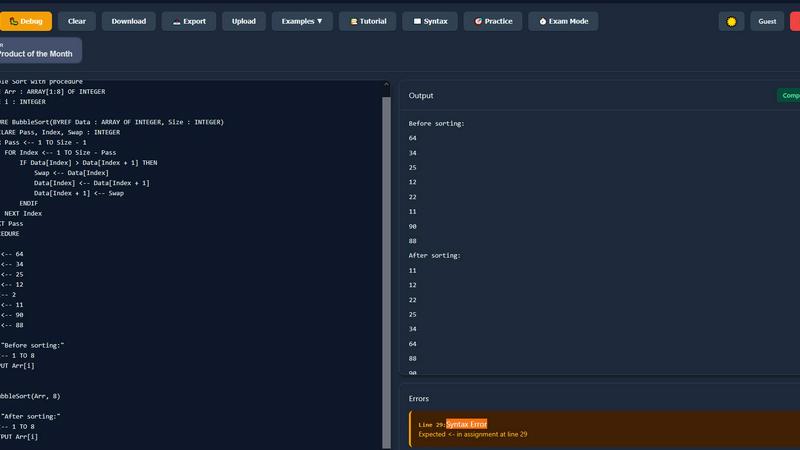
PseudoRun is the ultimate free platform for mastering IGCSE pseudocode with real-time validation and instant feedback.
Last updated: March 1, 2026
Visual Comparison
Code Word Solver - Missing Words Finder

PseudoRun
Feature Comparison
Code Word Solver - Missing Words Finder
Pattern Input Flexibility
The tool allows users to enter known letters, using symbols like '.' or '?' for unknown letters. This flexibility ensures that puzzlers can express their uncertainty while still receiving accurate suggestions for potential matches.
Multi-Pattern Solving
With the option to input two patterns simultaneously, this feature is particularly useful for solving linked words. It allows users to explore relationships between words that share the same letter-number mappings, increasing efficiency in solving complex puzzles.
Customizable Dictionary Size
Code Word Solver offers three distinct dictionary sizes: Hard (260k words), Normal (115k words), and Easy (20k words). This feature gives users the ability to choose the difficulty level that best suits their experience and skill, making the tool adaptable to different user needs.
Community-Driven Word Enhancement
Users can contribute to the tool's database by submitting new words or definitions. This community-powered feature ensures that the word coverage continually improves, enhancing the overall effectiveness of the solver for everyone.
PseudoRun
IGCSE Exam Focused
PseudoRun is meticulously aligned with the Cambridge IGCSE Computer Science pseudocode specifications and exam patterns. This ensures that students can practice in a manner that mirrors the actual exam conditions, thereby increasing their preparedness and confidence.
Real-Time Validation
With instant syntax checking and error detection, PseudoRun allows users to write flawless IGCSE pseudocode. This feature helps students identify and rectify issues on the fly, enhancing their understanding and proficiency in coding.
Step-by-Step Debugger
The step-by-step debugger is designed for a comprehensive learning experience, enabling users to execute their code line by line. This feature offers variable tracking, providing deeper insights into algorithm behavior, which is critical for mastering complex concepts.
Free Cloud Storage
PseudoRun provides unlimited cloud storage for all pseudocode programs, ensuring users can save their work and access it from any device. This feature not only aids in exam preparation but also promotes continuous learning without the fear of losing important progress.
Use Cases
Code Word Solver - Missing Words Finder
Beginner Puzzle Solving
For those new to codeword puzzles, the Code Word Solver provides an invaluable resource. Beginners can input simple patterns and receive immediate suggestions, making it easier to understand the structure and strategies of codeword solving.
Competitive Puzzle Solving
Experienced puzzlers can leverage the multi-pattern solving feature during competitions or timed challenges. This advanced functionality helps them maximize their efficiency and accuracy under pressure, giving them a competitive edge.
Collaborative Puzzles
Groups of friends or family members enjoying codeword puzzles together can utilize the solver to collaborate more effectively. By sharing patterns and potential solutions, they can enhance the group-solving experience and tackle tougher puzzles.
Continuous Learning and Improvement
Puzzle enthusiasts can use the tool not just for solving but also for learning. By analyzing the suggestions provided for different patterns, users can expand their vocabulary and understanding of word structures, thereby improving their future puzzle-solving skills.
PseudoRun
Exam Preparation
Students can use PseudoRun as a vital tool for exam preparation, practicing IGCSE-style pseudocode problems and receiving immediate feedback. This allows for targeted study and efficient use of time leading up to exams.
Classroom Learning
Educators can integrate PseudoRun into their teaching methodologies, using it as a practical tool to demonstrate algorithm concepts. The interactive features make it an excellent resource for enhancing classroom engagement.
Independent Study
For self-motivated learners, PseudoRun serves as an ideal platform for independent study. Users can explore various pseudocode problems, test algorithms, and refine their skills at their own pace without the constraints of a traditional classroom.
Algorithmic Thinking Development
PseudoRun fosters a deeper understanding of algorithmic thinking. By allowing users to visualize and interact with algorithm execution, it cultivates critical problem-solving skills essential for success in Computer Science.
Overview
About Code Word Solver - Missing Words Finder
Code Word Solver - Missing Words Finder is an innovative tool designed specifically for enthusiasts of codeword puzzles. It simplifies the process of cracking these challenging puzzles by allowing users to input known letter patterns and receive potential word matches. This functionality eliminates guesswork, empowering users to decode the grid with confidence and speed. Whether you are just beginning your journey into codewords or are a seasoned pro, this tool caters to all skill levels and enhances your puzzle-solving experience. The solver effectively maps letters to numbers (1-26), enabling users to maintain consistent letter relationships throughout the puzzle. With options for both single and multi-pattern solving, it caters to various puzzle complexities and enhances your ability to tackle linked words efficiently.
About PseudoRun
PseudoRun is the premier, free online platform tailored specifically for IGCSE Computer Science students aiming to master pseudocode. It serves as an interactive pseudocode editor and simulator, uniquely designed to bridge the gap between theoretical knowledge and practical application. With a user-friendly interface, PseudoRun enables learners to write, run, debug, and test algorithms in real-time, removing the complexities often associated with traditional programming environments. Our mission is clear: to democratize access to quality exam preparation tools that align perfectly with Cambridge IGCSE specifications, all while ensuring a distraction-free experience. By eliminating ads and premium paywalls, we empower students, educators, and novices to build confidence, enhance their learning processes, and achieve academic success. PseudoRun features instant validation, step-by-step debugging, and a rich library of practice problems, all designed to prioritize student privacy and focused learning. Join us in transforming the way students engage with algorithmic thinking and IGCSE Computer Science.
Frequently Asked Questions
Code Word Solver - Missing Words Finder FAQ
How does the Code Word Solver work?
The Code Word Solver works by allowing users to input known letter patterns and utilizing those to filter potential word matches. It uses a unique mapping system where letters correspond to numbers, helping users solve puzzles with clarity.
What should I do if I find a word not in the database?
If you encounter a word that is not in the database, you can submit it along with its definition to enhance the tool's coverage. This community contribution helps improve the solver for all users over time.
Can I use the solver on my mobile device?
Yes, the Code Word Solver is designed to be accessible on various devices, including mobile phones, tablets, and computers, allowing you to solve puzzles on the go.
Are there any tips for using the pattern input effectively?
To maximize the effectiveness of the pattern input, use '.' or '?' for unknown letters and numbers for repeated unknown letters. For instance, the pattern '11.E' will return words like "ooze". Refer to the instructions for detailed guidance.
PseudoRun FAQ
What is PseudoRun?
PseudoRun is a free online platform designed specifically for IGCSE Computer Science students to learn and practice pseudocode through an interactive editor and simulator.
How does real-time validation work?
The real-time validation feature checks the syntax of your pseudocode as you write, providing instant feedback on errors and helping you correct them immediately for better learning outcomes.
Is PseudoRun really free?
Yes, PseudoRun is completely free to use, with no ads or premium features. We believe in providing accessible learning tools to all students.
Can I access my work from different devices?
Absolutely! PseudoRun offers free cloud storage, allowing you to save your pseudocode programs and access them from any device, making it convenient for study anytime and anywhere.
Alternatives
Code Word Solver - Missing Words Finder Alternatives
Code Word Solver - Missing Words Finder is an innovative tool designed to assist users in cracking codeword puzzles by narrowing down possible answers based on known patterns. It falls under the category of puzzle-solving aids, providing a user-friendly platform for both casual players and serious enthusiasts. As users engage with codeword puzzles, they often seek alternatives due to varying needs such as pricing, specific features, or compatibility with different platforms. When selecting an alternative, it’s essential to consider factors such as the size of the word database, the flexibility of the pattern input method, and the overall user experience. A solution that caters to individual puzzle-solving styles and offers a robust community-driven word list can enhance the coding experience.
PseudoRun Alternatives
PseudoRun is a cutting-edge online platform designed specifically for IGCSE Computer Science students to learn and master pseudocode. As a free resource, it serves as an interactive editor and simulator, eliminating the need for complex setups and allowing users to write, run, debug, and test algorithms with ease. Users often seek alternatives for various reasons, including the need for specific features, user interface preferences, or compatibility with different learning styles. When selecting an alternative, it's crucial to consider factors such as alignment with curriculum standards, real-time feedback capabilities, and overall user experience to ensure effective learning outcomes.