
Code Word Solver - Missing Words Finder vs LessonPlanGenerator
Side-by-side comparison to help you choose the right product.

Code Word Solver - Missing Words Finder
Unlock your coding potential with our Code Word Solver, effortlessly finding missing words and solving puzzles fast.
Last updated: February 26, 2026

LessonPlanGenerator
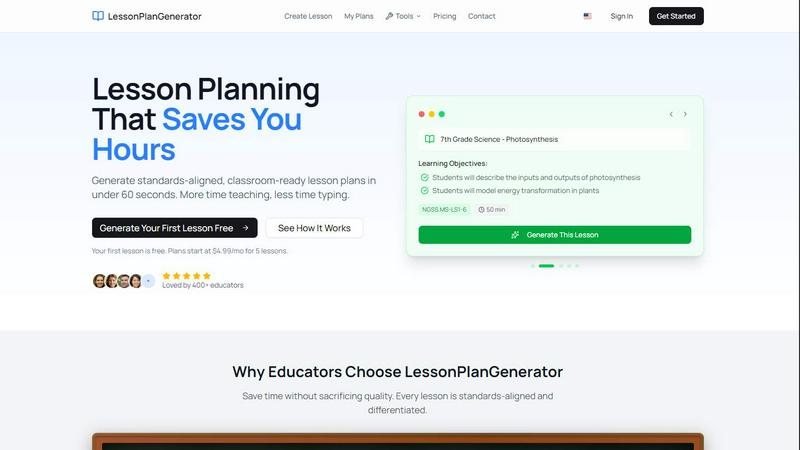
Effortlessly create standards-aligned lesson plans in under 60 seconds, freeing educators to focus on teaching.
Last updated: February 26, 2026
Visual Comparison
Code Word Solver - Missing Words Finder

LessonPlanGenerator
Feature Comparison
Code Word Solver - Missing Words Finder
Pattern Input Flexibility
The tool allows users to enter known letters, using symbols like '.' or '?' for unknown letters. This flexibility ensures that puzzlers can express their uncertainty while still receiving accurate suggestions for potential matches.
Multi-Pattern Solving
With the option to input two patterns simultaneously, this feature is particularly useful for solving linked words. It allows users to explore relationships between words that share the same letter-number mappings, increasing efficiency in solving complex puzzles.
Customizable Dictionary Size
Code Word Solver offers three distinct dictionary sizes: Hard (260k words), Normal (115k words), and Easy (20k words). This feature gives users the ability to choose the difficulty level that best suits their experience and skill, making the tool adaptable to different user needs.
Community-Driven Word Enhancement
Users can contribute to the tool's database by submitting new words or definitions. This community-powered feature ensures that the word coverage continually improves, enhancing the overall effectiveness of the solver for everyone.
LessonPlanGenerator
60-Second Generation
With LessonPlanGenerator, teachers can create complete lesson plans in just 60 seconds. By simply entering the topic, grade, and subject, users receive a structured lesson plan quickly, eliminating the frustration of staring at a blank template and saving precious time.
Standards Alignment
The platform includes built-in alignment with Common Core State Standards (CCSS), Next Generation Science Standards (NGSS), and various state standards. Visual alignment checks help educators identify any gaps in standards compliance before their administrators do, ensuring that all lesson plans meet necessary requirements.
Differentiation Built In
LessonPlanGenerator automatically incorporates differentiation strategies tailored for diverse learners. This includes English Language Learner (ELL) supports, Individualized Education Program (IEP) accommodations, and extensions for gifted students, making every lesson accessible to all students.
Easy Export Options
Teachers can export their generated lesson plans with just a click. Whether in Google Docs or PDF format, the exported plans are ready for immediate use, whether for a substitute teacher or for administrative review, making the process seamless and efficient.
Use Cases
Code Word Solver - Missing Words Finder
Beginner Puzzle Solving
For those new to codeword puzzles, the Code Word Solver provides an invaluable resource. Beginners can input simple patterns and receive immediate suggestions, making it easier to understand the structure and strategies of codeword solving.
Competitive Puzzle Solving
Experienced puzzlers can leverage the multi-pattern solving feature during competitions or timed challenges. This advanced functionality helps them maximize their efficiency and accuracy under pressure, giving them a competitive edge.
Collaborative Puzzles
Groups of friends or family members enjoying codeword puzzles together can utilize the solver to collaborate more effectively. By sharing patterns and potential solutions, they can enhance the group-solving experience and tackle tougher puzzles.
Continuous Learning and Improvement
Puzzle enthusiasts can use the tool not just for solving but also for learning. By analyzing the suggestions provided for different patterns, users can expand their vocabulary and understanding of word structures, thereby improving their future puzzle-solving skills.
LessonPlanGenerator
Streamlined Planning for Classroom Teachers
Classroom teachers can utilize LessonPlanGenerator to save time on lesson planning, allowing them to focus on engaging their students. The platform's quick generation feature means they can prepare multiple lessons in a fraction of the time, enhancing their overall teaching effectiveness.
Support for Homeschool Families
Homeschool educators benefit from the flexible pacing options offered by LessonPlanGenerator, which allows them to tailor lesson plans according to their family's unique schedule. Multiple grade levels can be managed under one subscription, providing a comprehensive solution for homeschooling needs.
Efficient Substitute Teaching Preparation
Substitute teachers can rely on LessonPlanGenerator to quickly generate ready-to-use lesson plans that ensure continuity in student learning. This is particularly valuable for schools that require immediate and effective lesson delivery in the absence of regular teachers.
Administrative Compliance and Oversight
Instructional coaches and administrators can use the platform to ensure that lesson plans meet district standards and requirements. With automatic alignment checks, they can easily review lesson plans for compliance, streamlining the oversight process and enhancing educational quality.
Overview
About Code Word Solver - Missing Words Finder
Code Word Solver - Missing Words Finder is an innovative tool designed specifically for enthusiasts of codeword puzzles. It simplifies the process of cracking these challenging puzzles by allowing users to input known letter patterns and receive potential word matches. This functionality eliminates guesswork, empowering users to decode the grid with confidence and speed. Whether you are just beginning your journey into codewords or are a seasoned pro, this tool caters to all skill levels and enhances your puzzle-solving experience. The solver effectively maps letters to numbers (1-26), enabling users to maintain consistent letter relationships throughout the puzzle. With options for both single and multi-pattern solving, it caters to various puzzle complexities and enhances your ability to tackle linked words efficiently.
About LessonPlanGenerator
LessonPlanGenerator is an innovative AI-powered Software as a Service (SaaS) platform designed specifically for educators who seek to streamline the lesson planning process. By enabling teachers to generate high-quality, standards-aligned lesson plans in under 60 seconds, this tool transforms the way educators manage their classroom preparation. Unlike generic AI chatbots, LessonPlanGenerator emphasizes a curriculum-first workflow that allows users to select their grade level, subject matter, state standards, time constraints, and classroom context. This tailored approach results in structured lesson plans that are ready for immediate classroom use. Beyond lesson plans, the platform also generates assessments, rubrics, worksheets, and supporting materials, all aligned to the same educational standards. This ensures that teachers can effectively reduce their planning time while meeting compliance with administrative and district requirements. Designed for K-12 teachers, substitute teachers, instructional coaches, and homeschool educators, LessonPlanGenerator empowers users to focus more on teaching and less on planning.
Frequently Asked Questions
Code Word Solver - Missing Words Finder FAQ
How does the Code Word Solver work?
The Code Word Solver works by allowing users to input known letter patterns and utilizing those to filter potential word matches. It uses a unique mapping system where letters correspond to numbers, helping users solve puzzles with clarity.
What should I do if I find a word not in the database?
If you encounter a word that is not in the database, you can submit it along with its definition to enhance the tool's coverage. This community contribution helps improve the solver for all users over time.
Can I use the solver on my mobile device?
Yes, the Code Word Solver is designed to be accessible on various devices, including mobile phones, tablets, and computers, allowing you to solve puzzles on the go.
Are there any tips for using the pattern input effectively?
To maximize the effectiveness of the pattern input, use '.' or '?' for unknown letters and numbers for repeated unknown letters. For instance, the pattern '11.E' will return words like "ooze". Refer to the instructions for detailed guidance.
LessonPlanGenerator FAQ
Is there a free option?
Yes, LessonPlanGenerator offers a free option that allows users to create one lesson per month at no cost. This enables educators to try the platform before committing to a paid plan.
How does pricing work?
The pricing structure includes several subscription tiers, starting with a free plan that allows for one lesson per month. Paid plans offer additional lessons at competitive rates, providing flexibility for individual needs.
What subjects and grades do you support?
LessonPlanGenerator supports a wide variety of subjects across all K-12 grade levels. This ensures that educators from different disciplines can utilize the platform for their specific teaching requirements.
Which standards are supported?
The platform supports major educational standards, including Common Core State Standards (CCSS) and Next Generation Science Standards (NGSS), along with specific state standards. This alignment helps teachers meet curriculum requirements effectively.
Alternatives
Code Word Solver - Missing Words Finder Alternatives
Code Word Solver - Missing Words Finder is an innovative tool designed to assist users in cracking codeword puzzles by narrowing down possible answers based on known patterns. It falls under the category of puzzle-solving aids, providing a user-friendly platform for both casual players and serious enthusiasts. As users engage with codeword puzzles, they often seek alternatives due to varying needs such as pricing, specific features, or compatibility with different platforms. When selecting an alternative, it’s essential to consider factors such as the size of the word database, the flexibility of the pattern input method, and the overall user experience. A solution that caters to individual puzzle-solving styles and offers a robust community-driven word list can enhance the coding experience.
LessonPlanGenerator Alternatives
LessonPlanGenerator is an innovative, AI-powered SaaS solution tailored for educators who require efficient and effective lesson planning. This tool empowers teachers to generate standards-aligned lesson plans, assessments, and supporting materials in mere minutes, significantly reducing the time spent on administrative tasks. Given the fast-paced nature of education, users often seek alternatives due to various reasons, including pricing, feature sets, or specific platform needs that align better with their teaching styles or requirements. When searching for alternatives, it’s essential to evaluate features that enhance lesson planning efficiency, such as the ability to customize lesson plans based on curriculum standards, user-friendly interfaces, and comprehensive support materials. Additionally, consider the scalability of the alternative, ensuring it can adapt to changing educational needs and classroom dynamics. Ultimately, the right choice will empower educators to maximize their teaching time and improve student outcomes.