
CloudBurn vs Mod
Side-by-side comparison to help you choose the right product.

CloudBurn
CloudBurn shows AWS cost estimates in pull requests to prevent budget surprises.
Last updated: February 28, 2026

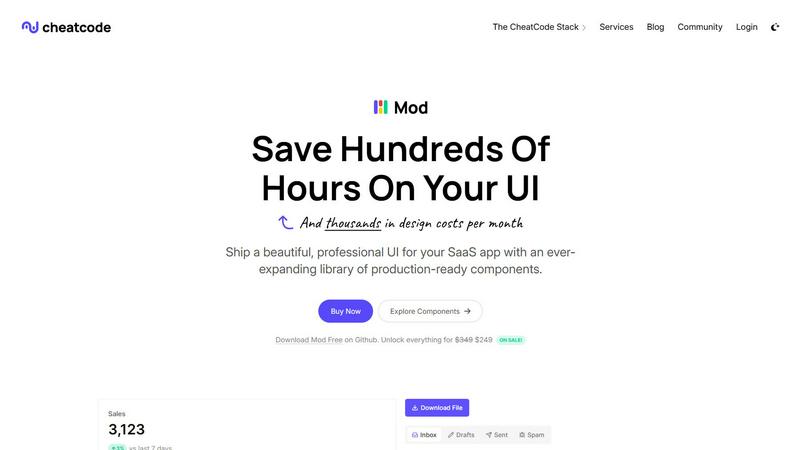
Mod is a CSS framework to build and scale your SaaS UI with a fast growing library of components.
Visual Comparison
CloudBurn

Mod
Feature Comparison
CloudBurn
Automated Pre-Deployment Cost Analysis
CloudBurn automatically scans every pull request containing Terraform or AWS CDK changes, generating a detailed, line-item cost report in seconds. It compares the proposed infrastructure against the current state, showing the exact monthly cost delta for each new or modified resource. This eliminates manual spreadsheet estimation and provides developers with instant, contextual feedback on the financial impact of their code, right where they work.
Seamless GitHub Integration
The platform is built for developer velocity and integrates 100% through GitHub. Setup is secure and permission-based, handled directly via the GitHub Marketplace. Once installed, CloudBurn works silently in the background, requiring no complex configuration or context switching. Cost reports appear as native PR comments, making cost awareness a natural part of the existing code review and CI/CD process without disrupting team workflow.
Real-Time AWS Pricing Data
CloudBurn pulls from the latest AWS pricing APIs to ensure every estimate is accurate and up-to-date. The analysis accounts for specific instance types, regions, and service configurations (like Fargate vCPU/memory allocations), providing precise cost calculations. This means teams can trust the numbers they see, enabling confident decision-making based on current market rates, not outdated or generalized estimates.
Proactive Cost Anomaly Prevention
By surfacing cost changes during the PR review phase, CloudBurn acts as an early warning system against budget-busting mistakes. It helps prevent costly misconfigurations—such as selecting an overly large instance type, forgetting to enable auto-scaling, or provisioning redundant resources—from ever reaching production. This proactive catch saves significant rework, avoids surprise bills, and establishes a scalable foundation for automated FinOps.
Mod
88+ Production-Ready Components
Mod delivers an extensive library of over 88 meticulously designed components that cover the entire spectrum of SaaS application needs. From complex data tables and interactive dashboards to authentication flows, modals, and navigation elements, every component is built with accessibility, clean code, and real-world use in mind. This eliminates the need to build common UI patterns from scratch, ensuring consistency and drastically reducing development time from the first commit.
Framework-Agnostic Integration
Engineered for maximum flexibility, Mod works seamlessly across the modern development landscape. It provides clean, portable styles and components that integrate directly into your preferred framework without lock-in. Whether your project is built on React (Next.js), Vue (Nuxt), Svelte, or even server-side frameworks like Rails or Django, Mod's CSS-centric approach ensures a smooth implementation, allowing teams to adopt it without disrupting their existing tech stack.
Complete Design System with Dual Themes
Mod is more than a component set; it's a full, coherent design system. It includes two professionally crafted themes—light and dark—that are fully integrated across all 88+ components and 168+ style variants. This systemic approach guarantees visual harmony, from typography and color palettes to spacing and interaction states. Switching themes is effortless, providing a premium dark mode experience for users without any extra engineering effort.
Mobile-First & Responsive Foundation
Every component and layout in Mod is built with a strict mobile-first, responsive philosophy. The styles automatically adapt and optimize for any screen size, from smartphones to desktops. This ensures your SaaS application delivers a flawless user experience on all devices from day one, removing the need for tedious, custom media query wrangling and guaranteeing your product is market-ready for a mobile-centric world.
Use Cases
CloudBurn
Enabling Developer-Led FinOps
Engineering teams can embed cost accountability directly into their development lifecycle. Developers gain autonomy and immediate feedback on their infrastructure choices, allowing them to optimize for cost-efficiency alongside performance and reliability. This shifts the FinOps model from a central gatekeeping function to a distributed, empowered practice, accelerating development while controlling spend.
Preventing Costly Deployment Mistakes
For teams managing complex, frequently changing infrastructure, CloudBurn is a critical safety net. It automatically flags high-cost changes in PRs, such as the accidental deployment of multiple t3.xlarge instances instead of t3.micros. Catching these errors pre-merge prevents them from spinning up in production and accumulating thousands in unnecessary costs before the next billing cycle.
Streamlining Infrastructure Code Reviews
Platform and DevOps engineers can enhance their code review process with concrete financial data. Instead of vague concerns about cost, reviewers can point to the exact dollar impact of a proposed change. This makes reviews more objective, data-driven, and efficient, helping teams balance architectural best practices with economic feasibility directly in the pull request conversation.
Gaining Visibility for Startups Scaling on AWS
Fast-growing startups need to scale their cloud infrastructure efficiently. CloudBurn provides clear visibility into how each new feature or service expansion will affect the monthly AWS bill. This allows founders and engineering leaders to forecast costs accurately, make informed scaling decisions, and ensure that cloud spend grows in a controlled, predictable manner alongside the business.
Mod
Rapid MVP Development for Startups
For founders and small teams racing to validate a concept, Mod is the ultimate accelerator. It allows you to bypass UI/design hiring and weeks of front-end development to build a polished, credible-looking Minimum Viable Product in record time. You can assemble professional landing pages, dashboards, and user interfaces that instill trust in early users and investors, all while conserving critical runway and focusing on core functionality.
Scaling Design Consistency in Growing Teams
As engineering teams expand, maintaining a consistent UI becomes a major challenge. Mod solves this by providing a single source of truth for all visual elements. New developers can immediately contribute features that match the existing product's look and feel, eliminating design debt and fragmentation. It acts as an embedded style guide, ensuring uniformity as your codebase and team grow in complexity.
Modernizing Legacy Application UIs
For established products built on older stacks or with inconsistent styling, a full redesign is a daunting, resource-intensive project. Mod offers a strategic path to modernization. Teams can incrementally replace outdated components with Mod's modern, responsive equivalents. Its framework-agnostic nature allows this refresh to happen within Rails, Django, or other backend-heavy applications without a complete front-end rewrite.
Building Internal Tools & Admin Panels
Development resources for customer-facing features often take priority, leaving internal tools with poor, ad-hoc interfaces. Mod empowers small teams to quickly build powerful, intuitive admin dashboards, analytics panels, and content management systems. Its comprehensive component set for data display, forms, and navigation means these critical operational tools can be both highly functional and aesthetically professional.
Overview
About CloudBurn
CloudBurn is a proactive FinOps platform engineered for modern engineering teams who build with Infrastructure-as-Code (IaC) tools like Terraform and AWS CDK. It directly tackles the all-too-common nightmare of unpredictable and spiraling cloud bills by shifting cost governance left, directly into the developer workflow. The core mission is to empower developers and platform engineers with real-time, actionable cost intelligence before code merges and deploys, transforming cloud cost management from a reactive, finance-led burden into a proactive, engineering-led practice. By seamlessly integrating with GitHub, CloudBurn automatically analyzes pull requests, calculates the precise dollar impact of infrastructure changes, and posts a clear cost report as a comment. This creates an immediate feedback loop, enabling teams to catch misconfigurations—like accidentally provisioning a dozen expensive instances—while the change is still under review. For startups and scaling companies, this isn't just about cost savings; it's about fostering a culture of financial responsibility and innovation, where every engineer has the visibility to make cost-aware architectural decisions, leading to immediate ROI and sustainable, efficient growth.
About Mod
Mod is the high-velocity CSS framework engineered for the modern SaaS builder. It's not just another component library; it's a complete design system that eliminates the friction between idea and interface. Built for developers who need to ship fast without sacrificing polish, Mod provides a meticulously crafted toolkit of over 88 production-ready components, 168 distinct style variations, and a comprehensive icon suite—all built with a mobile-first, responsive foundation. Its core value proposition is radical acceleration: by providing a battle-tested, aesthetically cohesive design language out of the box, Mod allows solo founders and scaling engineering teams to bypass weeks of UI design debate, custom CSS headaches, and consistency audits. It is deliberately framework-agnostic, seamlessly integrating with your stack of choice, whether that's Next.js, Nuxt, SvelteKit, Vite, or even traditional backend frameworks like Rails and Django. With built-in dark mode, two elegant themes, and yearly systemic updates, Mod ensures your product looks professional and stays modern, freeing you to focus on core functionality, user experience, and scaling your business.
Frequently Asked Questions
CloudBurn FAQ
How does CloudBurn calculate cost estimates?
CloudBurn calculates estimates by analyzing the infrastructure diff (from terraform plan or cdk diff) and querying the official AWS Price List API using the specific resource attributes like instance type, region, and storage configuration. It calculates the projected monthly cost based on 730 hours of usage (24/7 operation) for compute resources and applicable pricing models for other services, providing a highly accurate forecast.
What permissions does CloudBurn require on GitHub?
CloudBurn requests standard permissions to read repository contents and pull requests, and to write comments on them. This allows it to access the plan/diff output from your CI workflow and post the cost analysis report. Billing and setup are handled entirely through GitHub's secure marketplace infrastructure, so CloudBurn never stores your payment information directly.
Can CloudBurn analyze costs for existing infrastructure?
The primary focus of CloudBurn is on analyzing changes through pull requests to prevent cost surprises. It compares the proposed state against the current state to show the delta. For a comprehensive view of existing infrastructure costs, you would typically use a tool like the AWS Cost Explorer, which CloudBurn complements by preventing future cost growth.
Is there a free tier or trial available?
Yes, CloudBurn offers a Community plan that is free to use forever. They also provide a 14-day trial of the Pro plan, which includes advanced features. You can start the trial without a credit card directly from the GitHub Marketplace. This allows teams to experience the full value of automated pre-deployment cost analysis and prove its ROI before any commitment.
Mod FAQ
Is Mod a JavaScript library or a CSS framework?
Mod is primarily a CSS framework with accompanying HTML/component structures. It is designed to provide the styling and building blocks for your UI. Its framework-agnostic nature means it delivers styles and markup patterns that you can integrate using the JavaScript framework of your choice (like React or Vue) or use with plain HTML, making it incredibly versatile.
How does Mod handle customization and branding?
While Mod provides a complete, opinionated design system, it is built with customization in mind. The core CSS utilizes modern techniques like CSS custom properties (variables) for colors, spacing, and typography, allowing you to easily override and tailor the theme to match your specific brand identity. You can start with the polished defaults and adapt them as needed.
What does "framework-agnostic" actually mean for integration?
It means Mod does not require you to install a specific React or Vue plugin. Instead, you get clean, semantic HTML structures and CSS classes. You can copy the provided HTML snippets directly into your Svelte components, JSX in Next.js, or templates in Rails ERB files. The CSS you import handles all the styling, making it compatible with virtually any web technology that can output HTML.
Are updates and new components included?
Yes. Mod is committed to continuous evolution alongside web standards. A purchase includes access to yearly systemic updates, which encompass not only maintenance and bug fixes but also new components, style variants, and enhancements to the existing system. This ensures your UI toolkit remains modern and competitive without requiring a new purchase every cycle.