
claude-ide vs Hush Touch | Voice-to-Text for MacOS
Side-by-side comparison to help you choose the right product.

claude-ide
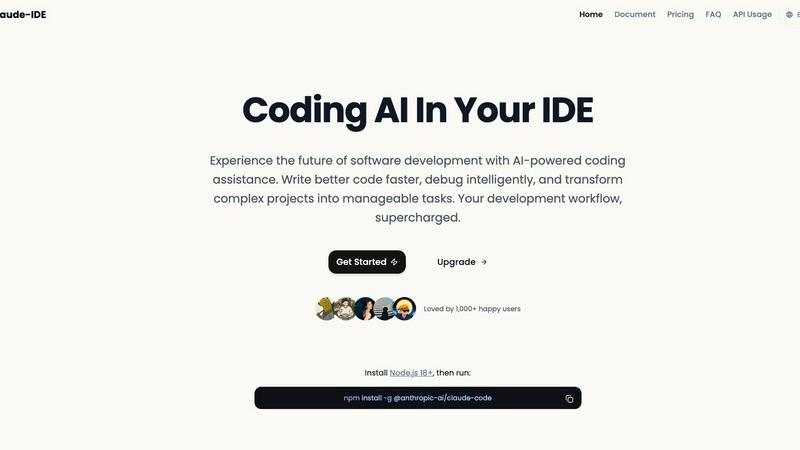
Transform your coding experience with Claude IDE, the AI assistant that accelerates development directly in your.
Last updated: March 1, 2026

Hush Touch | Voice-to-Text for MacOS
Transform your dictation experience with Hush Touch, the smart offline voice-to-text tool for Mac that learns as you.
Last updated: February 26, 2026
Visual Comparison
claude-ide
Hush Touch | Voice-to-Text for MacOS

Feature Comparison
claude-ide
Intelligent Code Understanding
Claude IDE possesses the ability to analyze and understand your entire codebase rather than just isolated snippets. This feature allows it to make coordinated changes across multiple files, ensuring that the suggestions it offers are relevant and aligned with the overall architecture and dependencies of your project.
Seamless Terminal Integration
By embedding itself directly into your terminal and favorite IDEs, Claude IDE eliminates the need for constant context switching. This seamless integration means you can access advanced AI features without leaving your preferred development environment, allowing for a more fluid and efficient coding experience.
Automated Code Familiarization
Claude IDE can quickly familiarize itself with new codebases, analyzing and explaining their structure within seconds. This feature simplifies onboarding processes for new developers and helps teams save valuable time by automatically understanding project architecture without requiring manual context input.
Comprehensive Workflow Management
With deep integration into GitHub and GitLab, Claude IDE streamlines the entire development workflow. It allows developers to manage issues, write code, run tests, and submit pull requests all within the terminal, fostering a more efficient and cohesive development process.
Hush Touch | Voice-to-Text for MacOS
Dual-Engine Recognition
Hush Touch employs a unique blend of two Apple dictation engines: DictationTranscriber for natural flow and punctuation, and SFSpeechRecognizer for custom vocabulary enhancement. This combination ensures that users enjoy highly accurate transcriptions that adapt to their unique speaking styles and terminologies.
Custom Vocabulary
With the ability to recognize up to 500 specialized terms, Hush Touch learns vocabulary over time, enhancing its accuracy for niche fields such as medical and technical jargon. This feature allows professionals to dictate complex phrases and terminology without worrying about misinterpretation, ensuring seamless communication.
Smart Text Processing
The app includes advanced smart text processing capabilities, such as filler word removal and auto-correction. This feature not only makes the transcriptions cleaner but also saves users time by automatically formatting lists and detecting frequently used phrases, all processed locally for immediate feedback.
100% On-Device Privacy
Hush Touch prioritizes user privacy by ensuring that all voice data is processed entirely on the user's Mac. There is no reliance on cloud services, meaning that sensitive information remains secure and off the grid. Users can dictate comfortably, knowing their data is protected.
Use Cases
claude-ide
Accelerated Onboarding for New Developers
When new team members join a project, Claude IDE can rapidly analyze the existing codebase and provide a comprehensive overview. This accelerates the onboarding process, enabling new developers to become productive much quicker than traditional methods would allow.
Enhanced Debugging Capabilities
With its intelligent debugging features, Claude IDE can identify issues within your code and suggest targeted fixes. This capability not only saves time but also reduces frustration, allowing developers to focus on building features rather than sifting through error logs.
Efficient Project Management
Claude IDE helps developers break down complex project requirements into manageable tasks. By transforming high-level ideas into actionable items, teams can maintain momentum and clarity throughout the development process.
Streamlined Collaboration
By integrating with version control systems and enabling seamless communication with team members, Claude IDE enhances collaboration. It allows multiple developers to work in harmony, ensuring that everyone is on the same page and can easily track progress and changes.
Hush Touch | Voice-to-Text for MacOS
Drafting Emails
With Hush Touch, drafting emails becomes a breeze. Users can quickly dictate their messages hands-free, allowing for rapid communication without the frustration of typing. The app's smart text processing helps maintain professionalism by auto-inserting punctuation and formatting.
Creating Content
Writers can leverage Hush Touch to generate articles, blogs, or reports with ease. Its adaptive learning feature ensures that the software becomes familiar with the writer's style, enhancing productivity and reducing the time spent on edits.
Medical Documentation
Healthcare professionals can rely on Hush Touch for efficient documentation of patient notes and medical records. The app's ability to recognize medical terminology and its adaptive learning capabilities make it a crucial tool for maintaining accuracy in clinical settings.
Programming and Code Documentation
Software developers find Hush Touch invaluable for dictating code comments, documentation, and technical specifications. The dual-engine recognition allows for precise transcription of programming languages and technical terms, streamlining the workflow and reducing errors.
Overview
About claude-ide
Claude IDE is an innovative AI-powered development environment that transforms the way developers code. By seamlessly integrating the advanced Claude Sonnet 4.5 model directly into popular tools like VS Code and JetBrains, it brings intelligent coding assistance right to your fingertips. Designed for a diverse audience, including solo developers, startup teams, students, and hobbyists, Claude IDE aims to enhance coding efficiency and productivity. Its primary value proposition lies in providing professional-grade coding support at an affordable price, democratizing access to advanced AI tools. Claude IDE comprehensively understands your entire codebase, enabling it to make coordinated changes across multiple files and deliver suggestions tailored to your project's specific architecture and dependencies. More than just a code completer, Claude IDE acts as a full-stack AI partner, capable of explaining intricate systems, intelligently debugging code, and breaking down ambitious project ideas into manageable tasks.
About Hush Touch | Voice-to-Text for MacOS
Hush Touch is a revolutionary voice-to-text application designed specifically for macOS, enabling users to dictate their thoughts with unprecedented speed, accuracy, and privacy. This innovative software leverages dual Apple transcription engines combined with an advanced Apple Intelligence final pass to ensure that the dictated text is not only clean but also contextually relevant. Hush Touch operates entirely on-device, which means users can enjoy seamless dictation capabilities even without an internet connection. This makes it ideal for professionals who prioritize data privacy, such as doctors, writers, and software engineers. With its lightweight design, quick launch time, and minimal setup requirements, Hush Touch effortlessly integrates into everyday writing workflows. For a one-time payment of $20, users gain a lifetime license, making it an unbeatable choice for those seeking a reliable dictation tool without the burden of ongoing subscription fees.
Frequently Asked Questions
claude-ide FAQ
What platforms does Claude IDE support?
Claude IDE supports major development environments such as VS Code and JetBrains, along with terminal integration, making it accessible across multiple platforms.
Do I need to be an experienced developer to use Claude IDE?
Not at all. Claude IDE is designed for developers of all skill levels, from beginners to seasoned professionals. Its intuitive interface and intelligent features make it easy for anyone to enhance their coding workflow.
How does Claude IDE understand my codebase?
Claude IDE utilizes the Claude Sonnet 4.5 model, which analyzes your entire codebase to understand its structure, dependencies, and architecture, ensuring that the suggestions it provides are contextually relevant.
Is there a trial version available for Claude IDE?
Yes, individuals can explore Claude IDE's features through a trial version, allowing them to evaluate its capabilities before committing to a subscription. This allows potential users to experience firsthand how it can enhance their coding practices.
Hush Touch | Voice-to-Text for MacOS FAQ
How does Hush Touch ensure privacy?
Hush Touch processes all voice data entirely on the user's device, with no reliance on cloud services. This means that your voice recordings and transcriptions remain private and secure.
What is the pricing structure for Hush Touch?
Hush Touch is available for a one-time payment of $20, providing users with a lifetime license. There are no subscription fees, making it a cost-effective choice for anyone needing reliable voice dictation.
Can Hush Touch recognize specialized vocabulary?
Yes, Hush Touch can recognize up to 500 specialized terms and learns additional vocabulary over time based on user corrections and input. This makes it suitable for various fields, including medical and technical professions.
What devices are compatible with Hush Touch?
Hush Touch is specifically designed for macOS and is optimized to run smoothly on Mac devices. Users can download the app and start dictating right away with minimal setup required.
Alternatives
claude-ide Alternatives
Claude IDE is a groundbreaking AI-powered development environment that enhances coding workflows by embedding intelligent assistance directly into your terminal and favorite IDEs. As developers increasingly seek tools that streamline their processes and elevate productivity, many users are drawn to alternatives when they encounter specific needs, such as budget constraints, feature sets that align better with their projects, or compatibility with different platforms. When considering alternatives, it’s essential to evaluate factors such as integration capabilities, the depth of AI assistance, and the overall user experience. Look for options that provide robust support for your entire codebase while ensuring seamless operation within your existing workflow. The right alternative should not only meet your immediate coding needs but also empower your growth and innovation as a developer.
Hush Touch | Voice-to-Text for MacOS Alternatives
Hush Touch | Voice-to-Text for MacOS is a cutting-edge dictation tool designed to enhance productivity through offline voice-to-text capabilities. As a member of the AI Assistants category, it offers users an innovative solution that prioritizes privacy and efficiency by processing data entirely on-device. Users often seek alternatives due to various reasons such as pricing, additional features, compatibility with different platforms, or specific use cases that may not be fully addressed by Hush Touch. When selecting an alternative, consider factors like ease of use, accuracy of transcription, privacy measures, and how well the product integrates into your existing workflow to ensure it meets your unique needs and expectations.