
Hush Touch | Voice-to-Text for MacOS vs URL to Any
Side-by-side comparison to help you choose the right product.

Hush Touch | Voice-to-Text for MacOS
Transform your dictation experience with Hush Touch, the smart offline voice-to-text tool for Mac that learns as you.
Last updated: February 26, 2026

URL to Any
Instantly convert any webpage into PDF, text, images, and more formats with one free tool.
Last updated: March 2, 2026
Visual Comparison
Hush Touch | Voice-to-Text for MacOS

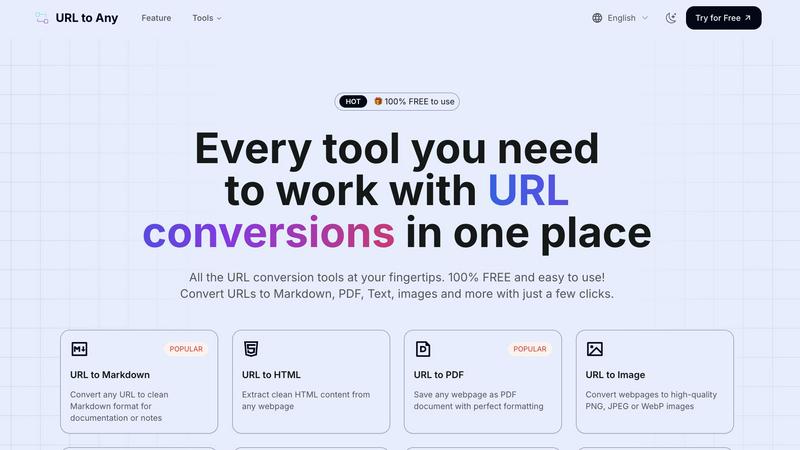
URL to Any
Feature Comparison
Hush Touch | Voice-to-Text for MacOS
Dual-Engine Recognition
Hush Touch employs a unique blend of two Apple dictation engines: DictationTranscriber for natural flow and punctuation, and SFSpeechRecognizer for custom vocabulary enhancement. This combination ensures that users enjoy highly accurate transcriptions that adapt to their unique speaking styles and terminologies.
Custom Vocabulary
With the ability to recognize up to 500 specialized terms, Hush Touch learns vocabulary over time, enhancing its accuracy for niche fields such as medical and technical jargon. This feature allows professionals to dictate complex phrases and terminology without worrying about misinterpretation, ensuring seamless communication.
Smart Text Processing
The app includes advanced smart text processing capabilities, such as filler word removal and auto-correction. This feature not only makes the transcriptions cleaner but also saves users time by automatically formatting lists and detecting frequently used phrases, all processed locally for immediate feedback.
100% On-Device Privacy
Hush Touch prioritizes user privacy by ensuring that all voice data is processed entirely on the user's Mac. There is no reliance on cloud services, meaning that sensitive information remains secure and off the grid. Users can dictate comfortably, knowing their data is protected.
URL to Any
One-Click Multi-Format Conversion
URL to Any provides a comprehensive suite of conversion tools in a single, unified platform. Go beyond basic saves; transform any URL into over 10 versatile formats including Markdown, PDF, PNG/JPEG images, plain text, structured JSON, XML, and even MP3 audio. This eliminates the need for multiple disparate tools, streamlining your workflow and providing unmatched flexibility for any project requirement directly from your browser.
Advanced Content Extraction & AI Summarization
This isn't just simple conversion; it's intelligent content processing. Extract clean HTML, pull all headings or meta tags for SEO analysis, and compile every link on a page into downloadable CSV/TXT lists. Furthermore, leverage the integrated AI Summarizer to instantly condense lengthy articles and reports into concise overviews using advanced AI technology, saving hours of manual reading and analysis.
Developer-Focused Data Utilities
Built with technical users in mind, URL to Any includes essential utilities for data handling and web interaction. Encode and decode text across 8+ formats like Base64, URL, and JWT. Resolve URLs to IP addresses and open multiple webpages simultaneously for testing or research. These features provide a powerful, free toolkit for developers, security researchers, and IT professionals.
Frictionless, Secure & Cloud-Based Access
Experience truly barrier-free utility. The tool is completely free, requires no sign-up, and processes all conversions instantly via a secure cloud engine. Your data is never stored on servers, ensuring privacy. With global access from any device and a browser extension for even quicker access, URL to Any is designed for seamless integration into your daily workflow without any setup or cost.
Use Cases
Hush Touch | Voice-to-Text for MacOS
Drafting Emails
With Hush Touch, drafting emails becomes a breeze. Users can quickly dictate their messages hands-free, allowing for rapid communication without the frustration of typing. The app's smart text processing helps maintain professionalism by auto-inserting punctuation and formatting.
Creating Content
Writers can leverage Hush Touch to generate articles, blogs, or reports with ease. Its adaptive learning feature ensures that the software becomes familiar with the writer's style, enhancing productivity and reducing the time spent on edits.
Medical Documentation
Healthcare professionals can rely on Hush Touch for efficient documentation of patient notes and medical records. The app's ability to recognize medical terminology and its adaptive learning capabilities make it a crucial tool for maintaining accuracy in clinical settings.
Programming and Code Documentation
Software developers find Hush Touch invaluable for dictating code comments, documentation, and technical specifications. The dual-engine recognition allows for precise transcription of programming languages and technical terms, streamlining the workflow and reducing errors.
URL to Any
Content Creation & Documentation
Content creators, bloggers, and technical writers can instantly convert research articles and web pages into clean Markdown or formatted text. This streamlines the process of gathering references, creating drafts, and building documentation without messy copy-pasting, preserving links and basic formatting for a professional output ready for their CMS or note-taking app.
Research & Archival
Students, academics, and analysts can reliably archive source material. Save webpages as perfectly formatted PDFs for offline reading and citation, or convert them to text for easy highlighting and note integration. Extracting all URLs from a bibliography page into a CSV file also simplifies source management and verification.
Web Development & Data Projects
Developers and data scientists can use the tool to scrape and structure web data efficiently. Converting webpage content into clean JSON or XML format provides structured data ready for APIs, databases, or analysis pipelines. The URL encoder/decoder and meta tag extractor are also invaluable for debugging and SEO auditing tasks.
Marketing & Sharing
Marketing professionals and social media managers can generate high-quality PNG images of webpages for promotional visuals or testimonials. Creating QR codes from any URL facilitates easy sharing in print materials or presentations. Converting articles to MP3 audio also offers an alternative content format for audience engagement.
Overview
About Hush Touch | Voice-to-Text for MacOS
Hush Touch is a revolutionary voice-to-text application designed specifically for macOS, enabling users to dictate their thoughts with unprecedented speed, accuracy, and privacy. This innovative software leverages dual Apple transcription engines combined with an advanced Apple Intelligence final pass to ensure that the dictated text is not only clean but also contextually relevant. Hush Touch operates entirely on-device, which means users can enjoy seamless dictation capabilities even without an internet connection. This makes it ideal for professionals who prioritize data privacy, such as doctors, writers, and software engineers. With its lightweight design, quick launch time, and minimal setup requirements, Hush Touch effortlessly integrates into everyday writing workflows. For a one-time payment of $20, users gain a lifetime license, making it an unbeatable choice for those seeking a reliable dictation tool without the burden of ongoing subscription fees.
About URL to Any
In today's digital-first world, content is the currency of innovation, but it's often locked in formats that don't fit your workflow. URL to Any is the agile, all-in-one conversion engine built to shatter these barriers and unlock the full potential of web content. It empowers a global, scaling audience—from solo developers and content creators to enterprise research teams—to instantly transform any webpage into the exact format they need. With a single click, convert URLs to clean Markdown for documentation, pristine PDFs for archiving, structured JSON/XML for data projects, high-quality images for presentations, and even MP3 audio for on-the-go consumption. Its core, disruptive value proposition is delivering this powerful, enterprise-grade utility with a relentless focus on user-centric design: 100% free, requiring zero registration, and processing at lightning speed. By eliminating friction and complexity, URL to Any accelerates the journey from content discovery to deployment, fueling productivity and empowering users to adapt, share, and innovate without constraints.
Frequently Asked Questions
Hush Touch | Voice-to-Text for MacOS FAQ
How does Hush Touch ensure privacy?
Hush Touch processes all voice data entirely on the user's device, with no reliance on cloud services. This means that your voice recordings and transcriptions remain private and secure.
What is the pricing structure for Hush Touch?
Hush Touch is available for a one-time payment of $20, providing users with a lifetime license. There are no subscription fees, making it a cost-effective choice for anyone needing reliable voice dictation.
Can Hush Touch recognize specialized vocabulary?
Yes, Hush Touch can recognize up to 500 specialized terms and learns additional vocabulary over time based on user corrections and input. This makes it suitable for various fields, including medical and technical professions.
What devices are compatible with Hush Touch?
Hush Touch is specifically designed for macOS and is optimized to run smoothly on Mac devices. Users can download the app and start dictating right away with minimal setup required.
URL to Any FAQ
Is URL to Any really free to use?
Yes, absolutely. URL to Any is 100% free to use. Every conversion tool, from URL to PDF to the AI Summarizer, is available without any cost, hidden fees, or subscription tiers. There is no requirement to create an account or register, allowing for completely frictionless access to all features.
How does URL to Any handle my privacy and data?
Your privacy is a top priority. All URL conversions are processed through a secure, cloud-based engine. Crucially, the content of your conversions is never stored on our servers after the processing is complete. We do not sell or share your data, ensuring your research and conversions remain private and secure.
What formats can I convert a URL into?
URL to Any supports a wide and growing range of output formats to suit various needs. Key formats include Markdown, PDF, PNG/JPEG/WebP images, plain text, HTML, JSON, XML, MP3 audio, and QR codes. Additionally, specialized tools provide outputs like CSV lists of URLs or extracted meta tag data.
Do I need to install any software?
No software installation is required. URL to Any is a fully cloud-based web application that works directly in your browser on any device (desktop, tablet, mobile). For even quicker access, you can optionally install the dedicated browser extension, but the core website provides full functionality without it.
Alternatives
Hush Touch | Voice-to-Text for MacOS Alternatives
Hush Touch | Voice-to-Text for MacOS is a cutting-edge dictation tool designed to enhance productivity through offline voice-to-text capabilities. As a member of the AI Assistants category, it offers users an innovative solution that prioritizes privacy and efficiency by processing data entirely on-device. Users often seek alternatives due to various reasons such as pricing, additional features, compatibility with different platforms, or specific use cases that may not be fully addressed by Hush Touch. When selecting an alternative, consider factors like ease of use, accuracy of transcription, privacy measures, and how well the product integrates into your existing workflow to ensure it meets your unique needs and expectations.
URL to Any Alternatives
URL to Any is a leading AI-powered web content conversion engine, designed to instantly transform any webpage into a wide range of formats like Markdown, PDF, and plain text. It operates within the AI Assistants category, focusing on removing friction from digital workflows for scaling teams and innovators. Users often explore alternatives to find a solution that aligns perfectly with their evolving needs. This could be due to specific feature requirements beyond core conversion, integration needs with existing platforms, or concerns about long-term scalability and support, even when a primary tool is free. When evaluating other options, prioritize a solution's conversion versatility, processing speed, and overall integration capability with your tech stack. The ideal alternative should not only match your immediate functional needs but also support your team's growth trajectory without introducing complexity or hidden costs.