
Prompt Builder vs SVG to 3D
Side-by-side comparison to help you choose the right product.

Prompt Builder
Prompt Builder instantly crafts and refines AI prompts for any model, saving you hours and boosting your results.
Last updated: April 13, 2026

SVG to 3D
Instantly convert your 2D SVG designs into stunning, web-ready 3D models with advanced controls and fast processing.
Last updated: February 26, 2026
Visual Comparison
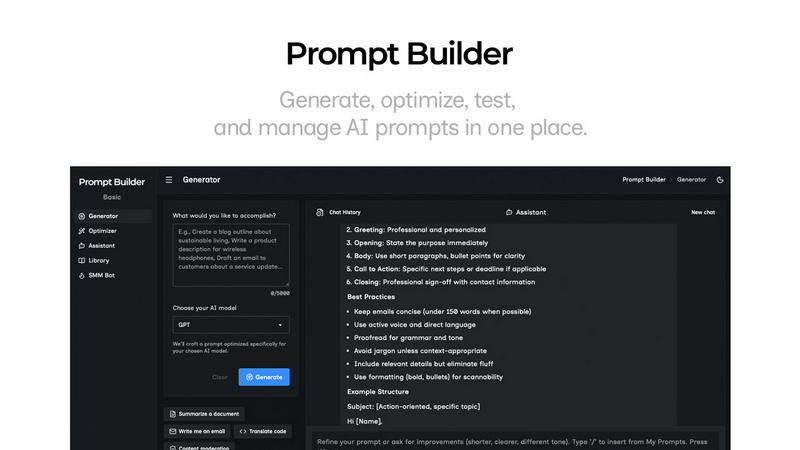
Prompt Builder
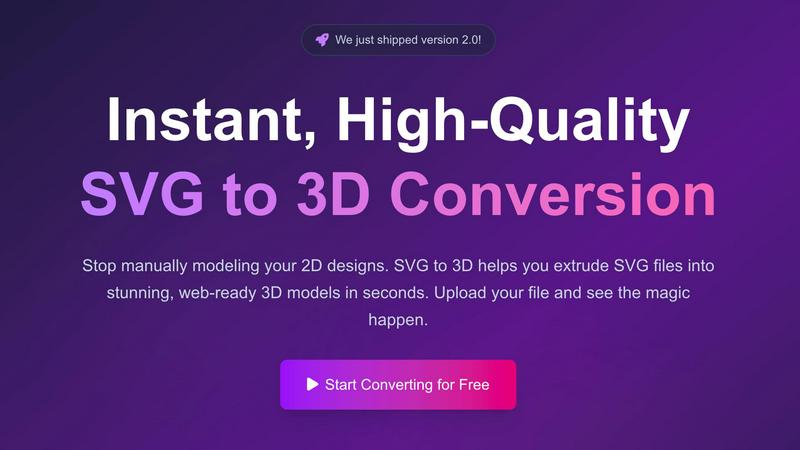
SVG to 3D
Feature Comparison
Prompt Builder
Prompt Generator
The Prompt Generator is your launchpad for perfect prompts. Simply describe your task or idea in natural language, select your target AI model (like Gemini, Claude, or GPT), and instantly receive a professionally structured, model-optimized draft. This feature eliminates the guesswork of model-specific syntax and best practices, providing a solid foundation that you can then refine directly within the integrated chat workspace. It’s designed for speed and quality, ensuring you start from a position of strength every single time.
Prompt Assistant & Chat Workspace
Test and iterate on your prompts without ever leaving the platform. The built-in Prompt Assistant lets you run your generated or saved prompts using a live model selector, supporting Grok, Gemini, GPT, DeepSeek, and others. This integrated chat environment allows for real-time follow-ups and refinements, keeping your entire prompt development history organized in one place. You can pin successful chat threads and save the final, effective prompts directly to your Library, turning iterative testing into a seamless, productive loop.
Prompt Optimizer
Elevate existing prompts to their maximum potential with the Prompt Optimizer. Paste any prompt—whether from your Library or an external source—and the Optimizer will enhance it for superior clarity, add necessary constraints, refine the output format, and suggest examples. Each optimization is saved in a history log, and you can pin your favorite versions. With one click, you can send the optimized prompt to the Assistant for immediate testing, creating a powerful feedback cycle for continuous improvement.
Prompt Library & Community Templates
Build and leverage a centralized knowledge base of high-performing prompts. Your personal Library allows you to save, categorize, tag, and quickly search all your best prompts for reuse across projects. Beyond your own work, explore a growing repository of Community Prompts and templates contributed by other users. This feature transforms isolated successes into scalable, organizational assets, enabling you and your team to standardize quality and accelerate development without starting from scratch.
SVG to 3D
One-Click to GLB for the Web
This feature allows users to export their 3D models as GLB files optimized for web use. The exports are ready to be seamlessly integrated into popular frameworks like Three.js or React Three Fiber, making it ideal for web developers looking to enhance their projects with interactive 3D graphics.
3D-Print Ready
SVG to 3D supports clean STL exports, ensuring that your models are ready for 3D printing. This functionality enables users to take their digital designs and convert them into tangible objects without the need for additional modeling software, streamlining the process from concept to physical product.
Fine-Tune Every Detail
Beyond basic extrusion, this feature allows users to adjust various elements of their 3D models, including thickness, bevels, and PBR materials. The real-time preview helps users visualize changes instantly, ensuring that every detail meets their expectations and results in a polished final product.
Lightning-Fast Processing
SVG to 3D employs optimized algorithms that convert SVG files into 3D models in mere seconds. This efficiency not only saves time but also enhances productivity by allowing users to generate high-quality models quickly, making it the fastest SVG to 3D conversion tool available online.
Use Cases
Prompt Builder
Content Creation & Marketing Teams
Marketing squads and content creators can drastically accelerate their workflow. Use the SMM Bot to generate platform-ready social posts for X, LinkedIn, or TikTok from a single brief, then refine tone and messaging in the chat. Save winning prompt formulas for recurring content types like email newsletters, blog outlines, or ad copy in your Library, ensuring brand consistency and saving hours per week previously spent on manual crafting and revisions.
Software Developers & Technical Writers
Developers and technical professionals can generate precise code snippets, documentation, API explanations, or debugging assistance tuned for models like Claude or GPT-4. The Prompt Generator ensures technical prompts include the correct constraints and output formats. The Optimizer can refine vague requests into detailed, step-by-step instructions, and all successful prompts can be saved for future, repeatable use, streamlining complex technical communication.
Researchers & Data Analysts
Researchers can leverage Prompt Builder to craft sophisticated prompts for data analysis, literature review summaries, hypothesis generation, and report drafting. By tuning prompts for models like Perplexity or Gemini Advanced, they can get more accurate and comprehensive outputs. The ability to iterate quickly in the Assistant and pin precise, effective query versions turns exploratory research into a structured, reproducible process, maximizing the value of AI assistance.
AI Educators & Prompt Engineers
For those teaching AI best practices or working as professional prompt engineers, Prompt Builder is an indispensable sandbox and demonstration tool. It allows for rapid A/B testing of different prompt structures across multiple models, with results saved for comparison. The Community Library also serves as a learning resource to study effective prompts from others, accelerating skill development and enabling the creation of robust, teachable prompt templates.
SVG to 3D
Creating Interactive Web Elements
Web developers can leverage SVG to 3D to transform static SVG icons into dynamic 3D models, enhancing the interactivity of their websites. This capability allows for captivating user experiences that engage visitors and elevate brand presence.
Rapid Prototyping for 3D Printing
Designers can utilize SVG to 3D to quickly prepare their 2D designs for 3D printing. The tool’s STL export feature ensures that prototypes are ready for fabrication, enabling rapid iterations and testing of design concepts before final production.
Enhancing UI/UX Presentations
With the ability to add depth and realism to UI elements, designers can use SVG to 3D to create visually striking mockups that impress clients and stakeholders. This tool helps in presenting ideas more effectively, showcasing how designs can look in a real-world context.
Transforming Logos into 3D Art
Business owners and marketers can convert their logos into 3D models for use in branding materials, promotional videos, or digital assets. This transformation adds a new dimension to branding efforts, making logos more memorable and visually appealing.
Overview
About Prompt Builder
Prompt Builder is the definitive prompt engineering workspace designed for innovators, creators, and teams who need to scale their AI output. It transforms the chaotic, time-consuming process of prompt crafting into a streamlined, high-velocity workflow. At its core, Prompt Builder is a unified platform where you can generate, test, optimize, and manage prompts for any major AI model, including GPT, Claude, Gemini, Llama, Mistral, and more. It's built for professionals who refuse to let inefficient workflows bottleneck their creativity and productivity. Instead of rewriting prompts for each model or losing your best versions in endless chat threads, Prompt Builder gives you a structured environment to describe your task in plain English, receive a model-tuned draft in seconds, refine it through iterative chat, and save polished prompts to a reusable library. This isn't just a tool; it's your competitive edge in the AI-powered landscape, turning hours of guesswork into minutes of precision execution.
About SVG to 3D
SVG to 3D is an innovative online tool designed to revolutionize the way designers and developers transform their 2D SVG vector graphics into stunning, professional-quality 3D models. This platform addresses the common frustration of relying on complex and heavyweight software like Blender or Cinema 4D for simple tasks such as extruding logos or icons. With SVG to 3D, users can effortlessly upload their SVG files and see high-quality 3D models generated in seconds, all within a user-friendly browser interface. The tool is particularly aimed at web developers, designers, and 3D printing enthusiasts looking for a fast, efficient, and reliable solution to create interactive 3D assets without compromising on quality. The main value proposition lies in its ability to provide a streamlined, high-performance workflow that empowers users to bring their designs to life swiftly and effectively.
Frequently Asked Questions
Prompt Builder FAQ
Which AI models does Prompt Builder support?
Prompt Builder is designed as a universal workspace, supporting all major AI models including OpenAI's GPT series, Anthropic's Claude, Google's Gemini, Meta's Llama, Mistral AI, DeepSeek, xAI's Grok, Perplexity, and Cohere. The Prompt Generator tailors your draft specifically to the model you select, and the Assistant lets you run and test prompts with many of these models directly within the platform.
How does the free plan work?
The free plan is designed to let you fully experience the platform's core workflow. It includes access to the Prompt Generator, Optimizer, Library, and Assistant, with a generous allowance of 25 assistant requests per month to test your prompts with live models, all without requiring a credit card. This allows you to integrate Prompt Builder into your process and validate its impact before upgrading.
Can I use prompts created here in other applications?
Absolutely. Prompts you create, optimize, and save in your Prompt Builder Library are yours to use anywhere. The platform is designed to craft superior prompts that you can copy and paste into ChatGPT, Claude.ai, or any other AI interface. It enhances your prompt engineering process, and the final output—the polished prompt—is a portable asset for your entire toolkit.
How does the Prompt Optimizer improve my existing prompts?
The Prompt Optimizer acts as an AI-powered editor for your prompts. It analyzes your input and provides structured improvements across key dimensions: enhancing overall clarity and instruction specificity, adding or refining constraints to narrow the output, suggesting optimal formats (like JSON, markdown, or bullet points), and proposing relevant examples to guide the AI. This systematic upgrade leads to more reliable, accurate, and useful responses from your target model.
SVG to 3D FAQ
How do I start using SVG to 3D?
To begin using SVG to 3D, simply visit the website and upload your SVG file. You can drag and drop your file or paste the SVG code directly into the editor to initiate the conversion process.
What file formats can I export my 3D models to?
SVG to 3D supports multiple export formats, including GLB, GLTF, OBJ, and STL. This versatility ensures that your 3D models can be used in various applications, from web development to 3D printing.
Is there a limit on the size of the SVG files I can upload?
Yes, SVG to 3D allows uploads of SVG files up to a maximum size of 5 MB. This limit helps maintain optimal performance during the conversion process.
Is my data secure when using SVG to 3D?
Absolutely! SVG to 3D prioritizes user privacy by processing files locally in your browser whenever possible. This approach minimizes the risk of data exposure, as no files are uploaded to external servers during the conversion.
Alternatives
Prompt Builder Alternatives
Prompt Builder is a comprehensive prompt engineering workspace designed for the AI Assistants category. It streamlines the entire process of generating, optimizing, testing, and managing AI prompts for models like GPT, Claude, and Gemini, turning a simple idea into a production-ready prompt in seconds. Users often explore alternatives for various strategic reasons. This could be due to specific budget constraints, a need for different feature integrations, or requirements to align with a particular tech stack or workflow. The landscape of AI tools is rapidly evolving, so it's natural for teams to assess their options. When evaluating other solutions, focus on core capabilities that drive efficiency and scale. Key considerations include the depth of optimization tools, flexibility across multiple AI models, and robust systems for organizing and reusing prompt assets. The goal is to find a platform that not only creates prompts but enhances your entire team's velocity and output quality.
SVG to 3D Alternatives
SVG to 3D is a cutting-edge tool designed to seamlessly convert 2D SVG vector graphics into high-quality 3D models. It falls under the category of AI Assistants, catering to developers, designers, and 3D printing enthusiasts who need a quick and efficient solution to transform their designs. Users often seek alternatives to this kind of tool due to various reasons such as pricing, the need for specific features, or compatibility with different platforms and software. When choosing an alternative, it’s important to look for factors like ease of use, output quality, available export formats, and whether the tool integrates smoothly into existing workflows. Additionally, consider the level of customization offered and any support for advanced features that may enhance your 3D modeling experience.