
OC Maker vs Sketch To
Side-by-side comparison to help you choose the right product.

OC Maker
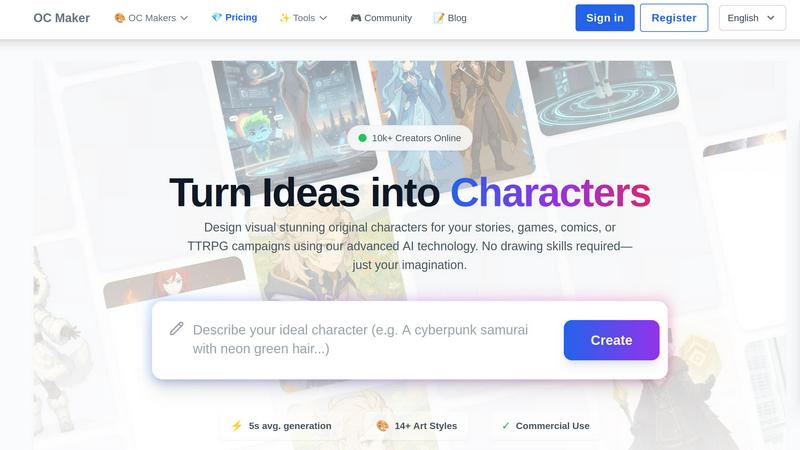
OC Maker instantly generates unique original characters for your creative projects using AI.
Last updated: March 1, 2026
Sketch To
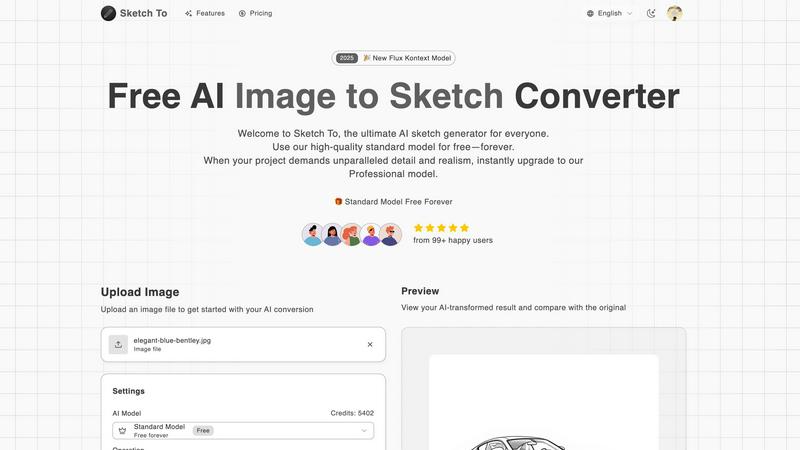
Sketch To instantly transforms your images into stunning AI sketches for any creative project.
Last updated: March 2, 2026
Visual Comparison
OC Maker
Sketch To
Feature Comparison
OC Maker
AI-Powered Character Generation
Our core engine generates complete, full-body original characters from scratch based solely on your text description. Simply input a detailed OC maker prompt describing appearance, personality, and style, and our AI creates a unique visual in an average of five seconds. This feature supports over 14 specific art styles, ensuring perfect alignment with your vision, whether it's for anime, fantasy, or hyper-realistic projects.
Themed Universe & Style Library
Dive deep into specific fandoms with our specialized, pre-trained AI models. We offer dedicated generators for popular universes like Genshin Impact, Sonic, Naruto, My Little Pony, and Jujutsu Kaisen. These models are finely tuned to understand and replicate the exact artistic nuances, color palettes, and character aesthetics of each style, guaranteeing authentic and fan-accurate creations every time.
Creative Power Tools Suite
OC Maker extends beyond static images with a professional suite of AI engines. This includes AI Video for turning text and images into cinematic clips, AI Headshot for generating studio-quality portraits, Face Swap for seamless photo and video edits, and Image to Prompt for reverse-engineering any image into a detailed Midjourney-style prompt. This suite allows for endless editing and animation possibilities.
Character Consistency & Editing
Maintain visual coherence across your projects with tools designed for consistency. You can generate multiple views and variations of the same character across different art styles, ensuring they remain recognizable. This is crucial for serialized content like comics, game development, and long-form storytelling, allowing for scalable character development and world-building.
Sketch To
Dual-Model AI Engine
Sketch To's foundation is its powerful dual-model system, designed to scale with your creative ambitions. The Standard Model provides high-quality, accessible conversions perfect for personal projects and exploration, available with free trial credits. When your work demands unparalleled realism, you can instantly switch to the world-class Professional Model, which delivers commercial-grade detail, texture, and accuracy. This architecture ensures you never pay for more than you need while having a clear path to upgrade your output quality.
Bidirectional Artistic Transformation
Unlike single-purpose tools, Sketch To offers powerful bidirectional conversion. You can transform any photo into a beautiful sketch across numerous styles like Pencil, Charcoal, Ink, or Watercolor. Conversely, you can breathe life into your rough drawings using the Sketch to Image AI feature, turning simple line art into stunning, photorealistic images. This dual functionality unlocks endless creative possibilities from a single platform.
Instant, High-Resolution Processing
Powered by a robust cloud-based AI infrastructure, Sketch To delivers results in seconds, not hours. There's no complex software to install or lengthy rendering times. Simply upload your file, choose your style, and generate. Every creation is processed and available for download in high resolution, ensuring your outputs are suitable for everything from social media posts to professional print materials.
Extensive Style Library & Customization
Cater to any creative vision with a comprehensive and growing library of artistic styles. Go beyond a simple pencil sketch to explore Charcoal, Colored Pencil, Comic, Concept Art, Figure Sketch, and Digital styles. The Model Configuration panel offers further control, allowing you to fine-tune the AI's output. This flexibility ensures you can achieve the exact aesthetic required for your project, every time.
Use Cases
OC Maker
Game Development & Prototyping
Indie and professional game developers can use OC Maker to rapidly prototype character concepts, design NPCs, and create entire rosters for their games. The ability to generate characters in specific styles (like fantasy or anime) and ensure consistency accelerates the pre-production phase, allowing teams to visualize ideas and iterate quickly without needing a full art department in the early stages.
Comic Book & Webtoon Creation
Artists and writers crafting serialized visual stories can generate main characters, supporting casts, and even background figures with consistent aesthetics. The themed universe generators help maintain a specific artistic style throughout the comic, while the suite of editing tools allows for creating promotional art, character sheets, and animated panels to engage an audience.
Tabletop RPG Campaigns
Game Masters and players can bring their tabletop RPG campaigns to life by generating visual representations of their custom characters, villains, and key NPCs. This enhances immersion and helps everyone at the table visualize the adventure. The fast generation time means you can create character art on-the-fly during a session based on narrative developments.
Professional Branding & Content Creation
Digital marketers, authors, and content creators can use OC Maker to design unique mascots, brand avatars, and illustrative content for blogs, social media, and books. The AI Headshot tool can generate professional profile pictures, while the general generator can create compelling original art to accompany written content, making branding more distinctive and visually engaging.
Sketch To
Social Media Content Creation
Creators and influencers can instantly generate unique, eye-catching artwork from their photos to stand out on platforms like Instagram, TikTok, and Pinterest. Transform portraits, travel photos, or product shots into artistic sketches or enhance simple doodles into polished images, fueling a consistent stream of engaging visual content without needing advanced design skills.
Digital Art & Design Projects
Hobbyists and professional designers can use Sketch To as a powerful ideation and asset-creation tool. Quickly generate sketch concepts from reference images, create textured backgrounds, or convert hand-drawn illustrations into high-fidelity digital assets for websites, games, or marketing materials, dramatically speeding up the creative workflow.
Educational & Student Projects
Students and educators can leverage Sketch To to add a professional, artistic flair to presentations, reports, and creative assignments. Transform historical photos into sketch-style visuals for history class, create scientific diagrams with an artistic touch, or produce compelling visuals for school publications, making academic work more visually engaging.
Professional Concept Visualization
Architects, product designers, and concept artists can use the Sketch to Image AI feature to rapidly visualize ideas. Upload a rough concept sketch and let the Professional Model generate a realistic render, providing a quick, cost-effective way to present ideas to clients or teams and iterate on designs before committing to detailed final artwork.
Overview
About OC Maker
OC Maker is the premier AI-powered creative platform engineered to scale your imagination into a visual reality. It's designed to democratize professional character design, eliminating the need for advanced drawing skills or expensive software. This web-based solution serves a massive, growing community of over 10,000 creators, including writers, game developers, comic artists, tabletop RPG enthusiasts, and digital storytellers. At its core, OC Maker uses advanced AI to transform detailed text prompts into unique, visually stunning original characters (OCs) in an average of just five seconds. The platform's key value proposition lies in its unparalleled accessibility combined with deep creative power. It supports over 14 distinct art styles—from Anime and Photorealistic to specific fandoms like Sonic, Genshin Impact, and Cuphead—ensuring perfect stylistic alignment for any project. Beyond simple generation, OC Maker provides a full suite of creative tools for editing, animating, and perfecting characters, empowering users to not just create assets but to build entire worlds and narratives. It's more than a generator; it's a growth engine for creative projects, enabling rapid prototyping, consistent character development, and bringing visionary ideas to life at an unprecedented pace.
About Sketch To
Sketch To is the ultimate AI-powered creative engine designed to democratize artistic transformation. It's a dynamic, web-based platform that instantly converts photos into stunning sketches and, uniquely, brings sketches to life as photorealistic images. Built for a new generation of creators, it eliminates the steep learning curve of traditional art software by leveraging cutting-edge artificial intelligence. Whether you're a social media enthusiast looking to create eye-catching content, a hobbyist exploring digital art, a student working on a project, or a professional designer needing high-fidelity assets, Sketch To scales with your ambition. Its core value proposition is a powerful dual-model system: a robust, always-free Standard Model for everyday creativity and a world-class Professional Model for commercial-grade realism. This approach ensures that anyone can start their creative journey at zero cost and seamlessly upgrade their toolkit as their projects demand higher quality and detail, embodying a true growth mindset for scaling creative output. With instant processing and support for a vast array of artistic styles, from pencil and charcoal to watercolor and digital, Sketch To is your all-in-one partner for evolving from a curious beginner to a professional creator.
Frequently Asked Questions
OC Maker FAQ
What is OC Maker and who is it for?
OC Maker is an AI-powered web platform that generates original characters from text descriptions. It's designed for anyone needing visual character art without drawing skills, including writers, game developers, comic artists, tabletop RPG players, digital content creators, and storytelling enthusiasts. It democratizes character design by making it fast, accessible, and stylistically versatile.
Do I need any artistic skill to use OC Maker?
No, you do not need any drawing or artistic skill to use OC Maker. The platform is built specifically for accessibility. Your primary tool is your imagination and ability to describe your character in a text prompt. The AI handles all the complex visual generation, allowing you to focus purely on the creative concept and story behind your character.
What art styles and fandoms does OC Maker support?
OC Maker supports a wide range of over 14 art styles and specific fandoms. This includes broad categories like Anime, Photorealistic, and Fantasy, as well as dedicated generators for universes like Genshin Impact, Sonic, Naruto, One Piece, Pokemon, My Little Pony, Cuphead, and Jujutsu Kaisen. You can also use the Universal Generator for styles not listed.
Can I use the characters I create for commercial projects?
Yes, characters generated on OC Maker are typically cleared for commercial use. This means you can use the original characters you create in your commercial projects, such as published games, books, comics, and merchandise. It is always recommended to review the specific Terms of Service for the latest details on licensing and usage rights.
Sketch To FAQ
How do I get started with Sketch To?
Getting started is simple and free. Visit the Sketch To website, sign up for an account, and you will receive trial credits to use with our high-quality Standard Model. You can immediately upload an image, choose a sketch style like Pencil or Charcoal, and generate your first AI-powered conversion with no upfront cost.
What is the difference between the Standard and Professional models?
The Standard Model is a powerful, free-tier option perfect for personal projects, social media, and hobbies, delivering clean, artistic conversions. The Professional Model is a premium upgrade that unlocks world-class realism, superior detail, and enhanced accuracy, making it ideal for commercial work, professional portfolios, and projects where the highest fidelity is required.
What file formats and sizes do you support?
You can upload common image file formats to begin your conversion. The platform currently supports a maximum file size of 5MB per image for upload. Your final AI-generated creations can be downloaded in high-resolution formats suitable for both digital use and professional printing.
Can I use Sketch To for commercial projects?
Yes, absolutely. The outputs from our Professional Model are designed and licensed for commercial use. This makes Sketch To an excellent tool for freelancers, agencies, and businesses needing to create unique marketing assets, product visuals, or branded content quickly and efficiently.
Alternatives
OC Maker Alternatives
OC Maker is a leading AI-powered creative platform in the image generation category, designed to help creators instantly visualize unique original characters. It empowers users to bridge the gap between imagination and visual reality without needing traditional artistic skills. Users often explore alternatives to find a solution that better aligns with their specific scaling needs, budget constraints, or desired feature sets. Some may seek different art style libraries, more advanced editing tools, or pricing models that support their project's growth trajectory. When evaluating other platforms, consider key factors like generation speed, the diversity and quality of artistic styles, licensing terms for commercial use, and the availability of advanced creative tools. The right alternative should not only match your immediate creative vision but also scale with your ambitions as a creator or business.
Sketch To Alternatives
Sketch To is a dynamic AI-powered platform in the image transformation category, specializing in instantly converting photos into artistic sketches and uniquely reversing the process to bring sketches to life as photorealistic images. It's built for creators who value speed, quality, and scalable creative tools. Users often explore alternatives for various reasons, such as seeking different pricing models, needing specific artistic styles beyond sketches, requiring offline software, or looking for tools integrated into a larger creative suite. The right fit depends heavily on your individual project scope and growth trajectory. When evaluating other options, consider key factors like the core AI capabilities, output quality for professional use, cost structure and scalability, and the overall user experience. The goal is to find a tool that not only meets your immediate creative needs but also scales with your ambition as your projects evolve.