
AI Photo Generator vs Sketch To
Side-by-side comparison to help you choose the right product.

AI Photo Generator
Generate stunning, photorealistic AI images from text or your own photos to scale creative production instantly.
Last updated: March 11, 2026
Sketch To
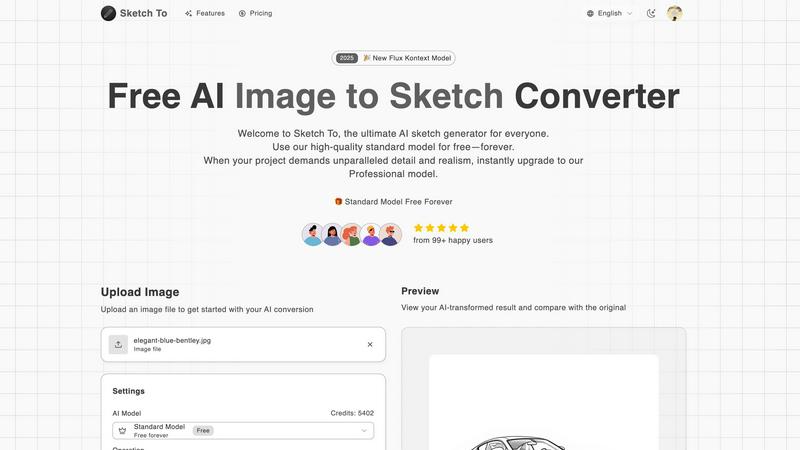
Sketch To instantly transforms your images into stunning AI sketches for any creative project.
Last updated: March 2, 2026
Visual Comparison
AI Photo Generator

Sketch To
Feature Comparison
AI Photo Generator
Ultra-Fast AI Model Selection
Choose from a curated suite of top-tier AI models like Flux, Ideogram, and Qwen, each optimized for specific tasks such as photorealism, character consistency, or detailed editing. This allows users to match the perfect engine to their project's needs, whether it's generating a product scene, editing a portrait, or creating a stylized poster, ensuring both speed and superior output quality for every use case.
Prompt-to-Masterpiece Generation
Our fine-tuned AI interprets detailed natural language prompts with high fidelity, accurately translating your vision for lighting, composition, mood, and detail into a finished image. This feature is engineered for fast iteration, enabling users to generate multiple variants for A/B testing and quickly lock in the strongest creative direction for campaigns, product visuals, or social media content.
Reference-Guided Image Transformation
Go beyond text by uploading a reference photo to guide the AI. This powerful image-to-image workflow allows for controlled edits, enabling you to change backgrounds, adjust composition, modify colors, or completely restyle an existing image while preserving core elements like identity or style continuity, perfect for maintaining brand consistency across assets.
Free-First, Scalable Editor
Start generating immediately with a browser-based, free-to-use AI photo editor online. This no-commitment approach lets teams test prompts, compare model outputs, and refine concepts before scaling up. Users can then seamlessly upgrade to access higher-resolution exports, faster generation speeds, and commercial usage rights, aligning cost with project growth.
Sketch To
Dual-Model AI Engine
Sketch To's foundation is its powerful dual-model system, designed to scale with your creative ambitions. The Standard Model provides high-quality, accessible conversions perfect for personal projects and exploration, available with free trial credits. When your work demands unparalleled realism, you can instantly switch to the world-class Professional Model, which delivers commercial-grade detail, texture, and accuracy. This architecture ensures you never pay for more than you need while having a clear path to upgrade your output quality.
Bidirectional Artistic Transformation
Unlike single-purpose tools, Sketch To offers powerful bidirectional conversion. You can transform any photo into a beautiful sketch across numerous styles like Pencil, Charcoal, Ink, or Watercolor. Conversely, you can breathe life into your rough drawings using the Sketch to Image AI feature, turning simple line art into stunning, photorealistic images. This dual functionality unlocks endless creative possibilities from a single platform.
Instant, High-Resolution Processing
Powered by a robust cloud-based AI infrastructure, Sketch To delivers results in seconds, not hours. There's no complex software to install or lengthy rendering times. Simply upload your file, choose your style, and generate. Every creation is processed and available for download in high resolution, ensuring your outputs are suitable for everything from social media posts to professional print materials.
Extensive Style Library & Customization
Cater to any creative vision with a comprehensive and growing library of artistic styles. Go beyond a simple pencil sketch to explore Charcoal, Colored Pencil, Comic, Concept Art, Figure Sketch, and Digital styles. The Model Configuration panel offers further control, allowing you to fine-tune the AI's output. This flexibility ensures you can achieve the exact aesthetic required for your project, every time.
Use Cases
AI Photo Generator
Social Media & Content Creation
Generate unique, eye-catching thumbnails, banner images, and social media posts that stand out in crowded feeds. Content creators can rapidly produce a constant stream of copyright-free visuals for YouTube, Instagram, and TikTok, maintaining a fresh and engaging online presence without a graphic design budget.
Marketing & Advertising Campaigns
Quickly produce high-quality visuals for ads, website banners, email newsletters, and presentation decks. Marketing teams can prototype campaign concepts, create multiple visual variants for testing, and generate professional assets on-demand, dramatically reducing production timelines and agency costs.
E-commerce & Product Visualization
Create photorealistic product scenes and lifestyle shots without expensive photoshoots. Entrepreneurs and e-commerce managers can generate images of products in various settings, colors, or contexts, perfect for online catalogs, mockups, and advertising, enabling faster go-to-market strategies.
Personal Branding & Professional Portraits
Transform a simple selfie into a polished, professional headshot or create consistent character visuals for a personal brand. This use case is ideal for professionals, influencers, and remote teams needing profile-ready images that convey a specific aesthetic or professional tone for LinkedIn, company websites, and speaker bios.
Sketch To
Social Media Content Creation
Creators and influencers can instantly generate unique, eye-catching artwork from their photos to stand out on platforms like Instagram, TikTok, and Pinterest. Transform portraits, travel photos, or product shots into artistic sketches or enhance simple doodles into polished images, fueling a consistent stream of engaging visual content without needing advanced design skills.
Digital Art & Design Projects
Hobbyists and professional designers can use Sketch To as a powerful ideation and asset-creation tool. Quickly generate sketch concepts from reference images, create textured backgrounds, or convert hand-drawn illustrations into high-fidelity digital assets for websites, games, or marketing materials, dramatically speeding up the creative workflow.
Educational & Student Projects
Students and educators can leverage Sketch To to add a professional, artistic flair to presentations, reports, and creative assignments. Transform historical photos into sketch-style visuals for history class, create scientific diagrams with an artistic touch, or produce compelling visuals for school publications, making academic work more visually engaging.
Professional Concept Visualization
Architects, product designers, and concept artists can use the Sketch to Image AI feature to rapidly visualize ideas. Upload a rough concept sketch and let the Professional Model generate a realistic render, providing a quick, cost-effective way to present ideas to clients or teams and iterate on designs before committing to detailed final artwork.
Overview
About AI Photo Generator
AI Photo Generator is a cutting-edge creative platform designed to democratize professional-grade visual content creation. By leveraging a suite of advanced, fine-tuned AI models, it transforms simple text descriptions or existing images into stunning, high-resolution digital art in seconds. The core mission is to remove technical barriers, empowering individuals and teams to scale their visual output without the need for extensive design skills or expensive software. It caters to a growth-oriented audience, from solo content creators and agile startups to marketing teams at scaling companies, providing them with a competitive edge through rapid, cost-effective, and copyright-free asset generation. The platform stands out with its ultra-fast processing, a vast library of artistic styles, and a dual-path workflow that supports both pure imagination (text-to-image) and iterative refinement (image-to-image), making it the most realistic and efficient AI photo generator for fast-moving, innovative teams.
About Sketch To
Sketch To is the ultimate AI-powered creative engine designed to democratize artistic transformation. It's a dynamic, web-based platform that instantly converts photos into stunning sketches and, uniquely, brings sketches to life as photorealistic images. Built for a new generation of creators, it eliminates the steep learning curve of traditional art software by leveraging cutting-edge artificial intelligence. Whether you're a social media enthusiast looking to create eye-catching content, a hobbyist exploring digital art, a student working on a project, or a professional designer needing high-fidelity assets, Sketch To scales with your ambition. Its core value proposition is a powerful dual-model system: a robust, always-free Standard Model for everyday creativity and a world-class Professional Model for commercial-grade realism. This approach ensures that anyone can start their creative journey at zero cost and seamlessly upgrade their toolkit as their projects demand higher quality and detail, embodying a true growth mindset for scaling creative output. With instant processing and support for a vast array of artistic styles, from pencil and charcoal to watercolor and digital, Sketch To is your all-in-one partner for evolving from a curious beginner to a professional creator.
Frequently Asked Questions
AI Photo Generator FAQ
What is the best way to write a prompt for good results?
For the best results, be specific and descriptive. Include details about the subject, setting, lighting (e.g., "soft morning light"), composition (e.g., "close-up portrait"), style (e.g., "cinematic"), and mood. Using our model presets for portraits, ads, or ecommerce can also help guide the AI to meet your specific workflow needs more accurately.
Can I use the generated images for commercial purposes?
Yes, images generated on our platform can be used for commercial purposes, including in advertising, on websites, and in products. This is a key feature that empowers businesses and creators to scale their content legally. Specific terms may apply based on your subscription plan, so reviewing our licensing details is recommended.
How does the image-to-image feature work?
The image-to-image feature uses your uploaded photo as a visual reference. You then provide text instructions on what to change, such as "change the background to a beach" or "make the style a vintage oil painting." The AI regenerates the image, incorporating your edits while preserving the core structure and elements of the original photo for controlled transformation.
Is there a free plan available?
Absolutely. We offer a free-to-start plan that allows you to experience the core AI photo generator and editor functionalities without any cost. This is designed to let you test prompts, explore different models, and understand the platform's value. For higher-volume usage, faster generation, and high-res commercial exports, scalable paid plans are available.
Sketch To FAQ
How do I get started with Sketch To?
Getting started is simple and free. Visit the Sketch To website, sign up for an account, and you will receive trial credits to use with our high-quality Standard Model. You can immediately upload an image, choose a sketch style like Pencil or Charcoal, and generate your first AI-powered conversion with no upfront cost.
What is the difference between the Standard and Professional models?
The Standard Model is a powerful, free-tier option perfect for personal projects, social media, and hobbies, delivering clean, artistic conversions. The Professional Model is a premium upgrade that unlocks world-class realism, superior detail, and enhanced accuracy, making it ideal for commercial work, professional portfolios, and projects where the highest fidelity is required.
What file formats and sizes do you support?
You can upload common image file formats to begin your conversion. The platform currently supports a maximum file size of 5MB per image for upload. Your final AI-generated creations can be downloaded in high-resolution formats suitable for both digital use and professional printing.
Can I use Sketch To for commercial projects?
Yes, absolutely. The outputs from our Professional Model are designed and licensed for commercial use. This makes Sketch To an excellent tool for freelancers, agencies, and businesses needing to create unique marketing assets, product visuals, or branded content quickly and efficiently.
Alternatives
AI Photo Generator Alternatives
AI Photo Generator is a leading platform in the AI image generation category, designed to transform text prompts and existing photos into professional digital art. It empowers users to create stunning visuals without needing advanced technical skills, making high-end design accessible to a broad audience. Users often explore alternatives for various reasons, such as seeking different pricing models, specific feature sets like inpainting or outpainting, or platforms that better integrate with their existing creative workflow. The need for a particular artistic style, higher resolution outputs, or different usage licenses can also drive the search for other tools. When evaluating alternatives, consider the core factors that impact your creative process. Key aspects include the quality and accuracy of image generation, the diversity of available styles and models, processing speed, and the overall cost-effectiveness for your volume of use. The right tool should align with your specific project requirements and growth ambitions.
Sketch To Alternatives
Sketch To is a dynamic AI-powered platform in the image transformation category, specializing in instantly converting photos into artistic sketches and uniquely reversing the process to bring sketches to life as photorealistic images. It's built for creators who value speed, quality, and scalable creative tools. Users often explore alternatives for various reasons, such as seeking different pricing models, needing specific artistic styles beyond sketches, requiring offline software, or looking for tools integrated into a larger creative suite. The right fit depends heavily on your individual project scope and growth trajectory. When evaluating other options, consider key factors like the core AI capabilities, output quality for professional use, cost structure and scalability, and the overall user experience. The goal is to find a tool that not only meets your immediate creative needs but also scales with your ambition as your projects evolve.