
Shrinkpad vs Whop Trends
Side-by-side comparison to help you choose the right product.

Shrinkpad
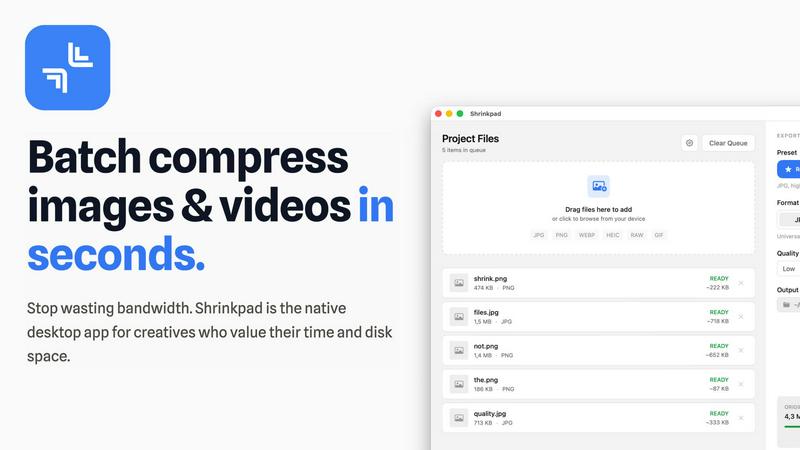
Shrinkpad instantly compresses images and videos on your Mac to save space and boost performance.
Last updated: February 28, 2026

Whop Trends
Whop Trends spots winning products early so you can scale your income with data.
Last updated: February 28, 2026
Visual Comparison
Shrinkpad
Whop Trends

Feature Comparison
Shrinkpad
Intelligent Quality Optimization
Shrinkpad automatically analyzes the visual complexity of each image and video to apply the perfect compression ratio, eliminating the guesswork. It intelligently balances file size reduction with visual fidelity, ensuring results are free from artifacts. This smart, automated approach guarantees professional-grade optimization every time, allowing you to maintain quality while dramatically shrinking file sizes.
Unlimited Batch Processing & Queue Management
Built to scale with ambitious projects, Shrinkpad handles massive queues with unparalleled stability. You can drop hundreds of files or entire folders, and the app will process thousands of assets in a single batch without crashing. A clear, real-time queue shows the status of every file, from waiting to processing, giving you complete visibility and control over large-scale optimization tasks.
One-Drop Folder Mode & Smart Detection
Simply drag and drop any folder onto Shrinkpad, and it instantly scans and identifies all supported media files within, including those in subfolders. It automatically detects over 50 formats, from common JPGs and PNGs to RAW photos and major video formats like MP4 and MOV, safely ignoring non-media files. This feature turns complex organization into a one-click operation.
Privacy-First, Local-Only Processing
Every compression task happens 100% locally on your Mac, leveraging the full power of Apple Silicon for multi-threaded, lightning-fast performance. Your files are never uploaded to the cloud, ensuring absolute privacy for sensitive client work, proprietary projects, and personal media. This also means you can optimize assets anywhere, completely offline.
Whop Trends
Live Market Data Feed
Access a continuously updated dashboard tracking over 197.3k+ Whop products with critical metrics like monthly revenue, affiliate percentage, product age, user count, and ratings. The data refreshes every 24 hours, providing a real-time pulse on market trends, emerging winners, and saturation levels so you can act on fresh intelligence, not outdated information.
Deep Product Analytics & Validation
Go beyond surface-level stats with deep-dive product pages featuring historical performance charts, review velocity timelines, and category context. This feature allows you to pressure-test demand, understand growth trajectories, and validate a product's long-term potential before you invest your time or capital into building or promoting it.
Integrated Affiliate & Revenue Intelligence
Seamlessly combine product discovery with monetization strategy. Filter and sort products by high affiliate commission rates (often 30% or more) alongside verified revenue estimates. This integration ensures you can immediately identify not just popular products, but profitable opportunities for promotion and partnership.
Specialized Market Tools Suite
Empower your research with built-in utilities like the Product Checker for instant analysis of any Whop link and the Revenue Calculator to model your own earning potential. Coupled with a comprehensive directory of 323+ Whop apps, these tools provide a complete ecosystem for strategic planning and competitive analysis.
Use Cases
Shrinkpad
Optimizing Web & App Assets for Performance
Developers and web designers can drastically reduce application bundle sizes and improve website core vitals like Largest Contentful Paint (LCP). By batch-compressing all interface images, icons, and promotional videos directly from export folders, Shrinkpad streamlines the pipeline to deliver faster-loading digital products without manual per-file effort.
Managing Photographer & Videographer Workflows
Photographers and videographers can reclaim gigabytes of storage after shoots by compressing RAW image sets and high-resolution video clips in bulk. Shrinkpad handles mixed-format batches effortlessly, preparing optimized deliverables for client previews, portfolio sites, or archive storage while keeping the original high-quality masters intact.
Streamlining Design-to-Export Workflows
Designers working in Figma, Photoshop, or Sketch can export entire asset sets at 2x or 4x resolution for flexibility and then use Shrinkpad to intelligently compress and auto-rename the entire batch in one step. This eliminates the tedious, manual process of optimizing and organizing hundreds of exported files individually.
Preparing Large Volumes of User-Generated Content
Product managers, community managers, or marketers handling large volumes of user-submitted images and videos can use Shrinkpad to uniformly optimize this content before it hits their platforms. This ensures consistent quality, reduces server storage and bandwidth costs, and maintains fast load times across applications and websites.
Whop Trends
For Builders: Validating Product Ideas
A developer can use Whop Trends to identify underserved niches with high revenue potential and low competition. By analyzing category benchmarks, pricing strategies, and user review patterns of existing successful products, they can validate their own product idea, position it effectively, and ship with data-backed confidence, significantly reducing the risk of building something nobody wants.
For Affiliates: Discovering High-Commission Programs
Digital marketers and affiliate promoters can leverage the platform's filters to quickly find trending products with strong affiliate programs (30-50% commissions). They can assess a product's momentum, stability, and user satisfaction to ensure they promote winning, reputable offers that convert well and generate sustainable passive income streams.
For Operators & Investors: Conducting Market Due Diligence
Operators managing portfolios or investors looking at digital assets can use Whop Trends for deep market research. The historical revenue charts and growth metrics allow for thorough due diligence, helping to identify products with consistent performance, strong operator execution, and scalable business models worthy of acquisition or investment.
For Researchers: Spotting Macro Trends
Analysts and content creators can utilize the vast dataset to spot overarching trends within the digital product space. By tracking category growth, pricing shifts, and emerging product types, they can create authoritative reports, predict future hot niches, and establish themselves as thought leaders based on concrete market data.
Overview
About Shrinkpad
Shrinkpad is the native macOS powerhouse engineered for the modern creator who demands speed, privacy, and ultimate storage efficiency. It's a desktop application that performs lightning-fast, batch compression of images and videos directly on your Mac, transforming gigabytes of digital clutter into optimized assets in seconds. The core value proposition is transformative: reclaim critical disk space and eliminate hours of manual, repetitive work without ever sacrificing quality or control over your files. Built for photographers, designers, developers, and content creators, Shrinkpad automates the tedious busywork of asset optimization, scaling seamlessly from casual use to processing thousands of files for large-scale projects. Unlike cloud-based tools, Shrinkpad leverages Apple's native frameworks to process everything locally. This means your sensitive project files, client assets, and personal media never leave your device, ensuring complete privacy and zero dependency on an internet connection. It's more than a tool; it's an indispensable asset for anyone looking to optimize their digital footprint, accelerate their creative workflow, and scale their productivity without compromise.
About Whop Trends
Whop Trends is the definitive market intelligence platform for the digital economy, built to give builders, affiliates, and operators a data-driven edge. In a landscape where timing is everything, Whop Trends tracks over 197.3k+ products daily within the Whop ecosystem, surfacing the winning products generating significant revenue before they become mainstream. It transforms random guessing into a repeatable, strategic workflow for discovering demand, validating niches, and executing with confidence. The platform provides unparalleled access to real revenue estimates, affiliate commission rates, growth signals, and competitive benchmarks. This isn't just a database; it's a growth engine designed to help you identify low-competition, high-opportunity pockets, validate ideas with historical performance data, and ultimately scale your digital business or affiliate portfolio with insights that compound over time. For anyone serious about building, promoting, or investing in digital products, Whop Trends is the essential tool to de-risk decisions and capitalize on market momentum.
Frequently Asked Questions
Shrinkpad FAQ
Can I use Shrinkpad for free?
Yes, Shrinkpad offers a Free Starter plan that includes essential tools for casual use. This plan allows standard compression for common formats like JPG and PNG with a limit of 10 files per batch and a maximum 1GB file size. It's a great way to experience the core speed and local processing benefits before upgrading for unlimited power.
What file formats does Shrinkpad support?
Shrinkpad supports a wide range of over 50 image and video formats natively. This includes common formats like JPG, PNG, MP4, and MOV, as well as professional formats like WEBP, AVIF, HEIC, and various RAW camera files. The app automatically identifies and applies optimal compression settings for each file type in a mixed batch.
Does Shrinkpad support video compression?
Absolutely. Shrinkpad provides powerful batch compression for videos alongside images. You can process video files like MP4 and MOV in the same batch as your photos, and the app will intelligently compress them to significantly reduce file size while aiming to preserve visual quality, all processed locally on your machine.
Are my files uploaded to the cloud?
No. Privacy is a foundational principle for Shrinkpad. All processing occurs locally on your Mac using Apple's native frameworks. Your original files, compressed outputs, and any data never leave your device. This ensures complete security and privacy for sensitive work and allows for compression without an internet connection.
Whop Trends FAQ
How current is the data on Whop Trends?
The data on Whop Trends is updated daily. Our system tracks over 197.3k+ products every 24 hours, ensuring you have access to the freshest market signals, revenue estimates, and growth metrics to make timely, informed decisions based on the current state of the market.
What kind of products does Whop Trends track?
Whop Trends exclusively tracks products hosted on the Whop.com platform. This includes a wide array of digital offerings such as online communities (Discord, Telegram), SaaS tools, courses, e-books, investment groups, and more—essentially any product that can be sold through a Whop storefront.
Is there a free version or trial available?
Yes, Whop Trends offers a Free Preview tier. This allows you to browse the extensive product database, test the Product Checker tool, and use the Revenue Calculator at no cost. To unlock the full database with advanced filtering, deep analytics, and export capabilities, a one-time payment for lifetime access is required.
What is the "one-time payment" access model?
Unlike many SaaS tools with monthly subscriptions, Whop Trends operates on a one-time payment model for lifetime access. You pay once and retain full access to the platform and all its current and future core features indefinitely, without recurring bills, making it a compounding asset for your business toolkit.
Alternatives
Shrinkpad Alternatives
Shrinkpad is a native macOS application for batch compressing images and videos, designed to reclaim storage and accelerate workflows for creators. It falls into the categories of image optimization and video compression tools, focusing on local processing for speed and privacy. Users often explore alternatives for various reasons, such as budget constraints, needing cross-platform compatibility beyond macOS, or requiring specific niche features not covered by a generalist tool. The search for the right fit is a natural part of scaling a creative or technical operation efficiently. When evaluating alternatives, key considerations include the processing method (cloud vs. local), supported file formats, batch processing capabilities, and the overall impact on your workflow's speed and security. The goal is to find a solution that aligns with your volume, platform, and quality requirements without creating new bottlenecks.
Whop Trends Alternatives
Whop Trends is a market intelligence platform in the product discovery and affiliate marketing category. It scans the Whop ecosystem to surface high-revenue, trending products, giving builders and operators a data-driven edge to validate ideas and scale their income. Users explore alternatives for various reasons. Some seek tools with a broader market scope beyond a single platform, while others prioritize different pricing models or specific feature sets like deeper analytics or integration capabilities. The search is often about finding the perfect fit for a unique workflow or budget. When evaluating an alternative, focus on core capabilities. Key considerations include the depth and freshness of market data, the ability to identify genuine low-competition opportunities, and tools that combine product discovery with actionable affiliate insights. The right platform should seamlessly integrate into your validation and execution process.