
Octopods vs Playwriter
Side-by-side comparison to help you choose the right product.

Octopods
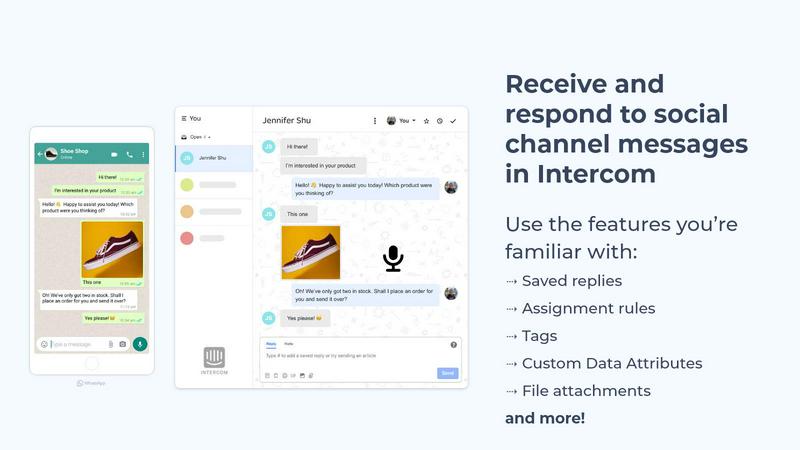
Octopods unifies WhatsApp, SMS, and more into Intercom or HubSpot, streamlining customer conversations in one place.
Last updated: February 26, 2026

Playwriter
Playwriter seamlessly empowers agents to control your live Chrome browser with AI, maintaining logins and extensions for optimal performance.
Last updated: March 18, 2026
Visual Comparison
Octopods
Playwriter

Feature Comparison
Octopods
Native Integration
Octopods works natively within Intercom and HubSpot, allowing teams to manage all messaging interactions from various channels without switching apps. This seamless integration ensures that workflows remain uninterrupted.
Rich Media Support
Support conversations can include rich media elements such as images, videos, audio clips, documents, and GIFs. This feature enhances customer interactions, making them more engaging and informative.
Proactive Outbound Messaging
With proactive outbound messaging capabilities, teams can utilize templates for initiating conversations. This feature allows for timely communication and ensures that customers receive relevant updates and information.
Custom Data Attributes
Octopods provides the ability to create Custom Data Attributes for filtering and segmentation. This feature enables teams to better organize contacts and tailor interactions based on customer preferences and behaviors.
Playwriter
Real Browser Session Access
Playwriter allows agents to work directly within your existing browser session. This means all your logins, extensions, and cookies are retained, providing a seamless browsing experience without the hurdles of bot detection or memory issues associated with headless browsers.
Full Playwright API Integration
With Playwriter, you gain access to the complete Playwright API through a single execute tool. This feature allows agents to run any Playwright code without cumbersome wrappers or schema bloat, ensuring low context usage and efficient automation workflows.
Collaborative Environment
Playwriter facilitates real-time collaboration between you and your agents. You can monitor their actions live, stepping in to solve captchas, consent walls, or other obstacles as they arise, ensuring that the automation process remains smooth and effective.
Advanced Debugger and Editor
The integrated debugger and editor enable you to set breakpoints, edit code on the fly, and intercept network requests. This powerful feature provides developers with the tools necessary to troubleshoot and optimize tasks effectively, enhancing the overall performance of your automation efforts.
Use Cases
Octopods
Customer Support Centralization
Customer service teams can use Octopods to consolidate support requests from various messaging apps into a single platform, streamlining the resolution process and improving response times.
Sales Engagement
Sales teams can engage with leads on their preferred messaging channels while ensuring that all conversations are documented and synced within HubSpot, enhancing follow-up efficiency and effectiveness.
Omnichannel Messaging
Octopods transforms Intercom and HubSpot into powerful omnichannel platforms, allowing businesses to manage customer interactions across multiple messaging apps without the complexity of additional inboxes.
Workflow Automation
By integrating messaging channels into existing workflows, teams can automate processes using Intercom and HubSpot features like assignments, internal notes, and tags, leading to increased productivity and reduced manual tasks.
Playwriter
Streamlined Testing Workflows
Developers can leverage Playwriter to automate browser testing without losing the context of user sessions. By enabling agents to navigate and test web applications in a familiar environment, teams can enhance testing efficiency and accuracy.
Enhanced Data Collection
Researchers and analysts can use Playwriter to automate the collection of data from various web sources. With direct access to browser sessions, agents can navigate complex websites and gather information while bypassing common barriers like captchas.
Effective User Experience Monitoring
UX teams can employ Playwriter to automate the monitoring of web applications from a user's perspective. By allowing agents to interact with websites as real users, teams can identify potential pain points and areas for improvement in the user journey.
Intelligent Automation for Marketing
Marketing teams can utilize Playwriter to automate repetitive tasks such as lead generation and web scraping. By providing agents with full access to a browser session, they can interact with online platforms efficiently, saving time and increasing productivity.
Overview
About Octopods
Octopods revolutionizes the way customer support teams engage with clients by seamlessly integrating over 18 messaging channels, including WhatsApp, Telegram, Instagram, LINE, Viber, SMS, and WeChat, directly into your Intercom or HubSpot inbox. This innovative tool eliminates the need for switching between disparate messaging apps, allowing teams to manage conversations natively within their existing support platforms. With Octopods, support, sales, and operations teams can leverage the full suite of Intercom and HubSpot features, including tags, saved replies, and AI capabilities, without losing context. This solution not only streamlines communication but also enhances team productivity and improves customer satisfaction by ensuring interactions are centralized and easily accessible. Designed for organizations that prioritize customer engagement, Octopods ensures that your team's workflows remain intact, while providing insights into response times, conversation volume, and team workload. Setup is quick and easy, making it an ideal choice for businesses eager to enhance their customer communication strategies.
About Playwriter
Playwriter is a revolutionary tool designed to empower AI agents by providing them direct control over your existing browser session. Unlike traditional setups where agents operate in isolated environments, Playwriter connects them seamlessly to your actual Chrome browser, complete with all your logins, extensions, and cookies. This innovative approach eliminates issues of bot detection and memory overhead, allowing agents to perform tasks as if they were you. The platform is ideal for developers, testers, and teams looking to enhance automation capabilities while maintaining human oversight. With Playwriter, you can automate repetitive tasks while still having the ability to intervene when necessary, creating a harmonious blend of human and AI collaboration.
Frequently Asked Questions
Octopods FAQ
How does Octopods enhance team productivity?
Octopods enhances team productivity by integrating multiple messaging channels into a single platform, eliminating the need for context switching and allowing teams to focus on customer interactions seamlessly.
Is the setup process complicated?
Not at all. Octopods is designed for quick and easy setup, enabling teams to start managing their messaging channels in just a few minutes without any technical expertise required.
Can I use Octopods with other messaging platforms?
Yes, Octopods supports over 18 messaging platforms, including WhatsApp, Telegram, and SMS, allowing teams to connect with customers on their preferred channels.
What security measures does Octopods implement?
Octopods is built on official, fully verified APIs that adhere to enterprise security standards, ensuring reliable and compliant messaging for businesses at scale.
Playwriter FAQ
How does Playwriter ensure security during browser sessions?
Playwriter operates entirely on your local machine, ensuring that no data is transmitted to external servers. The Chrome extension connects to a local WebSocket relay, which means all actions are secure and contained within your environment.
What are the system requirements for using Playwriter?
To use Playwriter, you'll need a compatible version of Google Chrome and Node.js installed on your machine. The extension and CLI can be easily installed to get started quickly.
Can I use Playwriter with other automation tools?
Yes, Playwriter is designed to work with any MCP client, including Cursor, Claude, and VS Code, allowing for flexibility in your automation setup and integration with various workflows.
Is Playwriter open source?
Absolutely! Playwriter is open-source and released under the MIT license, making it accessible for developers to contribute, customize, and enhance the tool according to their needs.
Alternatives
Octopods Alternatives
Octopods is a cutting-edge customer communication platform that integrates over 18 messaging channels, such as WhatsApp, Telegram, and Instagram, directly into your Intercom or HubSpot inbox. Designed to enhance customer support, sales, and operations, it streamlines conversations by allowing teams to leverage familiar tools and workflows without the need for context switching. Users often seek alternatives to Octopods due to various reasons, including pricing concerns, specific feature sets, or compatibility with existing platforms. When searching for a suitable alternative, it's essential to consider factors such as ease of integration, support for multiple messaging channels, and the ability to maintain a seamless conversation experience across different platforms.
Playwriter Alternatives
Playwriter is an innovative tool designed for automation, allowing users to control Chrome using AI via both a Command Line Interface (CLI) and a Multi-Client Platform (MCP). This powerful solution overcomes the limitations faced by traditional AI agents, providing access to your actual logged-in browser session, complete with all extensions. Users often seek alternatives to Playwriter due to various factors such as pricing, feature sets, and compatibility with their existing platforms and workflows. When choosing an alternative, it's essential to consider the specific features that align with your automation needs, such as ease of integration, the flexibility of use cases, and the ability to support various client environments. Ensuring that the alternative offers robust support and a user-friendly interface can significantly impact productivity and effectiveness in achieving your automation goals.