
Nano Banana Pro vs Sketch To
Side-by-side comparison to help you choose the right product.

Nano Banana Pro
Nano Banana Pro generates stunning 4K images effortlessly with AI-powered editing tools for creators seeking perfection.
Last updated: February 28, 2026
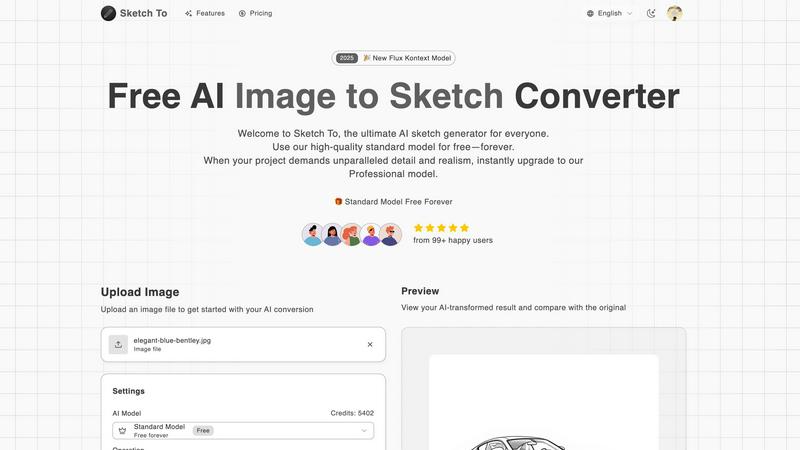
Sketch To
Sketch To instantly transforms your images into stunning AI sketches for any creative project.
Last updated: March 2, 2026
Visual Comparison
Nano Banana Pro

Sketch To
Feature Comparison
Nano Banana Pro
Character Consistency
Nano Banana Pro excels in maintaining character features across multiple images, ensuring perfect continuity that is vital for character design, storyboarding, and series creation. This feature leverages advanced multi-image understanding technology, allowing creators to keep their characters consistent even as they explore different artistic styles and scenarios.
Image-to-Image Editing
With the Nano Banana Edit functionality, users can transform existing images by uploading up to 10 images at a time. This feature empowers creators to use AI prompts to reimagine their photos, whether they want to add new elements, convert photographs into artwork, or entirely change the scene while preserving key features. It's a powerful tool for artists looking to innovate while maintaining the essence of their original works.
Enhanced Text Rendering
Nano Banana Pro includes a high-fidelity text rendering engine that ensures crystal-clear text in images. This feature is particularly beneficial for those creating posters, logos, and other forms of visual content that require precise typography. With this capability, users can say goodbye to the frustration of garbled or unclear letters.
Versatile Aspect Ratios
The tool supports a wide range of aspect ratios, from square (1:1) to ultrawide (21:9), accommodating various formats that creators might need. Whether you are designing for social media, presentations, or banners, Nano Banana Pro adapts to your requirements, making it a flexible choice for diverse visual content applications.
Sketch To
Dual-Model AI Engine
Sketch To's foundation is its powerful dual-model system, designed to scale with your creative ambitions. The Standard Model provides high-quality, accessible conversions perfect for personal projects and exploration, available with free trial credits. When your work demands unparalleled realism, you can instantly switch to the world-class Professional Model, which delivers commercial-grade detail, texture, and accuracy. This architecture ensures you never pay for more than you need while having a clear path to upgrade your output quality.
Bidirectional Artistic Transformation
Unlike single-purpose tools, Sketch To offers powerful bidirectional conversion. You can transform any photo into a beautiful sketch across numerous styles like Pencil, Charcoal, Ink, or Watercolor. Conversely, you can breathe life into your rough drawings using the Sketch to Image AI feature, turning simple line art into stunning, photorealistic images. This dual functionality unlocks endless creative possibilities from a single platform.
Instant, High-Resolution Processing
Powered by a robust cloud-based AI infrastructure, Sketch To delivers results in seconds, not hours. There's no complex software to install or lengthy rendering times. Simply upload your file, choose your style, and generate. Every creation is processed and available for download in high resolution, ensuring your outputs are suitable for everything from social media posts to professional print materials.
Extensive Style Library & Customization
Cater to any creative vision with a comprehensive and growing library of artistic styles. Go beyond a simple pencil sketch to explore Charcoal, Colored Pencil, Comic, Concept Art, Figure Sketch, and Digital styles. The Model Configuration panel offers further control, allowing you to fine-tune the AI's output. This flexibility ensures you can achieve the exact aesthetic required for your project, every time.
Use Cases
Nano Banana Pro
Character Design
Artists and game developers can utilize Nano Banana Pro for character design, generating multiple character iterations with consistent features across different poses and expressions. This enables them to create compelling narratives and visual storytelling that resonates with their audience.
Marketing Visuals
Marketers can leverage Nano Banana Pro to produce visually striking promotional materials, including banners, social media posts, and advertisements. The ability to generate high-quality images quickly allows teams to respond to market trends and campaigns efficiently.
Concept Art Creation
Illustrators and concept artists can use this tool to create concept art for animations, video games, and other creative projects. The Image-to-Image editing feature allows them to experiment with different designs and styles while maintaining the core elements of their initial concepts.
Educational Content
Educators and content creators can make use of Nano Banana Pro to develop engaging educational visual content. From infographics to illustrated lesson plans, the enhanced text rendering and high-resolution image generation can help convey complex information in a visually appealing manner.
Sketch To
Social Media Content Creation
Creators and influencers can instantly generate unique, eye-catching artwork from their photos to stand out on platforms like Instagram, TikTok, and Pinterest. Transform portraits, travel photos, or product shots into artistic sketches or enhance simple doodles into polished images, fueling a consistent stream of engaging visual content without needing advanced design skills.
Digital Art & Design Projects
Hobbyists and professional designers can use Sketch To as a powerful ideation and asset-creation tool. Quickly generate sketch concepts from reference images, create textured backgrounds, or convert hand-drawn illustrations into high-fidelity digital assets for websites, games, or marketing materials, dramatically speeding up the creative workflow.
Educational & Student Projects
Students and educators can leverage Sketch To to add a professional, artistic flair to presentations, reports, and creative assignments. Transform historical photos into sketch-style visuals for history class, create scientific diagrams with an artistic touch, or produce compelling visuals for school publications, making academic work more visually engaging.
Professional Concept Visualization
Architects, product designers, and concept artists can use the Sketch to Image AI feature to rapidly visualize ideas. Upload a rough concept sketch and let the Professional Model generate a realistic render, providing a quick, cost-effective way to present ideas to clients or teams and iterate on designs before committing to detailed final artwork.
Overview
About Nano Banana Pro
Nano Banana Pro is an innovative AI image generator tailored for creators, designers, and developers who aim to produce exceptional visuals swiftly and efficiently. Powered by the advanced Gemini 3 Pro image preview technology, it allows users to generate stunning 4K-ready images with impeccable character consistency and enhanced multi-step error correction. This versatile tool caters to both Text-to-Image and Image-to-Image editing needs, making it suitable for a wide array of applications. Whether you are crafting unique artwork, designing characters for a narrative, or transforming existing images into fresh compositions, Nano Banana Pro equips you with the necessary tools to achieve professional-level results. With a user-friendly interface and a thriving community of over 10,000 creators, Nano Banana Pro has established itself as a premier solution for anyone eager to elevate their visual content production.
About Sketch To
Sketch To is the ultimate AI-powered creative engine designed to democratize artistic transformation. It's a dynamic, web-based platform that instantly converts photos into stunning sketches and, uniquely, brings sketches to life as photorealistic images. Built for a new generation of creators, it eliminates the steep learning curve of traditional art software by leveraging cutting-edge artificial intelligence. Whether you're a social media enthusiast looking to create eye-catching content, a hobbyist exploring digital art, a student working on a project, or a professional designer needing high-fidelity assets, Sketch To scales with your ambition. Its core value proposition is a powerful dual-model system: a robust, always-free Standard Model for everyday creativity and a world-class Professional Model for commercial-grade realism. This approach ensures that anyone can start their creative journey at zero cost and seamlessly upgrade their toolkit as their projects demand higher quality and detail, embodying a true growth mindset for scaling creative output. With instant processing and support for a vast array of artistic styles, from pencil and charcoal to watercolor and digital, Sketch To is your all-in-one partner for evolving from a curious beginner to a professional creator.
Frequently Asked Questions
Nano Banana Pro FAQ
What makes Nano Banana Pro stand out from other AI image generators?
Nano Banana Pro distinguishes itself with its advanced character consistency, rapid generation speeds, and high-fidelity text rendering. The integration of Gemini 3 Pro ensures that users can create stunning visuals efficiently without sacrificing quality.
Can I use Nano Banana Pro for commercial projects?
Yes, Nano Banana Pro is suitable for commercial use. Users can create images for marketing, branding, and other business-related applications while adhering to the platform's usage guidelines.
How does the Image-to-Image editing feature work?
The Image-to-Image editing feature allows users to upload existing images and apply AI prompts to modify them. This can involve adding new elements, transforming scenes, or enhancing details, all while preserving key characteristics of the original image.
Is there a community for users of Nano Banana Pro?
Absolutely! Nano Banana Pro has a thriving community of over 10,000 creators. Users are encouraged to join and share their creations, gaining inspiration and feedback while connecting with other like-minded individuals in the creative space.
Sketch To FAQ
How do I get started with Sketch To?
Getting started is simple and free. Visit the Sketch To website, sign up for an account, and you will receive trial credits to use with our high-quality Standard Model. You can immediately upload an image, choose a sketch style like Pencil or Charcoal, and generate your first AI-powered conversion with no upfront cost.
What is the difference between the Standard and Professional models?
The Standard Model is a powerful, free-tier option perfect for personal projects, social media, and hobbies, delivering clean, artistic conversions. The Professional Model is a premium upgrade that unlocks world-class realism, superior detail, and enhanced accuracy, making it ideal for commercial work, professional portfolios, and projects where the highest fidelity is required.
What file formats and sizes do you support?
You can upload common image file formats to begin your conversion. The platform currently supports a maximum file size of 5MB per image for upload. Your final AI-generated creations can be downloaded in high-resolution formats suitable for both digital use and professional printing.
Can I use Sketch To for commercial projects?
Yes, absolutely. The outputs from our Professional Model are designed and licensed for commercial use. This makes Sketch To an excellent tool for freelancers, agencies, and businesses needing to create unique marketing assets, product visuals, or branded content quickly and efficiently.
Alternatives
Nano Banana Pro Alternatives
Nano Banana Pro is a cutting-edge AI image generator that operates within the design tools category, enabling users to create high-quality 4K visuals swiftly and efficiently. It appeals to a wide range of creators, including designers and developers, who are increasingly seeking alternatives to optimize their workflows and meet specific project needs. Users often explore alternatives due to varying pricing, desired features, and compatibility with their preferred platforms, as they aim to find solutions that align with their creative objectives. When choosing an alternative, it is crucial to consider factors such as the quality of image output, speed of generation, and the versatility of editing options. Additionally, assessing user-friendliness and community support can significantly enhance the overall experience, ensuring that the selected tool not only meets immediate needs but also fosters long-term growth and creative exploration.
Sketch To Alternatives
Sketch To is a dynamic AI-powered platform in the image transformation category, specializing in instantly converting photos into artistic sketches and uniquely reversing the process to bring sketches to life as photorealistic images. It's built for creators who value speed, quality, and scalable creative tools. Users often explore alternatives for various reasons, such as seeking different pricing models, needing specific artistic styles beyond sketches, requiring offline software, or looking for tools integrated into a larger creative suite. The right fit depends heavily on your individual project scope and growth trajectory. When evaluating other options, consider key factors like the core AI capabilities, output quality for professional use, cost structure and scalability, and the overall user experience. The goal is to find a tool that not only meets your immediate creative needs but also scales with your ambition as your projects evolve.