
Nano AI vs Shrinkpad
Side-by-side comparison to help you choose the right product.

Nano AI
Nano AI is your fast, all-in-one platform for seamless AI image generation, editing, and creative collaboration.
Last updated: February 28, 2026

Shrinkpad
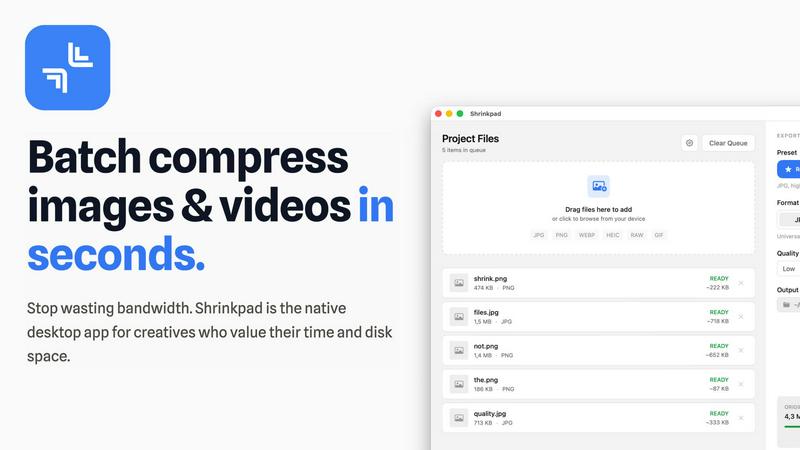
Shrinkpad instantly compresses images and videos on your Mac to save space and boost performance.
Last updated: February 28, 2026
Visual Comparison
Nano AI

Shrinkpad
Feature Comparison
Nano AI
Nano Banana Model
The Nano Banana model is the powerhouse behind Nano AI's rapid performance, enabling flash-speed image generation in under ten seconds. This feature allows users to create high-quality visuals quickly, streamlining the creative process and keeping teams in the flow of innovation.
Granular Style Control
With granular style control, users can dictate specific visual characteristics such as lighting, texture, and composition through simple descriptions. This feature allows for a high degree of customization, enabling creators to achieve unique aesthetics without complicated settings.
Inpainting and Outpainting
Nano AI's magic editing capabilities let users modify specific areas of an image using natural language. Whether it's changing a shirt color or expanding the background, users can highlight regions and describe their desired changes, allowing for seamless adjustments and creative freedom.
4K Neural Upscaling (Coming Soon)
The upcoming 4K neural upscaling feature will enhance the details in images, transforming drafts into production-ready assets. This technology sharpens edges and enriches textures, ensuring that even small image generations can be printed in billboard quality without loss of fidelity.
Shrinkpad
Intelligent Quality Optimization
Shrinkpad automatically analyzes the visual complexity of each image and video to apply the perfect compression ratio, eliminating the guesswork. It intelligently balances file size reduction with visual fidelity, ensuring results are free from artifacts. This smart, automated approach guarantees professional-grade optimization every time, allowing you to maintain quality while dramatically shrinking file sizes.
Unlimited Batch Processing & Queue Management
Built to scale with ambitious projects, Shrinkpad handles massive queues with unparalleled stability. You can drop hundreds of files or entire folders, and the app will process thousands of assets in a single batch without crashing. A clear, real-time queue shows the status of every file, from waiting to processing, giving you complete visibility and control over large-scale optimization tasks.
One-Drop Folder Mode & Smart Detection
Simply drag and drop any folder onto Shrinkpad, and it instantly scans and identifies all supported media files within, including those in subfolders. It automatically detects over 50 formats, from common JPGs and PNGs to RAW photos and major video formats like MP4 and MOV, safely ignoring non-media files. This feature turns complex organization into a one-click operation.
Privacy-First, Local-Only Processing
Every compression task happens 100% locally on your Mac, leveraging the full power of Apple Silicon for multi-threaded, lightning-fast performance. Your files are never uploaded to the cloud, ensuring absolute privacy for sensitive client work, proprietary projects, and personal media. This also means you can optimize assets anywhere, completely offline.
Use Cases
Nano AI
Rapid Prototyping for Marketing Campaigns
Marketing teams can leverage Nano AI to swiftly create prototypes for campaigns, generating visuals that capture their concepts effectively. The fast turnaround time allows for quick iterations based on feedback, ensuring that ideas are communicated clearly and efficiently.
Content Creation for Social Media
Social media managers can use Nano AI to produce eye-catching graphics and images tailored for various platforms. The ability to generate visuals in different aspect ratios and styles makes it easy to keep content fresh and engaging for audiences.
Designing Promotional Materials
Businesses can utilize Nano AI to create promotional materials like flyers, posters, and digital ads. With the platform's granular control and fast generation capabilities, teams can develop compelling designs that resonate with their target audience in record time.
Creative Exploration for Artists
Artists and designers can explore new styles and concepts using Nano AI's diverse features. The ability to experiment with image-to-image transformations and style adjustments fosters creativity, allowing artists to push the boundaries of their work effortlessly.
Shrinkpad
Optimizing Web & App Assets for Performance
Developers and web designers can drastically reduce application bundle sizes and improve website core vitals like Largest Contentful Paint (LCP). By batch-compressing all interface images, icons, and promotional videos directly from export folders, Shrinkpad streamlines the pipeline to deliver faster-loading digital products without manual per-file effort.
Managing Photographer & Videographer Workflows
Photographers and videographers can reclaim gigabytes of storage after shoots by compressing RAW image sets and high-resolution video clips in bulk. Shrinkpad handles mixed-format batches effortlessly, preparing optimized deliverables for client previews, portfolio sites, or archive storage while keeping the original high-quality masters intact.
Streamlining Design-to-Export Workflows
Designers working in Figma, Photoshop, or Sketch can export entire asset sets at 2x or 4x resolution for flexibility and then use Shrinkpad to intelligently compress and auto-rename the entire batch in one step. This eliminates the tedious, manual process of optimizing and organizing hundreds of exported files individually.
Preparing Large Volumes of User-Generated Content
Product managers, community managers, or marketers handling large volumes of user-submitted images and videos can use Shrinkpad to uniformly optimize this content before it hits their platforms. This ensures consistent quality, reduces server storage and bandwidth costs, and maintains fast load times across applications and websites.
Overview
About Nano AI
Nano AI is a transformative creative platform designed to bridge the gap between imagination and execution in visual content creation. Engineered for speed and scale, it empowers modern creators, marketing teams, and growth-driven startups by streamlining the entire visual production process. With the revolutionary Nano Banana model at its core, Nano AI delivers exceptional text-to-image and image-to-image results in under ten seconds, allowing users to iterate rapidly without the complexities of traditional software. The platform consolidates various functionalities, from AI-driven image generation to editing and collaborative sharing, into one intuitive workspace. Features such as granular style control, inpainting and outpainting capabilities, background removal, and shared galleries enable users to transform their ideas into professional-grade visuals effortlessly. As the upcoming 4K neural upscaling and robust API access promise to enhance productivity further, Nano AI positions itself as an essential tool for teams looking to maintain a competitive edge in fast-paced markets.
About Shrinkpad
Shrinkpad is the native macOS powerhouse engineered for the modern creator who demands speed, privacy, and ultimate storage efficiency. It's a desktop application that performs lightning-fast, batch compression of images and videos directly on your Mac, transforming gigabytes of digital clutter into optimized assets in seconds. The core value proposition is transformative: reclaim critical disk space and eliminate hours of manual, repetitive work without ever sacrificing quality or control over your files. Built for photographers, designers, developers, and content creators, Shrinkpad automates the tedious busywork of asset optimization, scaling seamlessly from casual use to processing thousands of files for large-scale projects. Unlike cloud-based tools, Shrinkpad leverages Apple's native frameworks to process everything locally. This means your sensitive project files, client assets, and personal media never leave your device, ensuring complete privacy and zero dependency on an internet connection. It's more than a tool; it's an indispensable asset for anyone looking to optimize their digital footprint, accelerate their creative workflow, and scale their productivity without compromise.
Frequently Asked Questions
Nano AI FAQ
What types of images can I create with Nano AI?
Nano AI allows users to create a variety of images, including text-to-image and image-to-image transformations. The platform supports different styles and effects, enabling versatile creative outputs.
How fast is the image generation process?
Thanks to the Nano Banana model, images can be generated in under ten seconds. This rapid performance ensures that users can focus on their creative ideas without being bogged down by long render times.
Can I collaborate with my team using Nano AI?
Yes, Nano AI includes features for team sharing and collaborative workspaces. Users can easily share their creations and get feedback, facilitating seamless collaboration across projects.
Is Nano AI suitable for non-professionals?
Absolutely! Nano AI is designed to be intuitive and user-friendly, making it accessible for both seasoned professionals and casual creators. Its straightforward interface allows anyone to produce high-quality visuals with minimal learning curve.
Shrinkpad FAQ
Can I use Shrinkpad for free?
Yes, Shrinkpad offers a Free Starter plan that includes essential tools for casual use. This plan allows standard compression for common formats like JPG and PNG with a limit of 10 files per batch and a maximum 1GB file size. It's a great way to experience the core speed and local processing benefits before upgrading for unlimited power.
What file formats does Shrinkpad support?
Shrinkpad supports a wide range of over 50 image and video formats natively. This includes common formats like JPG, PNG, MP4, and MOV, as well as professional formats like WEBP, AVIF, HEIC, and various RAW camera files. The app automatically identifies and applies optimal compression settings for each file type in a mixed batch.
Does Shrinkpad support video compression?
Absolutely. Shrinkpad provides powerful batch compression for videos alongside images. You can process video files like MP4 and MOV in the same batch as your photos, and the app will intelligently compress them to significantly reduce file size while aiming to preserve visual quality, all processed locally on your machine.
Are my files uploaded to the cloud?
No. Privacy is a foundational principle for Shrinkpad. All processing occurs locally on your Mac using Apple's native frameworks. Your original files, compressed outputs, and any data never leave your device. This ensures complete security and privacy for sensitive work and allows for compression without an internet connection.
Alternatives
Nano AI Alternatives
Nano AI is a cutting-edge creative platform that excels in ultra-fast AI image generation and editing, designed to streamline the visual creation process from inception to sharing. Users often seek alternatives to Nano AI for various reasons, such as pricing considerations, specific feature sets, or particular platform requirements that align better with their creative workflows. When searching for an alternative, it's essential to evaluate the speed of generation, ease of use, and the depth of editing capabilities to ensure that the chosen tool meets your creative and business needs effectively. --- [{"question": "What is Nano AI?", "answer": "Nano AI is an all-in-one creative platform designed for ultra-fast AI image generation and editing, enabling users to create high-quality visuals quickly."},{"question": "Who is Nano AI for?", "answer": "Nano AI is built for modern creators, marketing teams, and growth-focused startups looking to produce professional-grade visuals efficiently."},{"question": "Is Nano AI free?", "answer": "The pricing structure of Nano AI is not specified, but it is tailored for teams that prioritize speed and quality in their creative processes."},{"question": "What are the main features of Nano AI?", "answer": "Main features of Nano AI include flash-speed AI generation, granular style control, inpainting/outpainting capabilities, background removal, and shared galleries."}]
Shrinkpad Alternatives
Shrinkpad is a native macOS application for batch compressing images and videos, designed to reclaim storage and accelerate workflows for creators. It falls into the categories of image optimization and video compression tools, focusing on local processing for speed and privacy. Users often explore alternatives for various reasons, such as budget constraints, needing cross-platform compatibility beyond macOS, or requiring specific niche features not covered by a generalist tool. The search for the right fit is a natural part of scaling a creative or technical operation efficiently. When evaluating alternatives, key considerations include the processing method (cloud vs. local), supported file formats, batch processing capabilities, and the overall impact on your workflow's speed and security. The goal is to find a solution that aligns with your volume, platform, and quality requirements without creating new bottlenecks.