
Interhubz vs Playwriter
Side-by-side comparison to help you choose the right product.

Interhubz
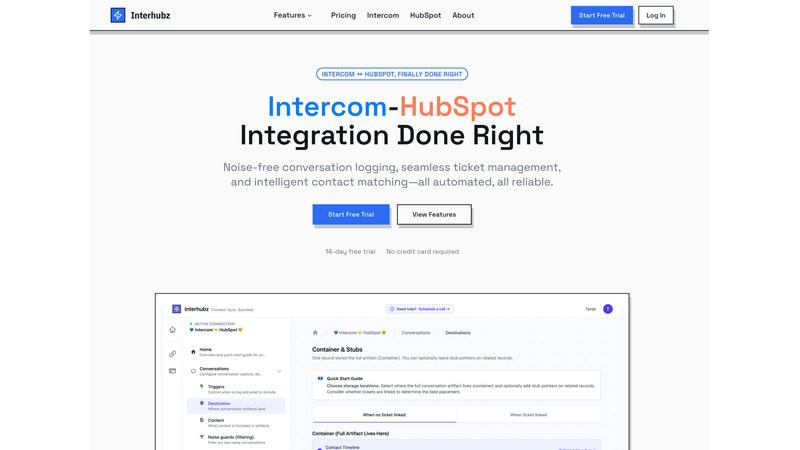
Interhubz effortlessly syncs Intercom chats to HubSpot as streamlined, organized entries for seamless team.
Last updated: February 26, 2026

Playwriter
Playwriter seamlessly empowers agents to control your live Chrome browser with AI, maintaining logins and extensions for optimal performance.
Last updated: March 18, 2026
Visual Comparison
Interhubz
Playwriter

Feature Comparison
Interhubz
One Note Per Conversation
Interhubz transforms the way conversations are logged by consolidating all messages from a single Intercom conversation into one rich, readable note in HubSpot. This feature eliminates the clutter of multiple entries, providing teams with a clear overview of discussions, including transcripts, summaries, and attachments, all in one place.
Intelligent Contact Matching
With advanced algorithms, Interhubz excels at matching contacts and companies across platforms using email, phone numbers, and custom properties. This intelligent matching process not only reduces the likelihood of duplicates but also enhances the accuracy of customer data, ensuring that teams have reliable information at their fingertips.
One-Click Ticket Creation
Interhubz simplifies ticket management by allowing users to create HubSpot tickets directly from Intercom with just one click. This feature includes bi-directional status synchronization, meaning that any updates made in Intercom reflect automatically in HubSpot, minimizing the risk of manual errors and improving workflow efficiency.
Noise Guards
To maintain a clean CRM, Interhubz incorporates smart noise guards that automatically filter out low-value interactions such as bot conversations and spam. Users can configure these filters to set thresholds for message counts and conversation durations, ensuring that only meaningful interactions are logged into HubSpot.
Playwriter
Real Browser Session Access
Playwriter allows agents to work directly within your existing browser session. This means all your logins, extensions, and cookies are retained, providing a seamless browsing experience without the hurdles of bot detection or memory issues associated with headless browsers.
Full Playwright API Integration
With Playwriter, you gain access to the complete Playwright API through a single execute tool. This feature allows agents to run any Playwright code without cumbersome wrappers or schema bloat, ensuring low context usage and efficient automation workflows.
Collaborative Environment
Playwriter facilitates real-time collaboration between you and your agents. You can monitor their actions live, stepping in to solve captchas, consent walls, or other obstacles as they arise, ensuring that the automation process remains smooth and effective.
Advanced Debugger and Editor
The integrated debugger and editor enable you to set breakpoints, edit code on the fly, and intercept network requests. This powerful feature provides developers with the tools necessary to troubleshoot and optimize tasks effectively, enhancing the overall performance of your automation efforts.
Use Cases
Interhubz
Streamlined Support Operations
Support teams using Intercom can leverage Interhubz to consolidate customer interactions into a single note in HubSpot, making it easier for sales and customer success teams to access relevant information without sifting through numerous fragmented entries.
Enhanced Sales Collaboration
Sales representatives benefit from the intelligent contact matching feature, which ensures that they are always working with accurate and up-to-date customer information. This leads to more effective communication and collaboration between sales and support.
Efficient Ticket Management
Support agents can create tickets from Intercom without switching tabs or manually entering data, thanks to the one-click ticket creation feature. This streamlines the process and reduces the chances of errors, allowing teams to focus on resolving customer issues faster.
Improved Data Integrity
By utilizing noise guards, organizations can maintain a cleaner CRM system. This feature ensures that only valuable conversations are recorded, which helps in keeping customer data accurate and relevant for future engagements.
Playwriter
Streamlined Testing Workflows
Developers can leverage Playwriter to automate browser testing without losing the context of user sessions. By enabling agents to navigate and test web applications in a familiar environment, teams can enhance testing efficiency and accuracy.
Enhanced Data Collection
Researchers and analysts can use Playwriter to automate the collection of data from various web sources. With direct access to browser sessions, agents can navigate complex websites and gather information while bypassing common barriers like captchas.
Effective User Experience Monitoring
UX teams can employ Playwriter to automate the monitoring of web applications from a user's perspective. By allowing agents to interact with websites as real users, teams can identify potential pain points and areas for improvement in the user journey.
Intelligent Automation for Marketing
Marketing teams can utilize Playwriter to automate repetitive tasks such as lead generation and web scraping. By providing agents with full access to a browser session, they can interact with online platforms efficiently, saving time and increasing productivity.
Overview
About Interhubz
Interhubz revolutionizes the integration landscape between Intercom and HubSpot by addressing the common pain points experienced by support and sales teams. Designed specifically for organizations that rely on Intercom for customer support while managing sales and customer success through HubSpot, Interhubz streamlines communication and enhances operational efficiency. The main value proposition lies in its ability to eliminate the clutter of multiple timeline entries generated during conversations. Instead of being bombarded with eight or more fragmented notes, users receive a single, clean, and formatted note that includes the full transcript and any relevant attachments. This approach not only improves readability but also ensures that context is preserved, allowing both support and sales teams to stay aligned without the chaos of traditional integrations.
About Playwriter
Playwriter is a revolutionary tool designed to empower AI agents by providing them direct control over your existing browser session. Unlike traditional setups where agents operate in isolated environments, Playwriter connects them seamlessly to your actual Chrome browser, complete with all your logins, extensions, and cookies. This innovative approach eliminates issues of bot detection and memory overhead, allowing agents to perform tasks as if they were you. The platform is ideal for developers, testers, and teams looking to enhance automation capabilities while maintaining human oversight. With Playwriter, you can automate repetitive tasks while still having the ability to intervene when necessary, creating a harmonious blend of human and AI collaboration.
Frequently Asked Questions
Interhubz FAQ
What platforms does Interhubz integrate with?
Interhubz is designed to seamlessly connect Intercom and HubSpot, allowing users to synchronize conversations, contacts, and ticket statuses between the two platforms effortlessly.
How long does it take to set up Interhubz?
Setting up Interhubz is remarkably quick and user-friendly, taking only a few minutes. The one-click OAuth connection eliminates the need for complicated API key configurations.
Can I customize the noise filters in Interhubz?
Yes, Interhubz allows users to configure noise guards according to their specific needs. You can set thresholds for minimum message counts and duration to filter out low-value interactions automatically.
Is there a free trial available for Interhubz?
Absolutely! Interhubz offers a 7-day free trial with no credit card required, allowing potential users to experience the platform's features and benefits before committing.
Playwriter FAQ
How does Playwriter ensure security during browser sessions?
Playwriter operates entirely on your local machine, ensuring that no data is transmitted to external servers. The Chrome extension connects to a local WebSocket relay, which means all actions are secure and contained within your environment.
What are the system requirements for using Playwriter?
To use Playwriter, you'll need a compatible version of Google Chrome and Node.js installed on your machine. The extension and CLI can be easily installed to get started quickly.
Can I use Playwriter with other automation tools?
Yes, Playwriter is designed to work with any MCP client, including Cursor, Claude, and VS Code, allowing for flexibility in your automation setup and integration with various workflows.
Is Playwriter open source?
Absolutely! Playwriter is open-source and released under the MIT license, making it accessible for developers to contribute, customize, and enhance the tool according to their needs.
Alternatives
Interhubz Alternatives
Interhubz is a cutting-edge integration tool that connects Intercom chats to HubSpot, streamlining communication and enhancing customer support efficiency. By consolidating multiple chat entries into a single, clean timeline entry, it alleviates the clutter often found in traditional integrations. Users typically seek alternatives to Interhubz for various reasons, including pricing considerations, feature sets that may better align with their unique business needs, or the desire for compatibility with different platforms. When selecting an alternative, it's crucial to assess the core functionalities that matter most to your team. Look for solutions that offer seamless data synchronization, intelligent matching capabilities, and features that promote a clutter-free experience. Balancing cost with the right features will ensure your chosen tool enhances productivity and aligns with your growth objectives.
Playwriter Alternatives
Playwriter is an innovative tool designed for automation, allowing users to control Chrome using AI via both a Command Line Interface (CLI) and a Multi-Client Platform (MCP). This powerful solution overcomes the limitations faced by traditional AI agents, providing access to your actual logged-in browser session, complete with all extensions. Users often seek alternatives to Playwriter due to various factors such as pricing, feature sets, and compatibility with their existing platforms and workflows. When choosing an alternative, it's essential to consider the specific features that align with your automation needs, such as ease of integration, the flexibility of use cases, and the ability to support various client environments. Ensuring that the alternative offers robust support and a user-friendly interface can significantly impact productivity and effectiveness in achieving your automation goals.