
Avif2Png vs RemoveTexts
Side-by-side comparison to help you choose the right product.

Avif2Png
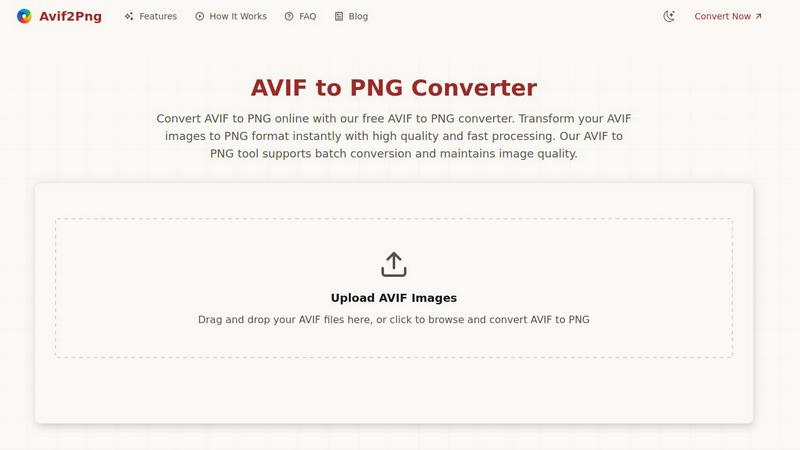
Seamlessly convert AVIF images to PNG format with our fast, free tool for enhanced compatibility and quality retention.
Last updated: March 1, 2026

RemoveTexts
RemoveTexts is an AI tool that instantly erases text from images, simplifying your design process without the need for Photoshop skills.
Last updated: March 11, 2026
Visual Comparison
Avif2Png
RemoveTexts

Feature Comparison
Avif2Png
Fast and High-Quality Conversion
Avif2Png provides an instant conversion process that maintains the original image quality throughout the transformation from AVIF to PNG. This ensures that users receive high-fidelity images ready for use in any application.
Batch Conversion Support
Our tool allows users to convert multiple AVIF files to PNG format simultaneously, saving valuable time and enhancing productivity. This feature is particularly beneficial for teams handling large volumes of images.
User-Friendly Interface
With a simple drag-and-drop functionality, Avif2Png makes it easy for users of all skill levels to convert their images. The intuitive design streamlines the conversion process, making it accessible and efficient for everyone.
Secure Processing and Privacy
Avif2Png prioritizes user security by ensuring that all uploaded files are processed securely and deleted immediately after conversion. This commitment to privacy allows users to convert images with peace of mind.
RemoveTexts
Paint to Remove
The Paint to Remove feature allows users to precisely control which text is eliminated by simply brushing over specific areas in the image. This level of control ensures that only the unwanted text is targeted, maintaining the integrity of the surrounding visuals.
Auto Remove All
With the Auto Remove All feature, users can automatically detect and erase all text elements in an image with just a single click. This feature leverages the power of AI to quickly process images, saving time while delivering impeccable results.
Edit & Replace Text
The Edit & Replace Text option empowers users to not only remove text but also substitute it with new content. The AI intelligently matches the original font style, allowing for seamless integration of the new text into the image.
Remove Objects
The Remove Objects feature extends beyond text removal, enabling users to eliminate unwanted visual elements such as logos or people from their images. This function is particularly useful for marketers looking to create clean product shots or presentations.
Use Cases
Avif2Png
Web Development
Web developers often face challenges with browser compatibility. Converting AVIF images to PNG ensures that visuals display correctly across all devices and older browsers, enhancing user experience and accessibility.
Graphic Design
Graphic designers frequently rely on PNG for its lossless compression and support for transparency. Converting AVIF to PNG allows them to maintain sharp edges and vibrant colors in logos, icons, and other graphics.
Content Creation
Content creators can benefit from converting AVIF images to PNG for use in blogs, social media, and websites. PNG format's broad compatibility makes it easier to share visuals across various platforms without quality loss.
Marketing and Advertising
Marketing teams often require high-quality images for campaigns. Avif2Png allows for quick conversion of AVIF images to PNG, ensuring that promotional materials are visually appealing and compatible with all digital channels.
RemoveTexts
E-commerce Product Photos
E-commerce sellers can utilize RemoveTexts to clean up product images by removing watermarks or distracting text overlays. This results in polished visuals that enhance product appeal and boost conversion rates.
Legal Document Redaction
Legal professionals can employ RemoveTexts to redact sensitive information from documents and images. With the ability to remove date stamps and personal details, they can ensure privacy while maintaining the document's professional appearance.
Social Media Content Creation
Content creators on social media can benefit from RemoveTexts by quickly editing out unwanted text from images or videos. This allows them to maintain a consistent and professional aesthetic across their platforms without time-consuming editing.
Academic Research and Presentations
Researchers and students can use RemoveTexts to prepare clean images for presentations or publications by removing irrelevant text or watermarks. This ensures that their work appears polished and credible, enhancing their academic impact.
Overview
About Avif2Png
Avif2Png is the cutting-edge solution tailored for the modern web, designed to seamlessly convert AVIF images to the widely accepted PNG format. In an era where image formats are continually evolving, Avif2Png stands out as a vital tool for developers, designers, content creators, and anyone focused on growth. The primary value proposition of Avif2Png lies in its ability to deliver high-quality, frictionless conversion at scale, removing compatibility barriers while maintaining the integrity of your workflows. As AVIF files provide superior compression, Avif2Png ensures that you can leverage this advanced format without sacrificing compatibility across various browsers, applications, and platforms. With an emphasis on speed, security, and the capability for batch processing, Avif2Png is an indispensable asset for teams that thrive on innovation and need their digital assets to operate seamlessly across diverse environments, turning potential technical challenges into smooth operational processes.
About RemoveTexts
RemoveTexts is a cutting-edge AI-powered image editing tool designed to effortlessly remove unwanted text from images in mere seconds. With its user-friendly interface, you can upload any image and utilize advanced generative AI to eliminate watermarks, subtitles, captions, and branded overlays without requiring any Photoshop skills. The technology behind RemoveTexts utilizes deep learning inpainting, ensuring that backgrounds are intelligently reconstructed, resulting in clean, professional-grade images. Ideal for creators, marketers, designers, and anyone needing quick and effective text removal, RemoveTexts has gained the trust of over 100,000 users globally. This innovative tool supports various languages and works seamlessly with multiple image formats, making it an invaluable asset for anyone who values clean visuals and efficiency.
Frequently Asked Questions
Avif2Png FAQ
What is AVIF format?
AVIF (AV1 Image File Format) is a modern image format known for its superior compression capabilities. It allows for smaller file sizes without significant loss in quality, making it ideal for web use.
Why should I convert AVIF to PNG?
Converting AVIF to PNG is essential for ensuring broad compatibility across various devices and platforms. PNG format supports lossless compression, maintaining image quality, which is crucial for graphics and design work.
Is Avif2Png free to use?
Yes, Avif2Png offers a free online conversion service with no registration required. Users can easily convert their AVIF images to PNG without any hidden costs.
How secure is the processing of my files?
Avif2Png takes user privacy seriously. All files uploaded for conversion are securely processed and deleted immediately after the conversion is completed, ensuring that your images remain private.
RemoveTexts FAQ
How does RemoveTexts work?
RemoveTexts utilizes advanced AI-powered deep learning inpainting technology to analyze surrounding pixels and intelligently reconstruct the background after text removal. This results in seamless, professional-grade images.
What image formats does RemoveTexts support?
RemoveTexts supports JPG, PNG, and WebP image formats, accommodating user needs across various platforms. Users can upload images up to 10MB for processing.
Can I remove watermarks with RemoveTexts?
Yes, RemoveTexts is specifically designed to remove watermarks and other unwanted text elements from images. The AI ensures that the background is reconstructed seamlessly, leaving no traces behind.
Is RemoveTexts suitable for non-designers?
Absolutely! RemoveTexts is designed for users of all skill levels. With its intuitive interface, anyone can easily remove text from images without requiring any design expertise.
Alternatives
Avif2Png Alternatives
Avif2Png is a cutting-edge online tool that specializes in converting AVIF images to PNG format, ensuring compatibility across various platforms and applications. As a cloud-based solution, it caters to developers, designers, and content creators who need to maintain high-quality visuals while leveraging the advanced compression capabilities of AVIF files. Users often seek alternatives due to factors such as pricing models, specific features that may better suit their unique needs, or compatibility with different operating systems and devices. When searching for an alternative to Avif2Png, it is essential to consider aspects such as conversion speed, quality preservation, and user-friendliness. Additionally, evaluating the tool's capacity for batch processing and any associated costs will help in selecting an option that meets both current and future scaling demands. Ensuring that the chosen alternative aligns with your workflow can significantly enhance productivity and ease of use.
RemoveTexts Alternatives
RemoveTexts is an innovative AI-powered tool designed to effortlessly remove unwanted text from images, making it a vital asset in the realm of image editing. As a member of the image and photo editing category, it caters to a diverse range of users, including creators, marketers, and designers who need quick and effective solutions for cleaning images. While RemoveTexts offers powerful features, users often seek alternatives for various reasons, such as pricing structures, feature sets, or compatibility with specific platforms. When choosing an alternative to RemoveTexts, it’s crucial to consider the ease of use, the quality of output, and whether the tool meets specific needs such as language support and advanced editing capabilities. Users should also evaluate the pricing model to ensure it aligns with their budget while providing the necessary functionality for their projects.