
AISeedance2 vs BlitzCut
Side-by-side comparison to help you choose the right product.

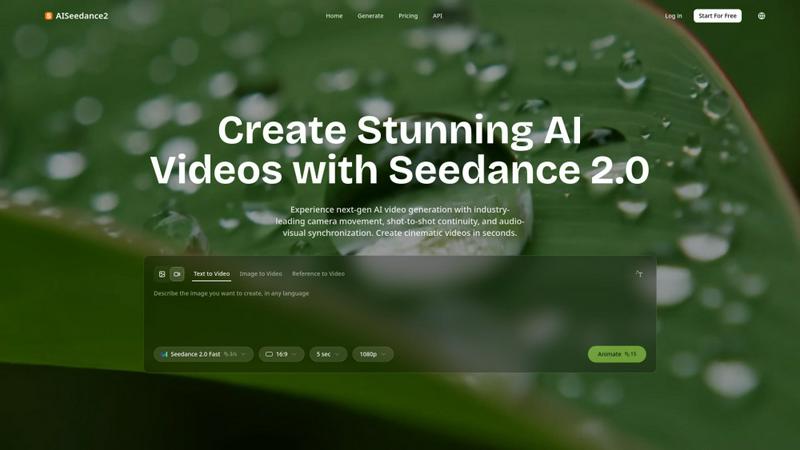
Seedance 2.0 is the most powerful AI video generator, creating cinematic videos from text or images instantly.
Last updated: February 27, 2026

BlitzCut
BlitzCut is an AI video editor that transforms raw clips into polished, viral-ready content in minutes, effortlessly.
Last updated: February 26, 2026
Visual Comparison
AISeedance2
BlitzCut

Feature Comparison
AISeedance2
Wide-Range Cinematic Camera Movement
This feature provides the most advanced AI camera control in the industry, executing large-scale, fluid movements that rival professional cinematography. It generates sweeping crane shots, dynamic tracking sequences, orbital movements, and drone-like aerial perspectives from a single text prompt. The AI understands cinematic motion to create smooth camera paths with accurate depth-of-field transitions and dramatic push-in/pull-out sequences, enabling complex camera choreography other models cannot achieve.
Shot-to-Shot Continuity
AISeedance2 maintains perfect visual coherence and narrative flow across different scenes and shots within a video. This ensures characters, settings, lighting, and style remain consistent from one clip to the next, which is essential for producing professional multi-shot narratives like short films or commercials. This continuity eliminates the jarring inconsistencies common in AI-generated video, resulting in a polished, cohesive final product.
Precision Audio-Visual Synchronization
The platform expertly synchronizes visual elements with audio tracks, ensuring every on-screen action, scene transition, and character movement matches the beat, rhythm, and mood of the soundtrack. This creates a deeply immersive viewing experience, crucial for music videos, animated explainers, and any content where timing and emotional impact are driven by audio cues.
Character Identity Lock
This capability ensures that characters maintain their unique facial features, clothing, body type, and style consistently throughout a video, even across different scenes, angles, and actions. It is vital for storytelling, allowing viewers to follow the same character through a narrative without visual discrepancies, which is a common challenge in AI video generation.
BlitzCut
Automatic Silence Removal
BlitzCut's automatic silence removal feature harnesses the power of AI to analyze your video and instantly cut out all pauses. This eliminates the tedious manual task of silence detection, saving content creators significant time, enabling them to maintain a steady posting schedule without sacrificing quality.
AI Captions
The AI captions feature offers over 95% accuracy while presenting styled captions that are optimized for virality. This means creators can easily add engaging text overlays to their videos, enhancing viewer engagement and ensuring that essential messages are communicated effectively, all without manual input.
Text-Based Editing
With BlitzCut's text-based editing option, users can edit their videos by simply deleting sentences from the transcription. This intuitive feature streamlines the editing process, allowing creators to refine their content quickly and focus on delivering impactful messages without getting bogged down by traditional editing methods.
Mobile-First Design
BlitzCut is designed with a mobile-first approach, ensuring seamless functionality on iPhone, iPad, and Mac. This enables creators to edit their videos on-the-go, making it easier than ever to produce high-quality content quickly, whether they are at home or out in the field.
Use Cases
AISeedance2
Short Film & Narrative Production
Independent filmmakers and content studios can leverage AISeedance2 to rapidly prototype and produce short films. The tool's shot continuity, character lock, and cinematic camera movement allow for the creation of compelling narratives with professional visual flow, significantly reducing production time and costs while enabling creative experimentation at scale.
Marketing & Advertising Creative
Marketing teams can generate high-impact video ads, product demos, and social media content quickly. The ability to produce 2K cinematic visuals with precise audio sync and dynamic camera work helps brands create engaging, polished creatives that capture attention and drive conversions without the need for expensive video shoots.
Educational & Explainer Content
Educators and course creators can transform complex information into engaging animated explainer videos. The audio-visual synchronization feature is perfect for matching visuals to voiceovers, while character consistency helps in creating recurring instructor avatars, making educational content more relatable and easier to follow for learners.
Dynamic Social Media Production
Content creators and influencers can produce a high volume of trendy, visually stunning clips for platforms like TikTok, Instagram Reels, and YouTube Shorts. The fast generation speed and tools like "Seedance 2.0 Fast" mode allow for rapid iteration on viral trends, creating professional-grade content that stands out in crowded social feeds.
BlitzCut
Social Media Influencers
Social media influencers can utilize BlitzCut to rapidly edit their content, ensuring they remain relevant in the fast-paced world of online engagement. With the ability to produce polished videos in just two minutes, influencers can consistently post fresh content that resonates with their audience.
Content Marketers
Content marketers can leverage BlitzCut to create promotional videos and advertisements quickly. The automation of silence removal and captioning allows them to focus on marketing strategy rather than the intricacies of video editing, leading to more effective campaigns.
Educators and Trainers
Educators can use BlitzCut to create engaging video lessons and tutorials. With its text-based editing feature, they can easily refine their content, ensuring that complex information is presented clearly and concisely, making learning more effective for their students.
Small Business Owners
Small business owners can benefit from BlitzCut by producing marketing videos and customer testimonials with ease. The quick editing capabilities allow them to showcase their products or services effectively, helping to build brand awareness without a steep learning curve in video editing.
Overview
About AISeedance2
AISeedance2, also known as Seedance 2.0, is the most powerful AI video generator available today, redefining the landscape of AI filmmaking for creators, marketers, educators, and production teams. Developed by ByteDance, this next-generation platform empowers users to transform simple text prompts, images, or reference videos into stunning, cinematic-quality content in seconds. Its core value proposition lies in delivering professional-grade video production capabilities that were previously inaccessible without extensive technical expertise and resources. AISeedance2 is engineered for those looking to scale their video content creation rapidly, offering industry-first breakthroughs that ensure every output is cohesive, dynamic, and visually compelling. By combining advanced AI with an intuitive interface, it removes traditional barriers, enabling users to produce everything from short films and marketing creatives to educational content and social media clips with unprecedented speed and quality, ultimately driving growth and engagement for modern digital ventures.
About BlitzCut
BlitzCut is an innovative AI-driven video editing tool designed specifically for content creators who demand speed and efficiency. With a mission to make professional video editing accessible to everyone, BlitzCut revolutionizes the editing process by focusing on the essentials that matter most to today’s creators. By prioritizing speed over feature count, BlitzCut enables users to transform their raw video clips into polished, post-ready content within minutes, rather than hours. It is particularly geared towards social media platforms like TikTok, Instagram Reels, and YouTube Shorts, making it the ideal choice for influencers, marketers, and everyday creators who need to keep their content fresh and engaging. The main value proposition lies in its ability to automate tedious tasks like silence removal and caption generation, allowing creators to spend more time on what they love: creating.
Frequently Asked Questions
AISeedance2 FAQ
What makes AISeedance2 different from other AI video generators?
AISeedance2 sets itself apart with three industry-first, breakthrough capabilities: wide-range cinematic camera movement for professional shots, shot-to-shot continuity for seamless scene transitions, and precision audio-visual synchronization. Combined with features like 2K resolution and character identity lock, it offers a more complete and professional filmmaking toolkit that produces higher-quality, more cohesive multi-shot videos.
What kind of videos can I create with AISeedance2?
You can create a wide variety of video content, including short films, marketing and advertising creatives, educational explainers, social media clips, action sequences, and character-driven narratives. The platform supports text-to-video, image-to-video, and reference-to-video generation, providing flexibility for different creative workflows and project needs.
How does the Character Identity Lock feature work?
The Character Identity Lock feature uses advanced AI models to recognize and consistently replicate a specific character's defining attributes—such as facial features, hairstyle, clothing, and body type—across every frame and scene of your generated video. This ensures your main subject remains visually constant, which is essential for coherent storytelling and professional-quality output.
Is AISeedance2 suitable for beginners with no video editing experience?
Yes, AISeedance2 is designed with an intuitive interface that simplifies professional video creation. Users can start by simply typing a text prompt. The AI handles the complex aspects like cinematography, continuity, and sync. This makes it accessible for beginners while still providing the advanced features that professional creators need to scale their production.
BlitzCut FAQ
How fast can I edit a video using BlitzCut?
With BlitzCut, you can complete the entire editing process—from import to export—in under two minutes. This includes automatic silence removal and the addition of styled captions.
Do I need to create an account to use BlitzCut?
No, BlitzCut is free to download and use, and no account is required. This makes it easy for anyone to dive right into video editing without any barriers.
What platforms does BlitzCut support?
BlitzCut is built for iPhone, iPad, and Mac, catering to the needs of mobile-first content creators who want to edit on-the-go.
How accurate are the AI-generated captions?
BlitzCut's AI captions boast over 95% accuracy. This high level of precision ensures that your videos convey the right messages and engage viewers effectively.
Alternatives
AISeedance2 Alternatives
AISeedance2 is a next-generation, web-based AI video generator that transforms text and images into dynamic videos. It operates in the competitive AI video creation category, empowering creators and teams to produce cinematic content with advanced features like camera movement and character consistency. Users often explore alternatives for various reasons, including budget constraints, specific feature requirements, or different platform integrations. Finding the right fit depends on your project scale, desired output quality, and workflow needs. When evaluating other options, consider core capabilities like resolution, motion control, and audio sync. Prioritize tools that align with your content goals, whether for rapid social clips or high-fidelity narrative projects, ensuring they can scale with your creative ambitions.
BlitzCut Alternatives
BlitzCut is an AI-powered video editor designed to streamline the video creation process for content creators. It falls under the category of content creation tools, specifically focused on enhancing social media video production by automating tedious tasks like silence removal and captioning. Users often seek alternatives to BlitzCut for various reasons, including pricing, feature sets, platform compatibility, and personal editing preferences. When choosing an alternative, it’s essential to consider the tool's ease of use, efficiency in workflow, and how well it aligns with your specific content creation needs. As the demand for quick and engaging video content grows, many creators are exploring options that can help them maintain a consistent posting schedule without sacrificing quality. Features that enable seamless editing, fast processing times, and user-friendly interfaces are critical factors in making an informed choice. Additionally, understanding the level of AI integration and support for mobile platforms can significantly impact the overall editing experience.